

What if automating channel reporting only delivers inconsistent partner data faster? When reports arrive in different formats and on different schedules, teams still have to consolidate, check, and correct the numbers before leaders can use them. Learning how to automate channel reporting starts with a practical principle: design data quality, workflow ownership, and reporting outputs together.
Automation isn’t just a matter of connecting tools. A repeatable process needs clear standards for partner submissions, assigned owners for validation, and a consistent view of channel sales, inventory, and program activity. Without those foundations, manual work and uncertainty can persist even after a new system is introduced.
This guide explains how to standardize partner data, map a dependable reporting workflow, and assess whether software or managed data support fits your organization. You’ll also learn what to consider when centralizing channel information and connecting it with other business systems. The goal is reporting your teams can understand, review, and use to make decisions.
Key Takeaways
- Learn how to automate channel reporting by defining the decisions reports need to support before selecting tools or building workflows.
- Map the reporting process from data sources and standard fields through validation, publishing, and exception review.
- Agree on partner responsibilities, reporting frequency, and data definitions to make submissions easier to manage consistently.
- Compare spreadsheets, internal workflows, channel platforms, and managed data services against your team’s specific requirements.
- Use a focused first rollout to assess POS and inventory visibility, integration needs, and ownership of reporting exceptions.
How to Automate Channel Reporting and Reduce Manual Work
Channel reporting automation is a repeatable process for collecting, validating, consolidating, and sharing partner data so teams can use it to make operational decisions. Learning how to automate channel reporting starts with defining which information matters, not simply moving spreadsheets into a new tool. The goal is a consistent view of partner sell-through and inventory, based on data teams can review and use.
Email attachments and locally saved spreadsheets make that difficult. Partners may use different templates or submit on different schedules. Internal teams then copy figures between files, resolve conflicting versions, and check entries manually. Comparisons can become inconsistent and visibility delayed. Channel reporting also serves a different purpose from CRM pipeline or marketing campaign reporting: it focuses on partner activity, such as sales through the channel and inventory, rather than sales opportunities or campaign results. It can contribute to broader Business Intelligence (BI) efforts by providing structured information for analysis and reporting.
For a brief look at a technical consideration in scripted workflows, watch this video on managing environment variables:
Which channel reports are worth automating first?
Start with recurring point-of-sale (POS) and inventory reports that inform operational decisions. For example, teams may need comparable partner sales and stock information to review channel activity. Identify the decisions those reports support, then list only the fields needed to make them. Add partner activity or incentive data when it serves a clear reporting purpose. Keeping the first scope focused avoids creating extra collection and validation work for details the team may not use.
What changes when reports move beyond spreadsheets?
A shared workflow makes clear how partners submit information, who reviews it, and who resolves errors or missing fields. Standardized definitions make partner records easier to compare, while named owners prevent correction requests from disappearing in email threads. These principles are part of a broader channel data management guide. Depending on reporting needs and internal capacity, the process may use software, managed data support, or both.
How to Build a Reliable Automated Channel Reporting Workflow
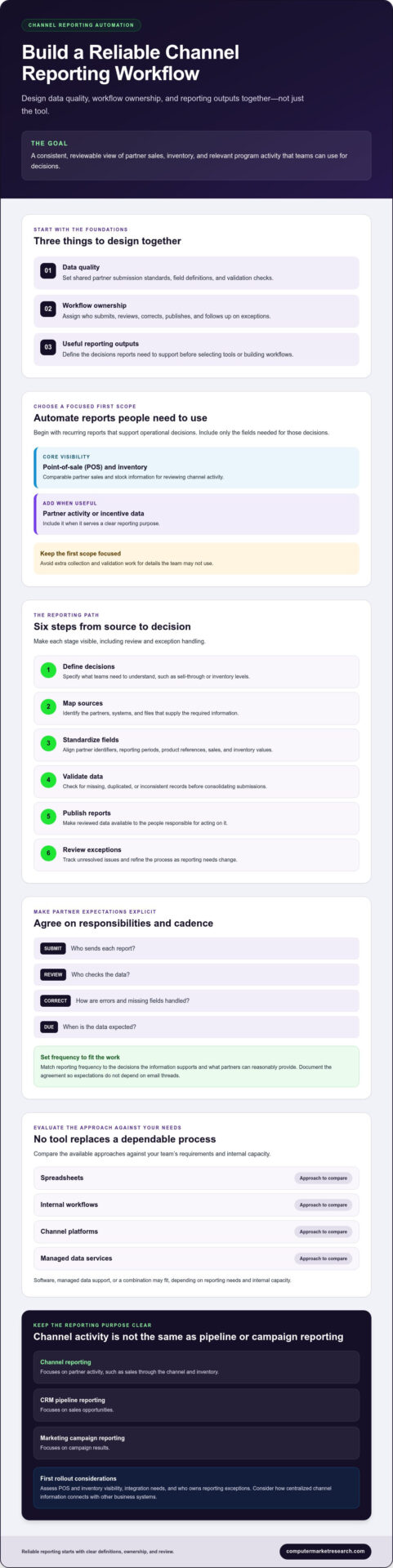
A dependable workflow makes each step visible, from partner submission to the report used for decisions. To determine how to automate channel reporting, define those decisions first, then build the data process around them. Use this sequence:
- Define decisions: Specify what teams need to understand from the report, such as sell-through or inventory levels.
- Map sources: Identify which partners, systems, and files supply the required information.
- Standardize fields: Set shared definitions for partner identifiers, reporting periods, product references, sales, and inventory values.
- Validate data: Check submissions for missing, duplicated, or inconsistent records before consolidating them.
- Publish reports: Make reviewed data available to the people responsible for acting on it.
- Review exceptions: Track unresolved issues and refine the process as reporting needs change.
Agree with participating partners on who submits each report, who reviews it, how corrections are handled, and when data is due. Set reporting frequency according to the decisions the information supports and what partners can reasonably provide. Document the agreement so expectations don’t depend on individual email threads.
How should teams standardize partner submissions?
Create a concise specification that lists required fields and defines their format for each reporting period. For example, specify how to record a partner identifier, which dates define the reporting period, and how product references map to shared internal identifiers. Map partner-specific labels to common definitions before comparing results. Also document how to flag incomplete, duplicated, or out-of-range records, rather than silently accepting or changing them.
How do validation and exception handling protect report quality?
Automated checks can flag missing required fields, duplicate records, or values outside agreed rules. A flag identifies a record for review, but a person may still need to determine whether an unusual value is an error or a genuine exception. Validation before publication helps decision-makers work from reviewed channel data rather than unexamined submissions. Assign an owner to each exception. That person can coordinate a correction with the partner or internal team and record how the issue was resolved.
These practices are especially useful when POS information connects with other channel processes. For related context, see this channel POS and Ship & Debit whitepaper. A broader perspective on data-informed management is also available from Harvard Business School.
Compare Channel Reporting Automation Approaches Before Choosing
Choosing how to automate channel reporting depends on the shape of your partner data and who will own the process. Compare options against the number and variety of data sources, data quality requirements, integration needs, and responsibility for collection and review. Choose an approach that covers your actual workflow without adding complexity your team doesn’t need.
| Approach | May fit when | Points to assess |
|---|---|---|
| Spreadsheets | Submission formats are stable and review responsibilities are clear. | Manual consolidation, version control, and how errors are flagged. |
| Custom internal workflow | Your team needs a process tailored to existing systems or partner requirements. | Who maintains it, how it handles format changes, and what integration work is required. |
| Channel management platform | Recurring partner data and reporting need a centralized workflow. | Supported report types, data handling, visibility, and integration scope. |
| Managed data services | Your team needs help collecting, cleansing, or normalizing partner reports. | Which data tasks are covered, how exceptions are handled, and who owns decisions. |
These approaches aren’t interchangeable. Depending on its capabilities, software can provide a place to manage submissions, workflows, and access to channel information. Managed data services address hands-on tasks such as collecting, cleansing, and normalizing partner data. Some organizations may need software, data support, or both. Before selecting an approach, document your requirements and verify report formats, collection schedules, and integration scope. Consider this software evaluation reference alongside direct documentation and your own workflow requirements.
When can a spreadsheet or internal workflow be sufficient?
A spreadsheet or a simple internal process may be workable when submissions follow a consistent format, the team can manage the workload, and someone is clearly responsible for review. Templates and formulas can help structure information, but the team still needs a way to handle format changes, corrections, and competing file versions. There’s no universal partner-count threshold for moving on. Reassess when manual consolidation or unresolved exceptions make reporting difficult to control.
When should teams assess a channel reporting platform?
Consider a centralized platform when recurring partner data needs a shared process or teams need dependable visibility into channel information. Assess how the platform handles collection, normalization, reporting access, and connections to systems your organization uses. For organizations seeking tailored analytics support or specialized Power BI danışmanlık hizmetleri, external consultants can help model and visualize consolidated partner metrics effectively. Confirm specific capabilities rather than assuming every report type or integration is available. For more context, review channel data management systems.
How to Implement Channel Reporting Automation Without Losing Data Control
A controlled rollout lets teams test the process before extending it to more partners or report types. Start with one defined use case, such as collecting POS data for a specific decision-making audience. Before automating submissions, agree on data definitions, partner responsibilities, exception owners, and access expectations. This keeps the initial scope clear and helps surface controls that need adjustment.
Test the workflow with representative source files, including examples of the variations you expect across partner formats. Check that fields map correctly, validation rules flag the intended issues, and authorized users can access the right reports. Resolve mapping and validation problems before expanding to other partners or use cases.
Track operational indicators to see whether the process is working as intended. Submission completeness, the types of exceptions raised, and how those exceptions are resolved can show where partner guidance or workflow rules need attention. Set expectations based on your own operating requirements rather than relying on universal targets.
What should teams prepare before connecting reporting systems?
Inventory the systems and files that provide relevant information, then document which system owns each field. Clarify where partner identifiers, product references, sales values, and inventory figures originate, and which source takes precedence if values conflict. Confirm integration scope and data exchange requirements with technical stakeholders, including supported formats and necessary mapping. For sales operations context, review channel sales management software.
How can teams maintain partner adoption and data governance?
Give partners clear instructions on what to submit, how and when to submit it, and how to correct an issue. Internally, specify who can view each report and who is authorized to approve data corrections. Clear expectations help partners understand their role and give internal teams a defined process for protecting data quality.
Review the workflow as partner programs and reporting needs change. A field that was once optional may become necessary for a new decision, while a validation rule may need adjustment as submissions evolve. Keep definitions and ownership documented, and review exception patterns with the teams responsible for resolving them. This helps keep automation governed and useful, with clear accountability for maintaining the process.
Choose a Channel Reporting Solution That Supports Better Decisions
The right solution should match the workflow you’ve defined, not force assumptions about how partners submit data or how reports are used. Compare software, implementation support, and ongoing data services against the same requirements: POS and inventory data handling, normalization responsibilities, reporting visibility, integration needs, exception workflows, and ownership. For teams that need to query, analyze, and visualize channel metrics across multiple backend databases, business intelligence tools like Knowi can simplify reporting across disparate data sources. Confirm what the solution supports in practice, including applicable data formats, report types, and integration scope.
What should a channel reporting evaluation include?
Use a requirements checklist in product discussions. Ask where partner data comes from, who maps partner fields to shared definitions, how authorized users access reports, and which team administers the workflow. Clarify how missing, duplicate, or unusual submissions are flagged and corrected, and which tasks remain with your organization. If POS and inventory reporting are priorities, ask how those data needs align with the solution’s available capabilities.
PartnerPortal™ is one option to assess. It centralizes partner onboarding, deal registration, and performance tracking, and supports visibility into channel data and inventory. These capabilities don’t confirm that every report type, dashboard configuration, file format, or integration will fit your requirements. Review the PartnerPortal channel management platform and verify the details relevant to your use case.
Once you’ve clarified fit, take your requirements into a product discussion. You can explore PartnerPortal™ as part of evaluating the platform.
What are practical next steps for a channel operations team?
Start with one priority report and document its source data, field definitions, partner and internal owners, intended audience, and the decisions it supports. Then compare that outline with the software, implementation, and managed data support you’re considering. This makes gaps visible before rollout and keeps the evaluation grounded in your operating needs.
- Data: Which sources provide the POS or inventory information, and how will partner-specific fields be normalized?
- Workflow: Who submits, reviews, corrects, and approves data?
- Access: Which roles need report visibility, and what access controls are available?
- Connections: Which integrations are needed, and what scope can be confirmed?
Document the answers, then use them to assess how to automate channel reporting without losing sight of data ownership. A clear requirements list gives your team a practical basis for selecting an approach and identifying what still needs confirmation.
Build a More Dependable Channel Reporting Process
Reliable channel reporting depends on more than choosing an automation tool. Start with the decisions your reports need to support, standardize the partner data behind them, and assign clear ownership for review and exceptions. Then compare software and managed data support against your reporting requirements, data quality needs, and integration scope.
That foundation is central to how to automate channel reporting without losing control of the information teams rely on. A focused rollout lets you assess whether the workflow handles your POS and inventory data, gives the right people useful visibility, and fits partner responsibilities. Confirm specific report types, formats, and integrations before moving forward.
Computer Market Research provides channel data management and managed data services for POS and inventory data. PartnerPortal™ centralizes partner onboarding, deal registration, and performance tracking. Assess whether these capabilities align with your needs, then explore PartnerPortal™ for your channel reporting workflow. Start with a discussion of your requirements to determine whether the platform and its data services fit your process.
Frequently Asked Questions
How do you automate channel reporting?
Automate channel reporting by defining the decisions reports need to support, then creating a repeatable process for collecting, standardizing, validating, and sharing partner data. Map data sources and fields, agree on submission schedules and responsibilities with partners, and set rules for flagging incomplete or unusual records. Publish reports after review, and track unresolved exceptions so the workflow remains dependable as reporting needs change.
What data should channel reporting include?
Include the fields needed to support specific channel decisions. Common inputs include partner identifiers, reporting periods, product references, point-of-sale (POS) sales, and inventory values. A team focused on stock visibility may need different details than one reviewing sell-through. Include partner activity or incentive data when it supports the reporting objective. Keep required fields distinct from optional details, and define each field consistently across partner submissions.
Can channel reporting be automated with spreadsheets?
Spreadsheets can support parts of a reporting workflow when submission formats are stable, the process is manageable, and review ownership is clear. Templates and formulas may help structure information, but they don’t automatically resolve inconsistent partner labels, competing file versions, or manual consolidation. As complexity increases, these limitations can make comparisons and data control harder. Assess the actual workload and error-handling needs before deciding whether spreadsheets remain suitable.
How do you improve the accuracy of partner reports?
Improve accuracy by documenting required fields, shared definitions, and acceptable formats before collecting reports. Map partner-specific product and field labels to internal definitions, then use checks to flag missing fields, duplicates, and values outside agreed rules. Assign an owner to review each exception and coordinate corrections with the partner or internal team. Keep a record of changes so unusual entries are investigated rather than silently altered or excluded.
What systems can channel reporting software integrate with?
Integration options depend on the solution and implementation scope. Computer Market Research implementation services can include connections with client CRM, ERP, or financial systems, but specific systems and workflows should be confirmed. Ask which data sources and destinations are supported, what formats and exchange schedules apply, and how fields are mapped. Confirm who manages integration issues and whether POS or inventory data can be handled as your reporting process requires.
What is the difference between channel reporting and channel data management?
Channel reporting organizes and presents partner information to help teams understand channel activity and make decisions. Channel data management is the broader discipline of collecting, cleansing, standardizing, and maintaining that information so it can be used consistently. Reporting depends on well-managed data: if partner records use different formats or definitions, the resulting view may be difficult to compare. Together, these practices support more consistent visibility into channel sales and inventory.
How do you choose channel reporting software?
Choose software by comparing its confirmed capabilities with your reporting requirements. Assess how it handles partner submissions, POS and inventory data, normalization, report access, integrations, and exception workflows. Clarify what your team must administer and what implementation or managed data support may cover. PartnerPortal™ is one option to evaluate for partner onboarding, deal registration, and performance tracking. Verify available report types, formats, and integrations against your use case before deciding.

Article by
Del Heles
Del Heles is the founder and CEO of Computer Market Research (CMR), a channel management software company he launched in 1984. With more than 40 years of experience, he’s known for helping manufacturers and distributors simplify complex partner programs through practical, customer-focused technology solutions.