

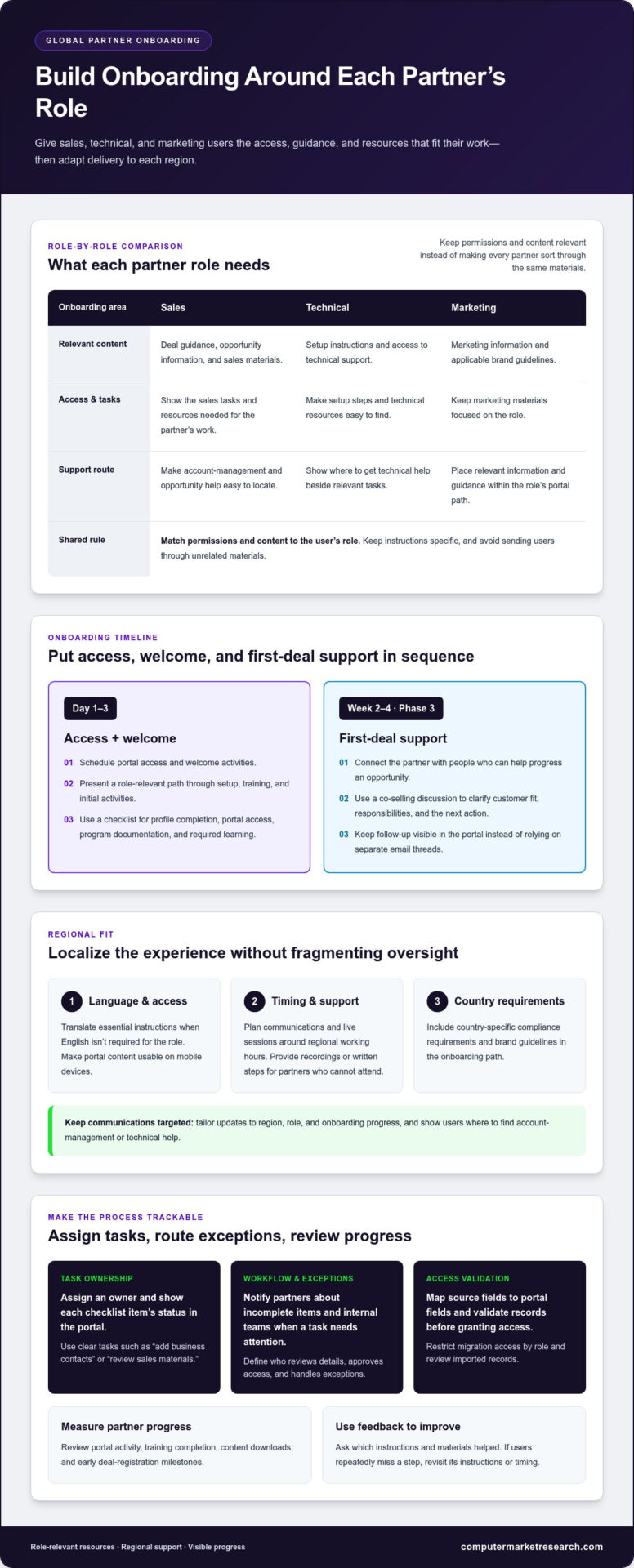
Onboarding global partners to a new portal works best when each partner gets access, guidance, and resources suited to their role and region. Schedule portal access and welcome activities for Day 1-3, then use role-based content to keep sales, technical, and marketing information relevant. Include country-specific compliance requirements and brand guidelines in the onboarding path.
A portal can make partner onboarding more consistent, but a one-size-fits-all experience may leave partners sorting through materials they don’t need. Structure the process without treating every market or role the same. This guide explains how to organize onboarding steps, localize support and materials, manage access and compliance content, and measure partner progress. You’ll also learn how a centralized portal can reduce scattered documents and manual follow-up, giving your team clearer visibility into onboarding activity while helping partners find the information they need.
Key Takeaways
- Match portal permissions and content to each partner’s role so users can find relevant sales, technical, or marketing resources.
- Adapt onboarding materials and support to partners’ languages, local context, and time zones to make guidance easier to use.
- Use welcome journeys, task checklists, and automated notifications to make onboarding steps clear and trackable.
- Organize country-specific compliance requirements and brand guidelines in accessible, clearly maintained portal resources.
- Measure partner progress through portal activity, training completion, and early deal-registration milestones to identify where targeted support can help.
Time zones, language barriers, and local support
Global onboarding can stall when partners receive instructions outside their local working hours or in an unfamiliar language. Plan communications around each partner’s region and role. A sales contact may need deal guidance, while a technical contact needs setup instructions and access to support. Targeted messages keep each person focused on relevant tasks. Irrelevant communications can lead to disengagement.
Accessibility and localization needs depend on each partner’s country, role, and working context. Make portal content usable on mobile devices, and adapt materials into local languages when English isn’t required for the job. Align these choices with country-specific compliance reviews rather than assuming one language or format works everywhere.
For a practical view of portal onboarding, watch this walkthrough:
Set a clear support route before inviting partners into the portal. Give users direct access to account managers and technical support teams so commercial and system questions reach the right people. Show the contact path beside relevant tasks, such as profile setup, training, or deal submission. This reduces handoffs and makes ownership clear.
Plan live sessions and response workflows around time zones. Schedule sessions at region-appropriate times, and provide recordings or written steps for partners who can’t attend. Organize support information by topic and role. For example, sales users should find opportunity guidance quickly, while technical users should see setup instructions without navigating unrelated materials.
First-deal support needs a defined place in the onboarding journey. Schedule it for Week 2-4 Phase 3, and connect a partner with the people who can help progress an opportunity. A co-selling discussion can clarify customer fit, responsibilities, and the next action. Keep the process visible in the portal, so both teams can track follow-up instead of relying on separate email threads.
- Localize: Translate essential instructions when English isn’t required for the role.
- Target: Send updates based on region, role, and onboarding progress.
- Support: Make account-management and technical-help routes easy to find.
Then build a feedback loop. Ask partners whether instructions were clear, which materials were useful, and where they needed help. Review responses alongside portal activity, such as training completion and content downloads. If users repeatedly miss a step, revise its instructions or timing. Integrate local feedback into the onboarding workflow so each market receives practical support without fragmenting program oversight.
How to Implement Partner Portal Best Practices?
Build onboarding around clear partner tasks, owners, and checkpoints. Map source fields to portal fields, restrict migration access by role, and validate records before granting partner access.
Welcome Programs and Onboarding Checklists
A welcome program gives each new partner a defined path through setup, training, and initial activities. Use a checklist for profile completion, portal access, program documentation, and required learning. Assign an owner to each task, then show its status in the portal. Automated notifications can remind partners about incomplete items and alert internal teams when a task needs attention.
Make every checklist item specific. For example, replace “complete setup” with “add business contacts” or “review sales materials.” Group tasks by partner role where needed. Review the welcome journey from a new partner’s perspective to ensure the instructions make sense before rolling it out more broadly.
Automated Partner Setup
Portal workflows can replace repeated manual setup with a consistent sequence. After an administrator creates a partner profile, the system can present relevant tasks, a training path, and program documents. Configure notifications for practical events, such as an unfinished profile or a completed approval step. Tie each notification to a clear next action.
Define workflow ownership before automating it. Identify who reviews partner details, who approves access, and who handles exceptions. Test the process with sample partner records, including incomplete information. Confirm that an error is routed to a named team rather than leaving the partner at a dead end.
Partner Information and Documents
Specify the information partners need to provide for your business process. A profile may collect the organization’s name, business contacts, relevant roles, and operating regions. Supporting documents can include a signed agreement or program documentation when applicable. Use clear field labels and explain how each requested item supports setup.
For secure migration, transfer only the partner data needed to operate the portal. Match fields between source records and the portal, preserve access controls, and validate sample entries before importing the full set. Reconcile imported records against the source, then grant partner access only after the responsible team reviews the results.
Automated onboarding workflows should also handle exceptions. For example, a missing contact field can pause the next step and notify the assigned administrator. A completed agreement can trigger the appropriate review task. These rules reduce duplicate follow-up while keeping decisions visible to the team managing partner setup.
Keep onboarding easy to audit. Record task status, approval ownership, and notification history within the workflow. Review these records when partners report confusion or delays. If the same step repeatedly generates questions, clarify the instructions or adjust the sequence. This feedback helps teams improve programs without relying on scattered email threads.
Before launch, test the full journey with a representative partner profile. Confirm that the welcome message, checklist, document requests, and access steps appear in the intended order. Then review the experience with the teams responsible for approvals and support. A controlled test can reveal gaps before the workflow becomes the standard route for new partners.
Compliance requirements and brand guidelines
Give every partner one structured place to find applicable compliance materials and approved brand assets. Separate country-specific requirements from company-wide standards, then assign owners to review and update each resource.
Organize Compliance Resources by Country
Create a country-by-country register showing which requirements apply, who owns each review, and where current guidance is stored. For example, distinguish a requirement relevant to one market from a company-wide program document. This structure helps partners identify relevant information without treating every resource as universally applicable.
For each resource, display its title, applicable market, owner, and review status. A portal administrator can group documents by country and partner role, then connect each item to the relevant onboarding task. Assign compliance reviewers to maintain the content so outdated guidance can be replaced through a controlled process.
Make Brand Standards Usable
Brand guidelines should turn standards into practical actions for partners. Include approved logos, product descriptions, presentation templates, and examples of correct brand use. A partner preparing a sales deck, for instance, should be able to find the current template and understand which assets are approved for that purpose.
Keep brand materials distinct from compliance documents, even when both appear in the same onboarding path. Label each asset clearly and identify its intended use. A structured library can organize approved materials by campaign, market, or partner role, making it easier to select the right item and avoid informal copies circulating by email.
Connect Guidance to Onboarding Tasks
Build compliance and brand steps into the partner journey instead of relying on a separate document dump. A checklist can direct partners to review relevant program documentation, complete a learning assessment, or locate approved marketing assets for a task. Show completion status to the responsible internal team.
Match access to responsibilities. Sales users may need program and brand materials, while technical users may need different documentation. Use role-based permissions to present relevant content and limit access to assigned users. This keeps the portal focused and prevents partners from being distracted by unrelated information.
- Classify: Separate country-specific materials from global standards.
- Assign: Name an owner for each document and review workflow.
- Control: Publish approved versions and remove superseded copies.
- Connect: Link each resource to the onboarding task where it applies.
Before launch, test the journey with a partner profile for each intended role and market. Confirm that the right materials appear, document labels are clear, and completion records reach the correct internal owner. This final review helps create a seamless experience while maintaining a structured approach to guidance and accountability.
Country-specific legal and compliance requirements
Privacy rules depend on where partners and data subjects are located, what personal data the portal processes, and how organizations use it. GDPR may be relevant to partner onboarding that involves personal data connected to the European Union. Assess whether it applies based on actual data flows and locations.
Start with a country-and-data map before creating portal fields. List each partner market, the information collected, its business purpose, and the teams that can access it. For example, distinguish a company’s general business address from personal contact details for an individual representative. This distinction helps reviewers identify which data needs closer attention.
Ask internal privacy and legal reviewers to assess the map against relevant jurisdictions. Record their decisions beside the affected portal steps, documents, and user roles. Organizations should avoid applying one market’s assumptions to every partner. A process built for one country may need different notices, review paths, or access settings elsewhere.
Use data minimization as a practical design test: collect only the information needed for a defined onboarding or channel-management task. If a form asks for a contact’s details, state the business purpose beside the field. Remove optional fields that don’t support a defined process. This keeps data collection focused and simplifies review.
Set permissions according to responsibility. A partner administrator may need to maintain company records, while a sales user may only need access to sales-related tasks. Define who can view, edit, export, or approve each data category. Apply the same review to internal teams and vendors that support portal operations.
Document how each relevant data type is handled. Identify where records enter the portal, which team uses them, and how updates or removal requests reach the right owner. These operational details help teams respond consistently without relying on an employee’s inbox or an informal spreadsheet.
- Map: Record partner markets, data categories, purposes, and access groups.
- Review: Route country-specific workflows to the appropriate legal and privacy reviewers.
- Configure: Align fields, notices, and permissions with documented review decisions.
- Maintain: Assign owners for updates when markets, processes, or portal data change.
Apply the same discipline to compliance documents. Store approved versions with a clear market label, responsible owner, and review status. For example, partners should be able to distinguish a country-specific privacy notice from general program documentation. Keep superseded copies out of active onboarding paths.
Before release, test each country’s partner journey using representative roles and records. Confirm that users see the intended fields, notices, and documents, and that access follows assigned responsibilities. Keep a record of review and configuration decisions. This creates a traceable process for maintaining country-specific requirements as partner operations evolve.
What information and documents should partners provide during portal onboarding?
Request information that supports a defined partner-program task, not a broad collection of background data. Organize portal fields into company profile, business contacts, program setup, and supporting documents. For each field, explain its purpose and identify the team that uses it. This makes onboarding requests easier to complete and maintain.
Start with the partner’s business profile. Collect the organization’s legal or trading name as used in program records, its business address, operating regions, and relevant company website. Ask for a primary contact responsible for portal administration. If partners operate through separate business units, capture the unit name so internal teams can route records correctly.
Record contacts by role rather than storing one general email address. For example, identify the sales contact, marketing contact, and portal administrator where those roles apply. Include each person’s name, work email, and responsibility in the program. This structure helps route training notices, deal updates, and account questions to the right contact.
Request program information that supports the partner’s intended activities. This may include sales territories, product categories, distribution relationships, or relevant business capabilities. Tie each field to a workflow, such as assigning sales resources by region. Avoid asking for details no team uses, since unnecessary fields add effort and create records that need ongoing maintenance.
Supporting documents should match the organization’s actual onboarding process. A checklist might include a signed partner agreement, program documentation, or an approved company profile. Use clear file labels and explain which document is needed for each task. If a document applies only to a particular partner type, show it only in that partner’s onboarding path.
Make data entry easy to review. Use consistent field names, mark required items clearly, and provide examples for fields that could be interpreted differently. For instance, explain whether a territory field expects a country, sales region, or assigned accounts. Validate entries for completeness, then route exceptions to the internal owner responsible for partner records.
- Company profile: organization name, business address, website, and operating regions.
- Contacts: named users, work email addresses, and program responsibilities.
- Program details: applicable territories, product categories, and partner activities.
- Documents: relevant agreements, program materials, and requested supporting records.
Before opening the portal workflow to partners, test the request with a sample profile. Confirm that each field has a clear purpose, each upload has an identified owner, and completed information reaches the right internal team. Review incomplete submissions for confusing labels or unnecessary requests, then refine the form before broader use.
For a structured way to manage partner records and onboarding tasks, explore a partner portal workflow.
Computer Market Research: PartnerPortal™
Computer Market Research provides PartnerPortal™ to centralize partner onboarding, deal registration, and performance tracking. It helps teams replace scattered documents and manual follow-up with a clearer view of partner activity.
Turn to PartnerPortal™ when your organization needs a structured way to manage partner access and channel workflows. Related processes can include Deal Registration, Co-op/MDF Management, and Rebates & Incentives, depending on your program needs.
For a closer look at how PartnerPortal™ fits your partner operations, contact Computer Market Research.
Build a Partner Experience That Can Evolve
A portal should support the partner program as it changes, not simply digitize today’s forms. Treat onboarding global partners to a new portal as an operating process with clear ownership. Assign someone to review partner feedback, identify recurring friction, and prioritize improvements to the experience.
Start with one practical next step: decide which part of partner onboarding needs the most coordination. It might be managing access, aligning teams around partner activity, or connecting incentive processes with the broader program. A defined priority makes it easier to assess how a centralized portal could support your channel operations.
Computer Market Research can help you explore how its partner solutions fit your program’s requirements. Discuss your partner portal needs with Computer Market Research, and take a considered next step toward a more manageable partner experience.
Frequently Asked Questions
How can I ensure cultural sensitivity during global onboarding?
Build cultural awareness into how partners experience your program, not just into translated materials. For example, review sales examples, imagery, terminology, and meeting formats with people familiar with each market. Ask local partner representatives to flag language that could be misunderstood or examples that don’t fit their business context. Record feedback and update shared materials consistently so individual teams don’t create conflicting versions.
How can I measure the success of my global onboarding program?
Measure whether partners progress from enrollment to meaningful participation. Track completion of key onboarding tasks, first deal registration, training progress, and partner activity after access begins. Compare results across partner cohorts or regions to identify where progress slows, rather than relying only on total portal logins. Pair these measures with partner feedback, then use recurring barriers to prioritize workflow changes and focused support.
How can companies maintain legal compliance in different countries during onboarding?
Maintain a jurisdiction-by-jurisdiction review process for the data and documents used in onboarding. For each partner market, record what data is collected, its business purpose, and the internal owner responsible for review. For example, route a new personal-data field through privacy and legal reviewers before adding it to a form. Revisit the assessment when partner workflows or data uses change, and preserve decision records.
What Is Partner Onboarding?
Partner onboarding is the process of bringing a new business partner into an organization’s program and operations. It can include administrative setup, access to program resources, training, and the steps needed to begin working together. For example, a distributor may need its company profile established, relevant users assigned, and sales processes explained before registering opportunities. Effective onboarding continues beyond initial setup as partners develop their activities.
What are the benefits of an effective international onboarding process?
An effective process gives partners a consistent route into the program while allowing for relevant differences between markets. Partners can understand their responsibilities, locate resources, and see what action comes next. For example, a regional sales team can receive guidance aligned with its channel role, while program administrators retain visibility across the broader network. Clear ownership also helps internal teams identify support needs before they disrupt partner activity.
What challenges do organizations face in global onboarding?
Organizations often need to coordinate fragmented partner records, multiple internal owners, and market-specific processes. One partner may have sales, technical, and marketing users with different needs, while internal teams store information in separate systems. This can lead to duplicate requests or unclear responsibility. A practical starting point is to map who supplies each data element, who approves it, and which team acts when an onboarding task stalls.
What role does technology play in global onboarding?
Technology makes partner tasks, approvals, and program information easier to organize and monitor. A portal can guide users through a defined journey, present resources relevant to their role, and give internal teams visibility into progress. For example, a dashboard can help program managers spot partners who haven’t completed required training. Technology supports process control, but teams still need clear workflow ownership and useful content.
What are the steps to onboard global partners to a new portal?
Start by mapping partner roles, markets, and the tasks each role must complete. Configure access and onboarding paths, prepare relevant program resources, then test the journey with representative partner profiles. Invite partners, monitor task progress, and use feedback to resolve confusing steps. After launch, review engagement and business milestones to refine the experience. This sequence connects setup, partner guidance, and ongoing improvement.

Article by
Del Heles
Del Heles is the founder and CEO of Computer Market Research (CMR), a channel management software company he launched in 1984. With more than 40 years of experience, he’s known for helping manufacturers and distributors simplify complex partner programs through practical, customer-focused technology solutions.