

A PRM-to-CRM connection can create as much confusion as it solves if both systems compete to own the same data. A reliable prm crm integration connects partner activity with sales workflows while making clear where partner, account, and opportunity records are managed. That clarity helps prevent duplicate updates and keeps teams working from consistent information.
If partner activity is scattered across spreadsheets, manual handoffs, and separate systems, it’s difficult to see how channel relationships contribute to sales. Connecting platforms is only part of the answer. Teams also need to decide which workflows belong in each system, what information should move between them, and who will validate the results.
This article explains how connected PRM and CRM data can support partner and sales workflows, and which decisions shape a dependable integration. You’ll learn how to set data ownership, permissions, and validation expectations, define implementation responsibilities, and assess whether a PRM platform fits your channel-management needs. We’ll also cover how PartnerPortal™ can be evaluated alongside your CRM and existing workflows, with implementation services that include technical integration with existing systems.
Key Takeaways
- Clarify how CRM and PRM responsibilities differ so customer-facing sales activity and partner operations have clear ownership.
- Define which information could flow between systems, such as partner profiles, registered deals, sales context, and performance data.
- Evaluate prm crm integration by deciding data ownership, update direction, and timing before configuration begins.
- Plan implementation with business owners, data stewards, CRM administrators, and integration specialists involved in requirements, testing, and rollout.
- Assess whether PartnerPortal™’s partner onboarding, deal registration, and performance tracking fit your existing workflows and channel-management needs.
What PRM CRM integration connects, and why partner teams need it
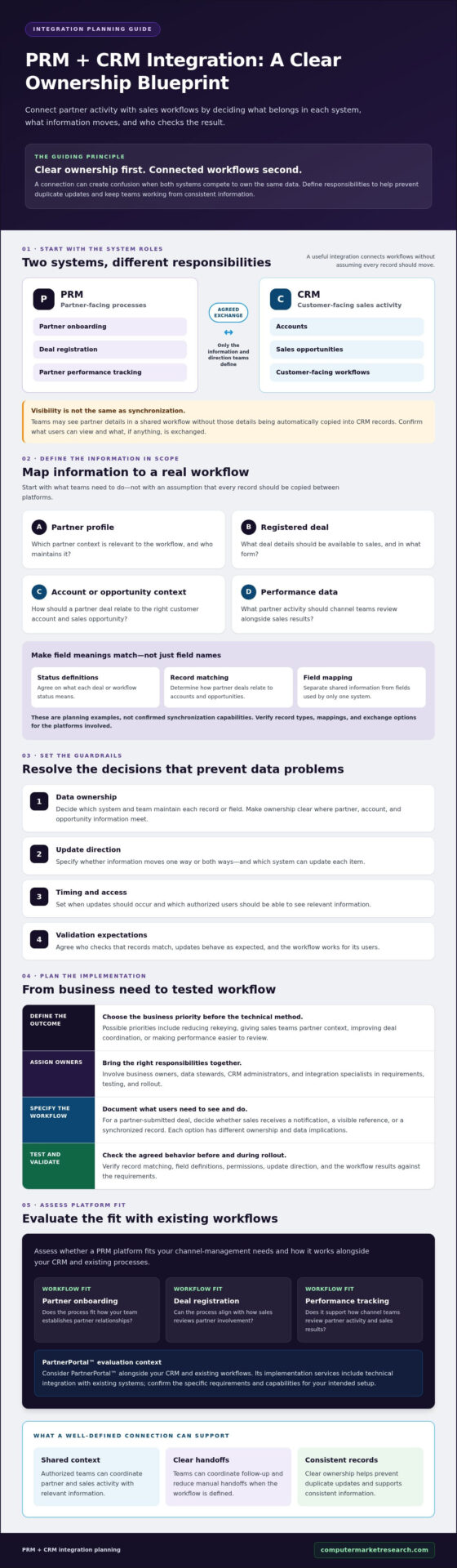
PRM CRM integration connects partner-management processes with customer relationship management workflows and data. A CRM typically supports customer-facing activity, such as managing accounts and sales opportunities, while a PRM supports partner-facing processes, including onboarding partners, registering deals, and tracking performance. Together, the systems can give authorized teams shared context for coordinating indirect sales.
The scope matters. Integration doesn’t automatically mean every record moves between platforms or that both systems can edit the same fields. Partner relationship management (PRM) covers processes for working with channel partners, but each organization must determine which of those processes should connect to its CRM.
For a practical look at integration challenges and partner operations, watch this video:
Which partner workflows benefit from a connected PRM and CRM?
Partner onboarding establishes the relationship and relevant partner context. Deal registration can alert sales teams to a partner’s involvement in a potential opportunity, while performance tracking can help channel teams review partner activity alongside sales results. When the right people can access relevant information, teams can coordinate follow-up and reduce manual handoffs.
Visibility isn’t the same as synchronization. A team might be able to view partner details in a shared workflow without those details being automatically copied into CRM records. Before implementation, confirm what information users will see, which records may be exchanged, and whether updates flow in one direction or both.
What should PRM CRM integration mean for your organization?
Start with business outcomes, not a technical method. Decide whether the priority is reducing rekeying, giving sales teams partner context, improving deal coordination, or making performance easier to review. Then identify owners across channel operations, sales operations, and IT. Together, they can define what data matters, who maintains it, and how to verify that the workflow works as intended.
If your team needs broader context before setting integration requirements, review partner relationship management fundamentals. A clear understanding of the partner processes involved helps prevent a new configuration from reproducing the same manual work across disconnected systems.
How PRM CRM integration moves partner and sales data
A useful way to plan prm crm integration is to start with the information teams need for specific workflows, rather than assume every record should be copied between systems. Potential integration scope may include partner profiles, registered deals, related account or opportunity context, and performance data. These are planning examples, not confirmed synchronization capabilities for any particular platform.
For example, a partner submits a deal for review in a PRM. If the agreed workflow calls for it, selected deal details could be made available to the internal sales team so they can assess the opportunity alongside existing account context. Define whether that means a notification, a visible reference, or a synchronized record. Each option has different data and ownership implications.
Which records and fields might teams need to align?
List the minimum partner, account, and opportunity information required for each workflow. Possible shared fields might identify the partner, customer account, deal status, and internal owner. Keep these distinct from system-specific fields that support only one platform’s processes.
Field definitions need to align, not just field names. Agree on what each status means, which account a partner deal relates to, and how records are matched. Before implementation, verify platform-specific record types, field mappings, and which data can actually be exchanged. Don’t treat a proposed mapping as a supported product capability until it’s confirmed.
How should teams think about synchronization and data ownership?
One-way synchronization sends selected updates in a single direction. Two-way synchronization allows updates to move in both directions. These are design choices, not universal features. For each record type and field, name the authoritative system and decide whether the other system can view or update it. Otherwise, conflicting edits can leave teams unsure which value to trust.
Technical stakeholders should also define update frequency, duplicate handling, and who investigates exceptions. A scheduled update may suit information that doesn’t need to change immediately. A time-sensitive sales workflow may require a different approach. Confirm available options with the platform and CRM teams rather than assuming real-time updates are supported.
Forrester has described PRM platforms as maturing into a horizontal channel management platform, reinforcing why integration planning should account for partner operations as well as sales data. For practical guidance on data quality and governance, see these channel data management practices.
How to evaluate PRM CRM integration without creating data problems
Connecting a PRM to a CRM doesn’t automatically mean replacing the CRM. The goal is to support partner workflows while keeping existing sales processes intact. For organizations seeking to streamline their core customer and sales management, learn more about cloud CRM solutions. Before choosing an integration pattern, assess who can create and update records, how duplicates will be identified, and what happens when information conflicts.
Use this comparison to frame decisions with channel operations, sales operations, and IT. It describes general design options, not features guaranteed by a specific platform.
| Decision | Potential benefit | Trade-off and governance needs | Questions to verify |
|---|---|---|---|
| One-way or two-way flow | One-way sharing can limit complexity. Two-way synchronization may reduce repeat entry when both teams need to update agreed data. | Two-way flows require clear field ownership, conflict rules, and duplicate handling. | Which records and fields can move in each direction? How are conflicting updates resolved? |
| Centralized or distributed ownership | A single authoritative source for each field makes reporting and maintenance easier to govern. | Different systems may own different records or fields, so teams need documented write permissions and escalation paths. | Which system owns each partner, account, opportunity, and status field? |
| Real-time or scheduled updates | Faster updates can support time-sensitive handoffs. Scheduled updates may better fit workflows that don’t need immediate changes. | Update timing affects operational capacity, data freshness, and the effort needed to monitor exceptions. | How quickly must users see changes? What update options are supported? |
Should the CRM or PRM own each data element?
Assign an authoritative source for every important record type and field before configuration. For example, a team might designate one system as the source for customer account details and another for partner onboarding information. The right allocation depends on actual workflows. Without it, an outdated value can overwrite a current one, creating conflicting records and unreliable reports. Document who may edit each field and who resolves disputed updates.
Which integration pattern fits your channel operations?
A simpler one-way flow may suit a workflow where one team publishes information for another to use. Two-way synchronization may fit shared processes, but it brings more decisions about edit rights, record matching, and exception handling. Neither pattern is universally better. Select based on workflow needs, data sensitivity, system capabilities, and the team’s capacity to manage issues.
Before launch, test duplicate prevention and permissions using representative records. Confirm how the integration identifies an existing account or deal, what users can view or change, and where failed or conflicting updates are routed. A practical channel data management framework can help teams document these controls. Verify available mappings and update behavior with the CRM and PRM providers before finalizing the design.
Plan PRM CRM integration from requirements to launch
A dependable prm crm integration starts with clear requirements, not a connector choice. Bring business owners, data stewards, CRM administrators, and implementation specialists into planning early. Each group sees different risks, including workflow disruption, inconsistent records, access gaps, and technical dependencies.
Use this sequence to move from discovery to a controlled rollout:
- 1. Set business goals. Define what the integration should improve, such as reducing manual handoffs or helping sales teams work with partner deal context.
- 2. Map current workflows. Document how partner onboarding, deal registration, and sales follow-up work today. Note where spreadsheets, rekeying, or unclear approvals create friction.
- 3. Specify data and ownership. List the records and fields needed for each workflow, identify the authoritative source, and document who can view or edit them.
- 4. Assess data and system dependencies. Record existing data quality issues and establish a baseline. Identify relevant CRM, ERP, finance, or other system dependencies without assuming a particular configuration.
- 5. Validate with representative cases. Test field mappings, permissions, duplicate scenarios, and exception paths using realistic partner and sales situations.
- 6. Roll out in phases and measure. Start with a defined group or workflow, resolve issues, then expand when results meet agreed criteria. Track data completeness, manual handoffs, and process adoption after launch.
What should teams document before implementation?
Create a shared requirements record covering business goals, current and intended workflows, required data, ownership, access needs, dependencies, and known data issues. Agree on how to measure the baseline before changes begin. This gives the implementation team a reference for decisions and helps business owners distinguish a configuration issue from an unclear process.
How can teams validate the integration before wider rollout?
Use representative scenarios, such as a new partner onboarding, a submitted deal linked to an existing account, and an update that conflicts with an established record. Confirm the expected outcome and who handles exceptions. Give users a clear route to report errors and request workflow clarification, then review feedback before expanding access. Explore the relevant partner portal software capabilities as you assess fit with existing processes.
Computer Market Research provides implementation and integration services for PartnerPortal™, including technical integration with existing systems. To assess how a partner platform could fit your channel workflows, review PartnerPortal™ against your requirements.
How PartnerPortal™ fits into a PRM CRM integration plan
PartnerPortal™ is Computer Market Research’s cloud-based partner relationship management platform. It centralizes partner onboarding, deal registration, and performance tracking, workflows that can support coordination between channel teams and sales operations. Its fit in a prm crm integration plan depends on how those processes align with your existing systems, data ownership rules, and access requirements.
Computer Market Research’s implementation services include setup and technical integration with clients’ existing CRM, ERP, or financial systems. That describes the service scope at a high level, but it doesn’t confirm a specific connector, synchronization method, supported CRM, or set of records and fields. Verify those details against your environment before treating them as implementation assumptions.
What should buyers confirm about PartnerPortal™ integration?
Bring your CRM administrator and business process owners into the discussion with a clear list of questions. Confirm:
- Which CRM platforms and integration approaches are supported for your environment?
- Which partner, account, and opportunity records, and which individual fields, can be exchanged?
- Can updates flow one way or both ways, and how are duplicates or conflicting changes handled?
- Which system owns each data element, and who can view, create, or edit it?
- What implementation work is included, what responsibilities remain with your team, and how will security requirements be addressed?
Answers should be specific to your planned workflow. For instance, if partner-submitted deal information needs to inform internal sales activity, document the required data and expected handling, then confirm that the proposed configuration supports it. Don’t infer capability from a general description of integration services.
What is a practical next step for evaluating fit?
Prepare a concise evaluation brief with current partner workflows, integration priorities, system owners, and unresolved data questions. Separate requirements that must be in place for launch from enhancements that can be assessed later. This gives your team and the provider a shared basis for discussing scope without assuming every desired workflow belongs in the initial setup.
Use that brief to review the PartnerPortal channel management platform alongside your requirements. A focused evaluation can help you determine what to verify about platform fit and implementation before committing to a design.
Build a clearer path from partner activity to sales
A dependable prm crm integration starts with clear decisions: which workflows should connect, which system owns each data element, and how teams will validate updates. These choices help limit duplicate records and make partner activity easier to coordinate with sales operations.
PartnerPortal™ centralizes partner onboarding, deal registration, and performance tracking. Computer Market Research also provides implementation and integration services for existing CRM, ERP, or financial systems. Confirm supported platforms, data mappings, implementation scope, and responsibilities against your organization’s requirements before settling on an integration plan.
To evaluate PartnerPortal™ alongside your partner workflows, review the platform against your requirements. Use the evaluation to clarify priorities, identify questions for your implementation team, and assess how the platform fits your channel operations. With clear ownership and a measured plan, your teams can move toward more coordinated partner and sales workflows.
Frequently Asked Questions
What is PRM CRM integration?
PRM CRM integration connects partner-management processes with customer relationship management workflows and data. A PRM supports partner-facing activity such as onboarding, deal registration, and performance tracking. A CRM generally supports customer-facing sales activity, including account and opportunity management. Integration can make selected partner context available to sales teams, but the records, fields, and update direction included depend on the organization’s requirements and the systems involved.
Why integrate PRM software with a CRM?
Integrating PRM software with a CRM can help channel and sales teams coordinate activity using shared context. For example, authorized sales staff may need visibility into a partner’s registered deal when working with a related customer opportunity. Connecting workflows can also reduce manual handoffs and repeated data entry, depending on the integration design. Define the business need first, then decide what information should be shared and which system should maintain it.
Does PRM CRM integration require replacing an existing CRM?
No. PRM CRM integration does not automatically require replacing an existing CRM. The systems can support distinct responsibilities, with the CRM continuing to serve customer-facing sales workflows while the PRM supports partner-facing processes. Before implementation, decide which records and fields each system owns, what information should be shared, and how updates should be handled. Verify that the proposed integration fits your CRM and current workflows.
What data should a PRM share with a CRM?
Share only the information needed for agreed partner and sales workflows. Potential integration scope might include partner profiles, registered deal details, related account or opportunity context, and performance data. These are examples, not a guarantee that a particular PRM can synchronize them. Identify the minimum required fields, define their meaning, and confirm supported records and mappings with the relevant providers before planning implementation.
Should PRM CRM integration be one-way or two-way?
Choose one-way or two-way synchronization based on workflow needs and data ownership. A one-way flow may be suitable when one system publishes information for another team to use. Two-way synchronization can support shared updates, but requires clear edit permissions and conflict-handling rules. Neither approach is right for every organization. Confirm system capabilities, update timing, and the team’s ability to manage exceptions before selecting a pattern.
How do you prevent duplicate records during PRM CRM integration?
Set record-matching rules and authoritative data sources before enabling information exchange. Decide how the integration should recognize an existing partner, account, or opportunity, and document what happens when a possible duplicate is found. Test expected matches and near-matches using representative records. Also assign an owner to investigate unresolved cases, so duplicates or conflicting updates don’t silently affect sales workflows or reporting.
How can a business evaluate a PRM CRM integration before committing?
Start with the workflows you need to connect, then document data ownership, required fields, permissions, and unresolved data-quality issues. Ask which CRM platforms, records, fields, synchronization methods, and implementation responsibilities are supported for your environment. Test representative partner and sales scenarios, including duplicate and exception cases. For PartnerPortal™, Computer Market Research provides implementation and integration services for existing CRM, ERP, or financial systems. Confirm scope and technical details directly.

Article by
Del Heles
Del Heles is the founder and CEO of Computer Market Research (CMR), a channel management software company he launched in 1984. With more than 40 years of experience, he’s known for helping manufacturers and distributors simplify complex partner programs through practical, customer-focused technology solutions.