

What good is a partner sales report if every distributor sends it in a different format and on a different schedule? For manufacturers, inconsistent POS data can turn routine channel reporting into hours of manual collection and cleanup. Errors and missing fields can also make partner sell-through and inventory harder to compare. The right pos data collection and processing services can bring structure to this work by collecting, cleansing, and standardizing partner reports.
A provider should reduce administrative work without adding unnecessary complexity. This guide explains how to assess POS data services, from partner submissions and data normalization to implementation and ongoing responsibilities. It also covers questions to ask about reporting formats, submission methods, validation rules, and processing cadence. These details should be confirmed for your program. With a repeatable data process and centralized channel information, your team can build a more dependable view of partner sales and inventory, then use it to inform channel decisions.
Key Takeaways
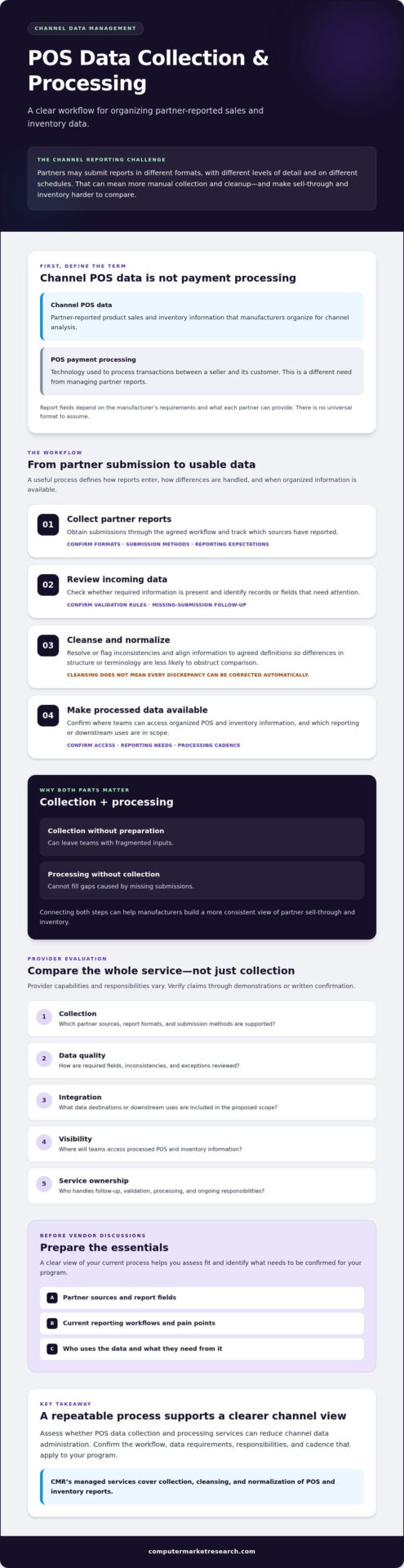
- Partner POS reporting services organize sales data from channel partners. They are distinct from systems that process customer payments.
- Review the full workflow, from report collection through cleansing and normalization, and confirm which details depend on your program.
- Compare providers on collection, data quality, integration, visibility, and service ownership. Verify claims through demonstrations or written confirmation.
- Before vendor discussions, document partner sources, report fields, current workflows, data users, and operational pain points.
- Assess whether pos data collection and processing services can reduce channel data administration. CMR’s managed services cover collection, cleansing, and normalization of POS and inventory reports.
What POS Data Collection and Processing Services Do for Channel Teams
For manufacturers, POS data usually means information partners report about product sales and inventory, not the technology used to take a customer’s payment. A distributor or reseller may send reports that differ in structure, completeness, and timing. Without a consistent process, comparing sell-through across partners can require repeated manual review and still leave gaps in the channel picture.
Channel POS data services collect partner sales reports and prepare the information for consistent use across a manufacturer’s channel. That differs from POS payment processing, which handles transactions between a seller and its customer. The reports relate to activity at a Point of sale (POS), but the manufacturer’s need is to organize partner-reported information for channel analysis.
For a brief look at why the quality of POS information matters, watch this video:
What counts as channel POS data?
Channel POS data can include partner-reported sales and inventory information. The fields depend on the manufacturer’s reporting requirements and what each partner can provide. One distributor may use different labels or report different details than a reseller, and some submissions may be incomplete. There is no universal format to assume. Identify the fields your team needs to assess partner sell-through and inventory, then confirm which sources can provide them.
Why collection and processing are separate needs
Collection means obtaining partner reports through agreed reporting workflows. Processing begins after receipt: the information is reviewed, cleansed, and normalized so differences in structure or terminology are less likely to obstruct comparison. Submission methods, validation rules, and processing cadence vary by provider, so confirm them before relying on a proposed workflow.
Both steps matter. Collecting reports without preparing them can leave teams with fragmented inputs. Processing alone cannot fill gaps caused by missing submissions. Well-managed pos data collection and processing services connect the two, helping manufacturers build a more consistent view of sell-through and inventory across partner relationships. Centralized channel information can support clearer performance assessment and inventory visibility. For a broader view of this discipline, see channel data management systems.
How POS Data Collection and Processing Works From Submission to Insight
A useful workflow does more than gather files. It defines how partner reports enter the process, how inconsistencies are handled, and when standardized information becomes available to channel teams. Submission methods, validation rules, processing cadence, and provider responsibilities vary. Confirm each detail before implementation.
From partner report collection to standardized data
Start by agreeing how each distributor or reseller will submit reports. Ask which submission methods and reporting formats the provider supports, how often partners are expected to report, and who follows up on missing submissions. Treat these as scoping questions, not capabilities to assume.
- Collect reports. Obtain partner submissions through the agreed workflow and track which sources have reported.
- Review incoming data. Check whether required information is present and identify records or fields that need attention.
- Cleanse and normalize. Resolve or flag inconsistencies and align the data to agreed definitions. Cleansing can improve usability, but it does not mean every discrepancy can be corrected automatically.
- Make processed data available. Confirm where teams will access organized POS and inventory information, and which reporting or downstream uses are in scope.
For example, partners may use different labels for the same product or report inventory in different ways. Define what each field means before combining submissions. Consistent definitions make partner reports easier to compare because teams interpret each field using the same rules.
Agree who reviews exceptions, contacts partners about missing or unclear information, approves changes to field definitions, and communicates processing status. If reports contain customer-level information, establish appropriate handling expectations. The National Retail Federation offers guidance on how retailers can responsibly gather and use customer data.
From processed POS data to channel visibility
Organized POS and inventory information can bring partner submissions into a more consistent view for channel performance reviews. Teams can assess what information is available, identify gaps that affect interpretation, and use available inventory data to inform discussions about channel activity. The usefulness of that view depends on the agreed fields, data quality checks, and reporting expectations.
Clarify what happens after processing. Ask whether information will be available in a channel management platform or passed to other business systems. If CRM, ERP, or financial-system integration is relevant, confirm the systems, requirements, responsibilities, and deliverables with the provider. For teams managing food service operations that require middleware to synchronize sales and order data across multiple channels, visit TableCompass.ai to see how restaurant POS systems connect with aggregators.
Organizations evaluating pos data collection and processing services can use this workflow to frame provider discussions. For more on organizing channel information, explore channel data management systems.
How to Compare POS Data Collection and Processing Providers
The right provider depends on your channel, not a generic ranking. Partner count, report volume, current collection workflows, and desired reporting outcomes all affect fit. Before demonstrations, separate confirmed requirements from claims that need evidence. If CRM integration is essential, for example, specify the system and intended use, then ask the provider to demonstrate or document how that scope would be handled.
Use the same criteria for each provider. Record whether each requirement is confirmed, needs a demonstration, or remains unanswered. Apply a rating scale if useful, but prioritize providers against your needs rather than treating every criterion as equally important.
| Area | What to assess | Evidence to request |
|---|---|---|
| Collection | Coverage of your partner sources and reporting workflows | Confirm supported sources, submission methods, and reporting cadence. |
| Data quality | Cleansing, normalization, exception review, and limits | Ask for a walkthrough using representative partner reports. |
| Integration | Fit with required CRM, ERP, or financial systems | Document the systems, scope, dependencies, and responsibilities. |
| Visibility | How teams access organized POS and inventory information | Request a demonstration using reporting needs similar to yours. |
| Service ownership | Who handles collection follow-up, exceptions, and ongoing administration | Get task ownership and communication expectations in writing. |
Questions to ask about data quality and coverage
Ask which POS and inventory sources the provider can handle, then check that they match your partner network. Request a clear explanation of how cleansing and normalization work, what triggers an exception review, and where the provider’s responsibility ends. Find out how missing, inconsistent, or late submissions are identified and communicated. Don’t assume a provider can correct every discrepancy without partner input.
Questions to ask about integration and ongoing support
Confirm integration requirements before selecting a provider. Identify which data should move between systems, who approves field mappings, and what work remains with your internal teams, partners, and provider. Ask how ongoing responsibilities and reporting expectations will be documented. For more context on channel reporting and related workflows, review the channel POS and ship-and-debit whitepaper.
Evaluate pos data collection and processing services on fit and evidence, not broad promises. Keep a record of demonstrations and written confirmations, then compare providers against your team’s operational requirements.
How to Prepare for a POS Data Services Evaluation
A productive evaluation starts with a clear picture of your current process. Before a demonstration or scoping discussion, gather examples of partner reports and map how they move from receipt to the teams that use them. This helps providers respond to your actual data environment rather than describe a generic workflow.
Build a clear current-state data inventory
Document your partner sources, reporting practices, and the people involved. Use real examples where possible, including reports with missing fields, inconsistent labels, or manual adjustments. The aim is to show where effort accumulates and where channel visibility becomes difficult, not to assume every partner reports in the same way.
- Partner sources: List distributor and reseller groups, the reports they provide, and how submissions are received.
- Timing and ownership: Record expected submission timing, internal report owners, and who follows up on gaps.
- Fields and inconsistencies: Note the fields teams rely on and document recurring differences or missing information.
- Workflows and manual steps: Describe how reports are reviewed, corrected, combined, and shared today.
- Users and decisions: Identify the teams using POS and inventory information and the channel decisions it informs.
Define evaluation criteria and success measures
Turn your current-state inventory into a prioritized list of needs. These may include more consistent data, less manual administration, clearer channel and inventory visibility, or fit with existing systems. Separate essential requirements from preferences so providers can explain where their proposed service fits and where further scoping is needed.
Set success measures using your own baseline. You might track the internal effort involved in handling reports, the consistency of required fields, or whether relevant teams can access the information they need. Avoid setting improvement targets before you understand the current process and what a provider will deliver.
Use demonstrations and scoping discussions to clarify data ownership. Ask who collects reports, reviews exceptions, follows up with partners, approves changes to field definitions, and manages any agreed CRM, ERP, or financial-system integration. Confirm responsibilities in writing, including what remains with your team and what falls within the provider’s defined scope.
This preparation gives your team a practical basis for evaluating pos data collection and processing services. For broader context before vendor discussions, explore the channel data management guide and consider how its approach relates to your documented workflows.
Evaluate Computer Market Research for POS Data Collection and Processing
Computer Market Research (CMR) may be relevant to manufacturers evaluating POS data services because its managed data services collect, cleanse, and normalize channel POS and inventory reports. This can fit teams looking to outsource parts of channel data administration and organize partner reporting. The service focuses on channel information, not standalone POS checkout software or payment processing.
PartnerPortal™ is CMR’s cloud-based channel management platform. It provides visibility into channel data and inventory, giving teams a place to view information across partner activity. Consider the managed services and platform in the context of your workflow: which tasks do you want to hand off, and how do teams need to access the resulting information? For further product context, review CMR’s channel data management systems.
Where CMR’s managed data services may fit
CMR’s managed data services cover collection, cleansing, and normalization of POS and inventory reports. To assess fit, compare that scope with your partner sources, recurring data issues, and internal responsibilities. Ask which report sources and formats can be handled, how exceptions are reviewed, and what your team or partners must continue to manage. Confirm these details rather than assuming every workflow or report type is supported.
PartnerPortal™ supports channel management and visibility into channel data. It is not a system for processing customer payments at checkout—if you need complete retail or wholesale POS software instead, check out Rkassa. Keeping that distinction clear helps your team assess the service against manufacturer channel-reporting needs.
What to confirm before starting an evaluation
Use a scoping conversation to align the proposed service with your partner network and reporting objectives. Ask CMR to clarify:
- Which partner data sources and report formats are in scope, and how partners submit information.
- What cleansing and normalization cover, how exceptions are handled, and who owns follow-up.
- Which POS and inventory information will be available through PartnerPortal™ and how it supports your intended review process.
- Whether CRM, ERP, or financial-system integration is relevant, and which systems, requirements, and deliverables need confirmation.
- How an evaluation can align with your partner workflows and objectives.
CMR describes implementation services that may include setup, configuration, branding, and integration with CRM, ERP, or financial systems. Confirm the scope for your systems and workflow before relying on any specific deliverable. A clear evaluation plan helps your team assess fit against documented needs without assuming an outcome in advance.
To take the next step, Claim your 90-day free trial and discuss how the evaluation can relate to your channel data requirements.
Build a More Dependable Channel Data Process
Choosing pos data collection and processing services starts with understanding your partner sources, reporting needs, and current workflow. Compare providers on report collection, data quality and exception handling, visibility, and service ownership. Confirm formats, processing cadence, and integration scope rather than relying on assumptions.
Computer Market Research’s managed data services collect, cleanse, and normalize channel POS and inventory reports. Its PartnerPortal™ channel management platform provides visibility into channel data and inventory. Founded in 1984, Computer Market Research specializes in channel management. Whether it fits your organization depends on your requirements and the confirmed service scope.
Use your documented workflows and objectives to guide an evaluation. Claim your 90-day free trial to explore whether the platform aligns with your channel data needs. Clear expectations and a repeatable process can help your team work toward more consistent reporting and make channel decisions with greater confidence.
Frequently Asked Questions
What are POS data collection and processing services?
POS data collection and processing services gather sales and inventory reports from distributors or resellers, then prepare the information for consistent channel use. Processing may include cleansing and normalizing submissions so teams can interpret partner data more consistently. These services address manufacturers’ channel reporting needs, not payment transactions at checkout. Confirm which partner sources, report formats, data fields, and processing tasks are included in the provider’s scope.
How does POS data processing work for manufacturers?
For manufacturers, the workflow generally starts with collecting partner reports, followed by an initial review, data cleansing, normalization, and making the processed information available for analysis. The exact steps depend on the provider and the manufacturer’s reporting requirements. Before selecting a service, clarify how missing or inconsistent data is handled, who follows up with partners, how often reports are processed, and where teams will access the resulting POS and inventory information.
What is the difference between POS data services and payment processing?
How do I choose a POS data collection provider?
Choose a provider by comparing its proposed workflow with your partner sources, data needs, systems, and internal responsibilities. Assess report collection, cleansing and normalization, exception handling, visibility, integration scope, and ongoing service ownership. Ask for demonstrations or written confirmation, especially for supported formats, submission methods, validation rules, and processing cadence. The best fit is the provider whose confirmed scope aligns with your priorities, not a generic ranking.
Can POS data services integrate with a CRM or ERP?
Integration with a CRM or ERP may be possible, but confirm the systems and scope with the provider. Computer Market Research describes integration with clients’ CRM, ERP, or financial systems, while specific requirements and deliverables depend on the project. Identify which data needs to move, its intended use, and who will own setup and ongoing responsibilities. Ask the provider to confirm the proposed integration details in writing before selection.
How much do POS data collection and processing services cost?
Costs depend on the solution and service scope, so request pricing based on your organization’s requirements. Potential components include access to PartnerPortal™, implementation and integration work, and ongoing managed data services. Computer Market Research’s subscription fees may scale with active partner count or data volume. Ask providers to itemize what is included, how scope affects pricing, and whether implementation or ongoing data administration is charged separately.
What information should I prepare before a POS data services demo?
Prepare an inventory of partner groups, report sources, expected submission timing, current fields, and internal owners. Bring representative examples of recurring inconsistencies and manual steps. Identify which teams use POS and inventory data and what decisions it supports. Also list required systems, integration questions, and responsibilities you expect the provider to handle. This context helps keep the demonstration focused on your workflows and evaluation criteria.

Article by
Del Heles
Del Heles is the founder and CEO of Computer Market Research (CMR), a channel management software company he launched in 1984. With more than 40 years of experience, he’s known for helping manufacturers and distributors simplify complex partner programs through practical, customer-focused technology solutions.