

Co-op funds don’t become easier to manage just because they’re moved into a portal. If requests, approvals, proof of performance, and reimbursement still depend on disconnected processes, fund status and partner activity can remain difficult to review. The right co-op marketing portal software connects fund administration with partner activity and program visibility.
A feature list is a useful starting point, but it won’t tell you whether a platform fits your channel program. Check how it handles each step, what controls support accurate fund administration, and whether its reporting gives your team a clear view of activity and balances.
This buyer’s guide offers a practical framework for comparing those capabilities. You’ll learn which workflows, controls, and reporting functions to assess, what to ask about integrations and implementation, and how to separate essential requirements from optional features. We’ll also consider where PartnerPortal™ may fit if you’re evaluating co-op/MDF management alongside broader partner and channel operations.
Key Takeaways
- Assess co-op marketing portal software by how well it supports your workflows, controls, visibility, and integration needs.
- Map the fund process from program rules through reconciliation, then confirm which steps the platform supports.
- Separate essential capabilities from desirable additions based on how your partners and internal teams work.
- Prepare for implementation by documenting processes, assigning owners, reviewing data, and planning testing and training.
- Consider whether PartnerPortal™ fits your co-op/MDF needs alongside broader partner and channel operations.
What Co-op Marketing Portal Software Does for Channel Programs
Co-op marketing portal software gives channel partners and program administrators a shared place to manage co-op marketing fund workflows, from submitting requests to reviewing activity and supporting documentation. Co-op funds typically help partners carry out marketing that supports a supplier’s products or brand. This reflects marketing co-operation, where businesses coordinate marketing efforts while retaining defined roles and program rules.
A co-op portal is more focused than a general partner portal, which may support a wider range of channel activities, such as onboarding or deal registration. It also differs from a standalone campaign execution tool focused on creating or distributing marketing materials. A co-op portal centers on fund administration and the information partners and administrators need to manage program activity. The exact scope varies by platform.
For context on how co-op workflows can fit into broader channel operations, explore channel sales management software.
For a visual introduction to a co-op marketing portal, watch this video:
Which co-op program tasks can a portal support?
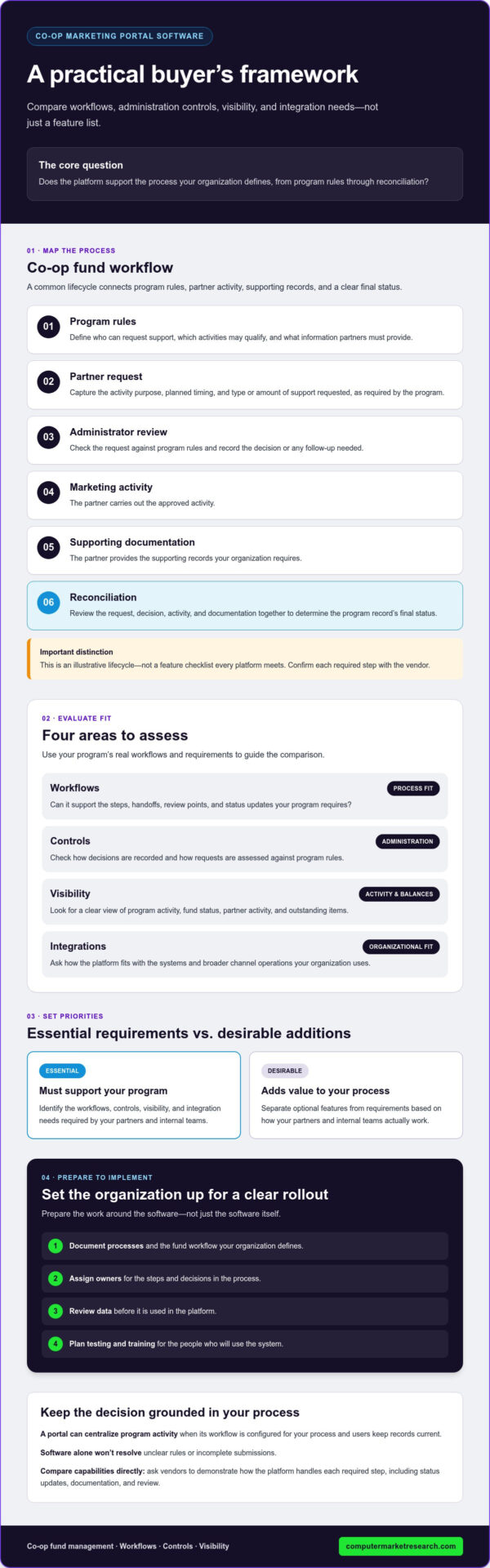
A typical process may begin with program rules, followed by a partner request, administrator review, marketing activity, supporting documentation, and reconciliation. A shared workflow can clarify what partners need to provide and what administrators need to assess at each stage. It can also help users check a request’s status without piecing together updates from separate messages.
These stages describe a common process, not a guaranteed feature set. Ask vendors to demonstrate how their software handles each step your program requires, including status updates, documentation, and review. Confirm specific capabilities rather than assuming every portal supports the same workflow.
How does co-op software differ from spreadsheets?
Spreadsheets and email can record requests, balances, and decisions, but information may be spread across files, inboxes, and personal tracking systems. A portal can provide a centralized view of program activity if its workflow is configured for your process and users keep records current. Software alone won’t resolve unclear rules or incomplete submissions.
If your team spends time reconciling file versions or chasing status updates, consider whether a shared system would improve visibility and accountability for both partners and administrators.
Managing Co-op Marketing Funds: Request to Review
A co-op fund process needs clear rules, defined decision points, and a reliable record of what happened at each stage. Map it as a sequence: program rules, partner request, review, marketing activity, supporting documentation, and reconciliation. This is an illustrative lifecycle, not a feature checklist every platform meets. Co-op marketing portal software should support the process your organization defines, so confirm each required capability with the vendor.
Start with the program rules: who can request support, which activities may qualify, and what information partners need to provide. Clear requirements give partners a consistent starting point and help administrators assess requests against the same criteria. For a partner-oriented overview of the concept, see Co-op advertising.
- Request: A partner submits the activity purpose, planned timing, and type or amount of support requested, as required by your program.
- Review: The assigned decision-maker checks the request against program rules and records the outcome or any follow-up needed.
- Activity and documentation: The partner carries out the approved activity and provides the supporting records your organization requires.
- Reconciliation: The team reviews the request, decision, activity, and documentation together to determine the program record’s final status.
Think of the lifecycle as a series of handoffs: partners provide information, authorized reviewers make decisions, and both sides can see what remains outstanding. Whether a partner is executing digital advertising or hosting in-person client events like golf outings—sourcing gear from suppliers such as golfballmonkey.com—the portal should clearly capture invoices and deliverables. A portal may support these handoffs, but the details depend on its capabilities and your configuration.
What should a partner request and approval workflow include?
Decide which request details are needed to evaluate an activity, such as its purpose, timing, and requested support. Match those fields to your program rules and assign decision ownership. Ask vendors to demonstrate whether their portal can reflect your review stages and record status changes and reviewer actions. Confirm these controls instead of assuming they’re included.
How should teams manage proof and reimbursement documentation?
Partners and administrators need a clear process for submitting and reviewing the records your program requires. Ask how the platform handles supporting documentation, exceptions, and incomplete submissions, including how partners learn that more information is needed. Treat reimbursement as a process to verify: confirm whether the software supports the steps your team needs rather than assuming it initiates or manages payments.
Before selecting a platform, compare the vendor’s demonstrated workflow with your documented process. If you’re assessing whether PartnerPortal™ fits your co-op/MDF program, you can review the available 90-day free trial as part of your evaluation.
Evaluating Co-op Portal Software for Your Program Needs
Start your comparison with your current program process, not a vendor’s feature list. List the steps partners and administrators follow, identify where requests stall or information gets lost, and classify each capability as required or desirable. Evaluate co-op portal software by workflow fit, partner usability, controls, visibility, and integration needs.
Use a simple matrix to compare platforms against the same practical questions:
| Evaluation area | Questions to ask | Priority test |
|---|---|---|
| Workflow fit | Can the portal reflect your request, review, activity, and documentation steps? | Required if those steps are central to your current program. |
| Partner usability | Can partners find program information, submit requests, and check relevant statuses? | Required if partners are expected to manage their activity directly. |
| Controls | Can access, review roles, and program-specific rules be represented? | Required controls should match your governance process. |
| Visibility | What fund status, activity, and documentation views are available to administrators? | Prioritize views that support routine program decisions. |
| Integrations | Which systems can exchange data, and how is that data flow managed? | Required only where your process depends on connected systems. |
Mark a capability as required when the program can’t operate as intended without it. Features that may help but aren’t necessary for your current workflow can remain desirable additions. This distinction keeps evaluations focused and makes trade-offs easier to explain to stakeholders.
Which controls and reporting questions should buyers ask?
Ask vendors how permissions, review roles, and program-specific rules can be configured. Then request a demonstration using realistic examples. What can an administrator see about a pending request, fund status, or submitted documentation? What can a partner see about their own activity? Confirm which reports are available, what information they include, and how often they update. Don’t assume real-time status or a particular analytics function without verification.
How should integrations and partner adoption affect the decision?
Map your current CRM, ERP, and finance processes before discussing integration needs. Identify the records that need to move, which system owns each data point, and who maintains the connection. Ask the vendor to confirm supported systems, data flow, and implementation scope. Verify compatibility rather than relying on a general integration claim.
Partner adoption matters just as much as technical fit. Review the onboarding steps and ask partners to test common tasks, such as finding program requirements or checking request status. A capable platform still depends on clear guidance and accurate inputs. For more information about the company’s offering, explore co-op/MDF management for distributors.
Preparing Your Organization for a Co-op Portal
A portal rollout works best when it reflects a process your team has examined, rather than digitizing unclear rules and handoffs. Before selecting co-op marketing portal software, document the current workflow, assign owners, review partner and fund data, test a representative process, and prepare users for their roles. The rollout plan will depend on your existing processes, required integrations, and the vendor’s implementation scope.
Start by defining what the system needs to support. Clarify who maintains program information, who reviews requests, and who answers partner questions. Then identify the records that need to be prepared or transferred. Discuss migration responsibilities, data formats, and integration work with the provider before setting implementation expectations.
What program information should be ready before setup?
Gather the rules and records that determine how the program operates. Document eligibility criteria, review responsibilities, required evidence, and exception paths, including how your team handles a request outside the usual process. Identify partner records and existing fund data that may need cleanup or preparation. For help planning data quality, see this guide to channel data management systems.
Assign an owner to each data set and confirm with the provider who is responsible for reviewing, preparing, and migrating it. Don’t assume historical records will transfer in a particular format or that connected systems are included in the implementation. Confirm the scope and dependencies directly.
How can teams support adoption after launch?
Keep the initial rollout focused. Test a representative workflow with the people who will use it, including administrators, approvers, and participating partners. Check that each role understands where to find relevant information, what action to take, and how to ask a question. Resolve unclear instructions or process gaps before expanding access across the partner network.
Match training to responsibilities. Administrators may need guidance on program records and oversight; approvers need to understand their review role; partners need clear instructions for participating and supplying required information. Set a process for questions, corrections, and feedback after launch so recurring issues can inform adjustments.
After rollout, review adoption and workflow bottlenecks using reporting the vendor confirms is available. For example, check whether your team can see the statuses or activity needed to identify where requests are waiting. Don’t rely on metrics the platform doesn’t provide. Use your findings to refine guidance or clarify ownership.
If you’re ready to assess PartnerPortal™ against your co-op/MDF workflow, explore the 90-day free trial.
When PartnerPortal™ May Fit a Co-op Marketing Program
PartnerPortal™ may be relevant for organizations that want to manage co-op/MDF activity within a broader channel management platform. Consider evaluating it if partner and fund workflows are spread across separate tools or records, or if channel teams need clearer visibility alongside other partner operations. Fit depends on your program’s requirements, so compare the platform with the workflows and controls you defined before shortlisting vendors.
Computer Market Research offers PartnerPortal™, a cloud-based channel management platform, and co-op/MDF management. The platform’s broader capabilities include partner onboarding, deal registration, performance tracking, channel data visibility, and integrations. These capabilities provide a reason to evaluate the platform, not a guarantee that it supports every co-op process or integration your organization needs. For information about the offering, review the co-op/MDF platform for distributors.
How does co-op management connect to broader partner operations?
Co-op administration can be evaluated alongside partner onboarding and performance tracking because these activities involve the same channel relationships. A team assessing co-op fund workflows may also want to understand how broader partner information is managed in the platform. Before assuming the processes share data or features, ask the provider to demonstrate how the relevant areas work together and confirm what’s included for your use case.
What should buyers confirm before starting a trial?
Set evaluation goals first. Then ask the provider to clarify:
- Which co-op tasks the trial environment supports and how those workflows can be tested.
- How user roles and access relate to partner, reviewer, and administrator responsibilities.
- What partner or fund data is needed for an evaluation and how to prepare it.
- Which integrations are supported, how data flows, and what implementation work is in scope.
- What guidance is available for setting up and evaluating your chosen workflows.
Use the answers to test a representative process against your requirements, rather than judging fit by a general feature overview. Confirm any specific functionality, integration, or implementation detail with the provider. Don’t assume it’s included until verified.
Once your evaluation goals are clear, you can claim the 90-day free trial and assess whether PartnerPortal™ aligns with your co-op/MDF program and broader channel operations.
Choose a Portal That Fits Your Program
The right co-op marketing portal software should support how your organization administers funds, give partners and internal teams useful visibility, and fit the data and processes you’re prepared to manage. Start with your program’s requirements, distinguish essential capabilities from optional ones, and verify workflow, integration, and implementation details directly with the provider.
A platform is only part of the solution. Clear program rules, assigned owners, prepared data, and practical training all contribute to a more consistent process. Evaluate these elements together to make a decision based on operational fit, not a feature list alone.
Computer Market Research offers PartnerPortal™ as a channel management platform, with co-op/MDF management among its offerings. If you’ve defined what you want to evaluate, claim your 90-day free trial to explore whether it aligns with your program needs.
Frequently Asked Questions
What is co-op marketing portal software?
Co-op marketing portal software supports digital workflows for administering cooperative marketing funds with channel partners. Depending on the platform, it may help organize partner requests, review steps, supporting documentation, and program visibility. Capabilities vary, so compare the software with your program rules and confirm which workflows and reports are available. A product category label alone doesn’t explain how a provider handles fund administration.
How does co-op marketing software work?
Co-op marketing software can provide a shared place to manage steps in a funding workflow. A process may begin with program requirements and a partner request, then move through review, marketing activity, documentation, and reconciliation. The exact sequence depends on company policy and the platform. Map your current process first, then ask vendors to demonstrate the relevant tasks, user roles, and records rather than relying on a general overview.
What features should co-op marketing portal software have?
Choose features according to your program’s requirements. Assess request intake, review controls, partner access, status visibility, documentation handling, and reporting. Consider administrator and partner usability, data handling, and any integrations your workflow needs. Ask vendors to demonstrate each essential capability and clarify whether configuration or additional services are needed. Verify that a feature is included in the platform you’re evaluating instead of assuming it’s standard.
Can co-op marketing portal software integrate with a CRM or ERP?
Integration availability depends on the provider, the systems involved, and your organization’s requirements. Identify which records need to move between the portal and your CRM, ERP, or finance environment. Then ask which specific systems are supported, which direction data flows, who owns each record, and what implementation work is included. Confirm the system and workflow with the provider before treating a general integration statement as a fit.
How is co-op marketing portal software different from MDF software?
Co-op and market development funds are related channel funding approaches, but businesses may define their programs, rules, and workflows differently. Software may support one or both, depending on the provider and configuration. Compare platforms against your funding criteria, partner processes, approval paths, and reporting needs. Check how each provider defines and supports the fund types your program uses.
How can a company measure whether a co-op portal is working?
Measure performance against program goals using indicators your team can define consistently and the platform can report. Possible measures include request status, partner participation, documentation completeness, or visibility into allocated funds. Establish how each measure will be interpreted before rollout, then review results with program owners. If the data shows recurring delays or gaps, investigate the workflow and make adjustments. Don’t assume a particular return or time saving without evidence.
Is a co-op marketing portal suitable for a small partner program?
It may be, depending on partner count, process complexity, administrative workload, and the value of improved visibility. A small program with straightforward requirements may not need extensive software, while a smaller team can still face manual bottlenecks that a structured workflow could address. Compare implementation and ongoing effort with the specific problems you expect the portal to solve before deciding.
What should I ask during a co-op software trial?
Before a trial, define what you need to evaluate and ask which co-op tasks the trial environment supports. Test a representative request and review process using realistic roles, program rules, and available data. Confirm whether you can assess relevant reports or integrations, and involve both administrators and partner-facing users. Record unclear steps, then compare what you observed with your documented requirements before drawing conclusions about platform fit.

Article by
Del Heles
Del Heles is the founder and CEO of Computer Market Research (CMR), a channel management software company he launched in 1984. With more than 40 years of experience, he’s known for helping manufacturers and distributors simplify complex partner programs through practical, customer-focused technology solutions.