

What if partners could adapt campaign materials to their markets without changing the brand elements that make them recognizable? That’s the challenge with co-branding marketing assets for partners: centrally produced materials can protect consistency, but rigid templates and manual approvals can slow launches or leave partners with assets that don’t fit their needs.
Brand control and local relevance don’t have to compete. Partners need practical ways to tailor messaging, while your team needs clear standards and confidence that approved materials are used correctly. Without a repeatable process, useful assets can be overlooked, inconsistently customized, or difficult to connect to campaign results.
This guide explains how to plan, approve, and distribute partner-ready assets. You’ll learn to define what stays consistent and what partners can adapt, reduce avoidable approval friction, and connect asset use with campaign activity and channel outcomes. The goal is a co-branding workflow that gives partners room to execute while keeping your program organized and measurable.
Key Takeaways
- Set clear operating rules so partners can use campaign-ready materials without creating avoidable brand inconsistency.
- Build a repeatable workflow around the audience, objective, partner segment, channel, and desired action.
- For co-branding marketing assets for partners, define which elements stay fixed, which partners can edit, and which changes need approval.
- Measure asset access, campaign execution, and business outcomes separately to identify where partner campaigns can improve.
- Use centralized partner information and performance visibility to support channel operations. PartnerPortal™ centralizes onboarding, deal registration, and performance tracking.
Why co-branding marketing assets for partners needs a clear operating model
Co-branded assets combine a company’s approved branding with a partner’s identity. They give partners a ready starting point for outreach while keeping core brand elements consistent. The broader concept of Co-branding helps explain why both brands need a clear, coordinated presence.
A defined operating model tells partners which materials they can use, what they can adapt, and when a change needs review. Without those boundaries, partners may recreate assets, delay campaigns while seeking clarification, or use materials in ways that weaken consistency. Clear guidance reduces friction without treating every partner or audience as identical.
Asset access is only the first step. A download doesn’t show whether a partner used the file in a campaign, reached the intended audience, or prompted the desired action. Track access separately from execution: first establish whether partners can find the materials, then assess whether they used them as intended and what campaign activity followed.
Which partner marketing assets are suitable for co-branding?
Email copy supports direct outreach, while social posts give partners concise messages to share with their audiences. Landing pages provide a campaign destination and call to action; presentations help partners explain an offer in a sales conversation. Event materials can support promotion before an event and follow-up afterward. Choose formats according to the campaign objective and how each partner engages its audience.
Reusable templates are useful for shared campaign elements, such as approved messaging and visual structure. Add partner-specific context where it affects relevance, such as the audience, local offer, or next step. This avoids rebuilding every asset while giving partners more than a logo swap.
What makes co-branded assets useful to partners?
Partners need materials they can use without guessing. Provide clear messaging, practical instructions, and a call to action suited to the campaign. Explain which fields they can change and where to find the approved version. Straightforward directions reduce back-and-forth and make it easier to use assets as intended.
Relevance matters as much as brand consistency. A message that reflects the partner’s audience and role is more useful than a generic asset, even if the generic version is polished and on-brand. Adoption depends on the material’s fit and the workflow around it, not the number of files available. A focused, accessible set of assets can be more actionable than a large library with unclear choices.
Step-by-Step Guide to Partner Co-Branding Assets
A reliable process for co-branding marketing assets for partners starts before design work. Define the campaign, decision-makers, and version controls first. Then create materials partners can use, with clear instructions and a way to assess results.
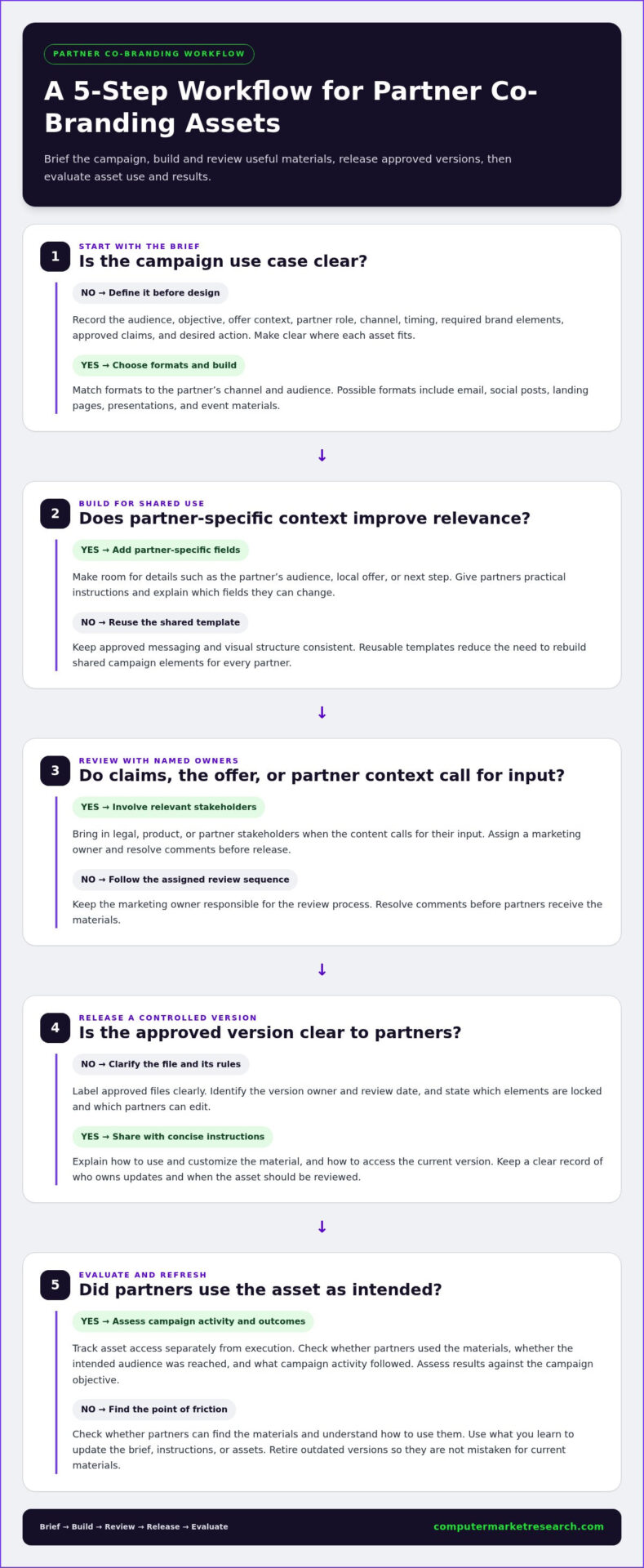
Brief the campaign, build and review the assets, release approved versions, then evaluate use and results.
Start with the campaign brief and partner use case
Specify who the campaign should reach, what it should accomplish, the offer or message, and the partner’s role. Identify the partner segment and channel, such as email outreach to existing customers or social posts aimed at a new audience. These choices determine which formats are useful and what action each asset should encourage. Record timing, required brand elements, and approved claims in the brief.
- 1. Define the brief. Document the audience, objective, offer context, partner role, channel, timing, and desired action. Make the intended use clear enough that partners know where each asset fits.
- 2. Select formats and build. Choose email, social, landing page, presentation, or event materials based on how partners will reach the audience. Reuse templates for shared campaign content and provide fields for partner details where context matters.
- 3. Review with named owners. Assign a marketing owner and set the review sequence. Involve legal, product, or partner stakeholders when claims, the offer, or partner context calls for their input. Resolve comments before release so partners aren’t left to interpret conflicting edits.
- 4. Release a controlled version. Label approved files clearly, identify the version owner and review date, and state which elements are locked and which can be edited. Give partners concise instructions on use, customization, and access to current materials.
- 5. Review use and results. Check whether partners accessed and used the assets, then assess campaign activity against the objective. Use the findings to update the brief, instructions, or materials before the next release. Retire outdated versions so they aren’t mistaken for current assets.
Create, review, release, and refresh each asset
Version control matters as much as approval. Keep a clear record of the approved file, who owns updates, and when the material should be reviewed. When messaging or campaign details change, partners need to distinguish the new version from older copies. This reduces ambiguity and makes revisions easier to manage.
For broader channel coordination, channel partner management software can centralize partner onboarding, deal registration, and performance tracking. These capabilities support partner operations, while the asset workflow defines how campaign materials are prepared and governed.
How to balance brand control with partner customization
Standardize the brand, adapt the execution. This gives partners room to make a campaign relevant without leaving them to guess which brand elements, messages, or claims they can change. For co-branding marketing assets for partners, document the boundaries in the template and usage guidance, then assign an owner to maintain approved versions.
The right level of customization depends on brand risk, campaign purpose, and partner context. A campaign with established messaging may need only partner contact details and a relevant call to action. A new offer or audience-specific claim may warrant review before release. Make the distinction explicit: routine edits shouldn’t trigger unnecessary approval cycles, while higher-impact changes should receive attention.
Which elements should remain consistent across partners?
Set consistent rules for logo treatment, core brand identifiers, approved product claims, and disclosures required for the specific campaign. Requirements can vary by offer, channel, or context, so don’t treat every disclosure or review step as universal. Templates, usage guidance, and a current set of approved claims help reduce visual and messaging variation across partner campaigns.
What should partners be able to adapt locally?
Partners can often add their contact details, audience context, relevant local examples, and an appropriate call to action. Mark editable fields directly in the asset and explain what should replace each placeholder. This prevents ad hoc redesign and focuses revisions on details that make the campaign useful to the partner’s audience.
| Control level | Examples | Recommended handling |
|---|---|---|
| Locked | Logo treatment, core brand identifiers, approved product claims | Keep consistent in every partner version. |
| Partner-editable | Contact details, audience context, local examples, relevant calls to action | Identify editable fields and provide instructions. |
| Approval required | Changes to claims, offer details, brand presentation, or context-dependent disclosures | Route to the named owner or relevant reviewer before use. |
Centralized templates generally provide stronger control and consistency. Allowing defined fields to be edited can improve execution speed and local relevance. Partner-led creation offers more flexibility, but unclear standards can increase variation and review effort. Choose an approach that fits the campaign’s risk and purpose. In every case, name a version owner, provide concise usage guidance, and make the current approved file easy to identify.
How to launch and measure a partner co-branding campaign
A successful launch takes more than sharing approved files. Partners need to know which materials to use, who the campaign is for, when it runs, and what action to ask their audience to take. Measurement should distinguish access from execution, and execution from business impact.
Prepare partners to use the campaign materials
Send a concise launch message that identifies the target audience, campaign purpose, available assets, and desired next action. Include usage instructions, campaign timing, and a clear route for questions or approval requests. Make sure partners can access current materials before launch.
- Confirm each partner can access the approved assets and understands which format suits each channel.
- Explain editable fields, locked elements, and approval steps.
- Share supporting materials, such as campaign messaging and the intended call to action.
- Set a review cadence to gather partner feedback and identify confusing or underused assets.
For broader campaign execution context, see this through-channel marketing automation guide. A defined workflow for co-branding marketing assets for partners connects campaign materials with partner activity without assuming that access alone means a campaign is underway.
Measure asset use without confusing activity with impact
Use separate measurement stages to see where activity is happening and where the process may need adjustment:
- Access: Record whether partners can find or download the assets. This shows availability, not campaign execution.
- Execution: Track whether partners used the materials in the intended channel and during the campaign period. Where possible, record the asset or format used.
- Outcome: Connect campaign activity to relevant pipeline or revenue measures only when the underlying data supports that attribution.
Use a consistent campaign identifier across participating partners and channels. For example, include a shared campaign name or code in reporting records, and use consistent tracking conventions in campaign links where appropriate. Document the convention before launch so activity can be compared without confusing one partner’s campaign with another’s.
Review results alongside partner feedback. If access is high but execution is limited, revisit the instructions, asset fit, or launch process. If partners execute but outcome data is incomplete, improve measurement before drawing conclusions about impact. To explore PartnerPortal™, claim your 90-day free trial.
How channel operations software can support a repeatable co-branding program
Co-branded asset workflows sit alongside partner operations, but they are separate processes. Spreadsheets and disconnected records can make it harder to coordinate partner status, deal activity, and performance information, especially when teams maintain separate versions. A channel operations platform can centralize partner information and provide broader visibility, while a distinct asset workflow governs how campaign materials are created and managed.
Where centralized partner operations fit into campaign execution
Consistent onboarding and partner records give teams an organized foundation for administering a channel program. Deal registration and performance tracking add visibility into partner activity, but they don’t prove that a partner used a specific campaign asset or that an asset generated a particular result. Keep asset-level campaign tracking distinct from broader partner operations.
PartnerPortal™ centralizes partner onboarding, deal registration, and performance tracking. These capabilities support channel operations around a co-branding program. Asset creation, customization, approval, and distribution follow their own workflow. For more context, explore partner relationship management software. The partner relationship management guide can also help clarify how partner administration fits into a broader program.
Decide whether a broader partner platform fits your program
Evaluate the operational need before choosing a platform. Consider how many partner records your team manages, whether onboarding and deal registration have become complex, what performance information teams need to see, and where manual processes create coordination challenges. Then compare those needs with documented capabilities. If the priority is producing or distributing co-branded assets, define that workflow separately from partner operations.
- Partner scale: Are partner records and onboarding steps becoming difficult to coordinate manually?
- Workflow complexity: Do deal registration processes need clearer administration?
- Data visibility: Would centralized performance tracking help teams understand partner activity?
- Asset governance: Is there a distinct process for creating, approving, versioning, and sharing campaign materials?
This separation helps teams select tools based on actual needs and avoid conflating channel management with asset production. Once you’ve assessed whether centralized onboarding, deal registration, and performance tracking align with your program, you can evaluate PartnerPortal™ through the 90-day free trial.
Put a repeatable partner campaign process into practice
Effective co-branding marketing assets for partners depend on a clear operating model: keep essential brand elements consistent, define what partners can adapt, and clarify approval and version ownership. A structured workflow from campaign brief to release and review reduces avoidable friction while giving partners materials suited to their audiences.
Measure each stage separately. Asset access shows whether materials are available; campaign execution and business outcomes require their own evidence. This distinction helps teams assess what’s working and improve the process without confusing downloads with impact.
Channel operations can support the work around campaigns. PartnerPortal™ centralizes partner onboarding, deal registration, and performance tracking, while asset creation and approval remain distinct workflows. Computer Market Research, founded in 1984, brings experience in channel operations. If centralized partner processes are part of your next step, start your 90-day free trial. With clear standards and useful flexibility, you can build a partner campaign process that’s easier to manage and improve over time.
Frequently Asked Questions
What are co-branding marketing assets for partners?
Co-branding marketing assets for partners combine a company’s approved brand elements with a partner’s identity or relevant details. Examples include email copy, social content, landing pages, presentations, and event materials. These assets help partners communicate a campaign to their audiences while maintaining consistent core messaging and brand presentation. Clear usage guidance shows partners how to apply the materials without changing elements that should stay consistent.
How do you create co-branded marketing materials for channel partners?
Start by defining the campaign objective, audience, partner role, and intended action. Choose formats that suit the channel, such as email copy for direct outreach or a presentation for a partner-led sales conversation. Identify fixed brand elements and editable fields, then route the materials through the appropriate review process. Before release, provide usage instructions and a version date. After launch, review asset use and campaign results to guide updates.
What should partners be allowed to customize in co-branded assets?
Partners may be able to adapt contact information, local examples, audience context, and calls to action. Keep brand identifiers, approved product claims, and other sensitive content under tighter control where appropriate. Mark editable fields in the template and explain which changes partners can make themselves and which need review. Clear boundaries help partners add relevant context without ad hoc redesign or unnecessary approval delays.
How can a company keep co-branded partner assets on brand?
Use written brand guidance, reusable templates, approved messaging, and clear ownership for reviews and updates. Mark editable areas so partners don’t have to infer what they can change. Identify each approved version and remove superseded materials from active use. For context-dependent content, such as offer details or disclosures, define the appropriate review process. These controls maintain consistency while keeping routine partner execution practical.
How do you encourage partners to use co-branded marketing materials?
Make assets easy to find, relevant to partner audiences, and straightforward to adapt within agreed rules. Explain the campaign objective and next action instead of sending files without context. Ask partners for feedback on usability and audience fit, then use it to refine the materials. Track access separately from execution: availability or downloads show that assets were reached, not necessarily that partners used them.
How do you measure the performance of co-branded campaigns?
Define campaign goals before launch and use consistent tracking conventions across partners and channels. Review asset access, partner execution, audience engagement, and relevant pipeline or revenue measures as distinct signals. Downloads alone don’t prove business impact. Connect campaign activity to outcomes only when reliable data supports that attribution. A consistent campaign identifier helps organize reporting, while clearly defined measures make it easier to interpret results and identify gaps.
Can partner management software create co-branded marketing assets?
Partner management software can support channel operations without producing campaign materials. PartnerPortal™ centralizes partner onboarding, deal registration, and performance tracking. These functions support broader partner administration, while asset creation, customization, approval, and distribution are separate workflow requirements. Map the steps your team needs, then compare them with each platform’s documented capabilities. This distinction helps prevent assumptions about asset functions based on software designed for partner operations.

Article by
Del Heles
Del Heles is the founder and CEO of Computer Market Research (CMR), a channel management software company he launched in 1984. With more than 40 years of experience, he’s known for helping manufacturers and distributors simplify complex partner programs through practical, customer-focused technology solutions.