

A pricing program can increase sales and still make net revenue harder to track. Software to manage contra revenue helps organize the discounts, rebates, and incentive programs that reduce gross revenue, while connecting program activity to financial reporting. The right platform depends on whether the main need is managing pricing and partner incentives, recognizing revenue, or coordinating those processes with broader business systems.
Revenue management and revenue recognition are easy to confuse, but they address different parts of the revenue cycle. Revenue management supports pricing and sales programs; revenue recognition governs how revenue is recorded over time. Software that blurs these roles can leave teams with fragmented data and manual reconciliation.
This guide explains what each type of platform does, compares common approaches, and outlines the functions used to track temporary price reductions and rebates. You’ll learn how to assess program tracking, accrual visibility, integrations, and reporting against your operational needs, so you can find a practical fit for your pricing programs.
Key Takeaways
- Separate revenue management from revenue recognition so platform requirements match the processes you need to control.
- Compare standalone, conversation-based, and CRM-native options against your existing sales tools and revenue model.
- Assess how temporary price reductions, rebates, and price waterfalls affect visibility into pocket price and net revenue.
- Prioritize functions that connect pricing programs with partner activity, financial data, and reporting workflows.
- Explore how PartnerPortal™, Co-op/MDF Management, Rebates & Incentives, and Deal Registration support channel program administration.
What is revenue management?
Revenue management coordinates pricing, sales activity, billing, and financial data to inform revenue decisions. For a manufacturer, a temporary discount recorded in a customer relationship management (CRM) system should align with the customer order and its financial treatment. Software to manage contra revenue helps organize reductions such as rebates and discounts alongside sales and accounting workflows. The aim is a consistent view of each program, its transactions, and its effect on revenue.
Integrations connect the systems that hold these records. A CRM may contain accounts, opportunities, and negotiated terms; sales engagement tools track outreach and partner activity. Billing systems hold invoices and credits, while an enterprise resource planning (ERP) platform manages orders and financial records. Sharing relevant data lets teams trace a pricing program from an approved opportunity through billing and reporting.
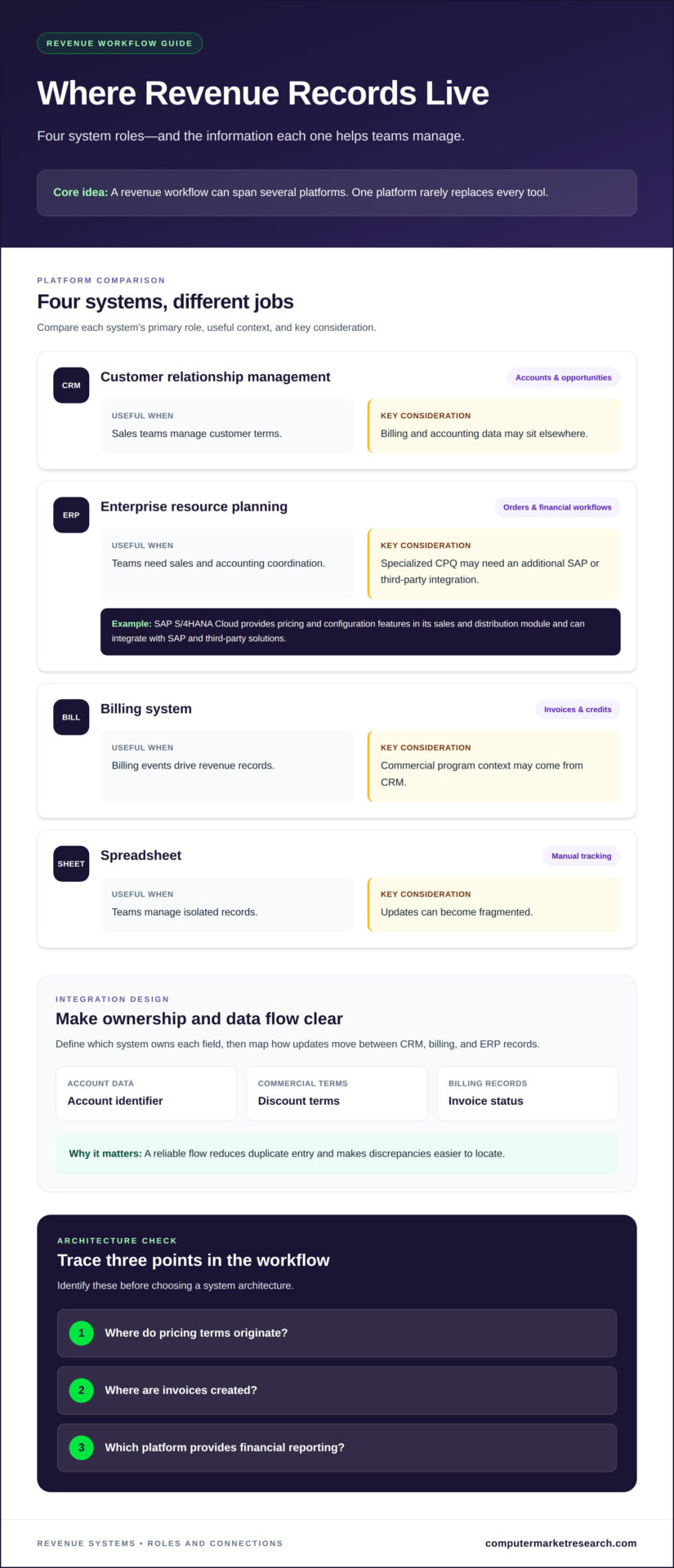
For example, SAP S/4HANA Cloud provides pricing and configuration features in its sales and distribution module, and it can integrate with SAP and third-party solutions. More specialized CPQ functionality may require an additional SAP or third-party integration. SAP S/4HANA Cloud can also support contract terms and connect with financial accounting systems. This structure helps teams relate product, order, and accounting information without treating each record as an isolated spreadsheet.
Integration design matters as much as the platform names. Teams define which system owns each field, such as the account identifier, discount terms, or invoice status. They then map how updates move between CRM, billing, and ERP records. A reliable flow reduces duplicate entry and makes discrepancies easier to locate. Channel operations may also connect sales workflows with channel sales management software when partner activity is part of the revenue process.
The table compares common system roles and shows why one platform rarely replaces every tool in a revenue workflow.
| Option | Primary role | Useful when | Key consideration |
|---|---|---|---|
| CRM | Accounts and opportunities | Sales teams manage customer terms | Billing and accounting data may sit elsewhere |
| ERP, such as SAP S/4HANA Cloud | Orders and financial workflows | Teams need sales and accounting coordination | Specialized CPQ may need integration |
| Billing system | Invoices and credits | Billing events drive revenue records | Commercial program context may come from CRM |
| Spreadsheet | Manual tracking | Teams manage isolated records | Updates can become fragmented |
To choose a system architecture, identify where pricing terms originate, where invoices are created, and which platform provides financial reporting. Then prioritize integrations that connect these records without duplicating ownership.
What is revenue recognition software?
Revenue recognition software helps finance teams record revenue in the correct periods as contracts are fulfilled. It organizes contract terms, performance obligations, transaction prices, and recognition schedules for reporting and analysis. Under ASC 606, revenue is recognized when control of a good or service transfers to the customer, in an amount reflecting expected consideration. The standard uses a five-step process to assess contracts and determine when revenue is earned.
Consider an annual subscription sold for $1,200 upfront. If the service is delivered evenly across the year, the example recognizes $100 monthly rather than recording the entire amount immediately. Software can apply schedules to contract data, update a revenue sub-ledger, and give finance teams records to review during close. Automated processing shifts operations toward reviewing exceptions and approving results.
Pricing depends on the software’s scope and the company’s revenue model. A platform focused on recognition schedules differs from revenue intelligence software, which analyzes sales activity and forecasts performance. When evaluating options, consider contract volume, billing complexity, integration requirements, reporting needs, and implementation work. These factors explain why pricing and deployment effort vary, and why a single model may not suit every business.
Implementation connects the recognition system to contract, billing, and accounting data. Teams map product and service records, define how contract changes affect schedules, and test outputs against existing financial records. NetSuite or another ERP may serve as the financial system of record, while a separate recognition tool handles specialized schedules. Data cleanup and workflow design affect the effort needed to maintain reliable results.
Revenue intelligence and recognition solve related but distinct problems. Revenue intelligence analyzes pipeline activity and sales performance; recognition software manages accounting schedules and reported revenue. For SaaS and B2B companies, a billing change, contract amendment, or usage adjustment can affect the data needed for both functions. Separating their roles clarifies which platform supports forecasting and which maintains recognition records.
B2B pricing and price management shape the contract data that recognition systems receive. A company may use subscription pricing, usage-based charges, or negotiated terms. Pricing tools structure offers and discounts; recognition workflows then use the resulting contract details to determine schedules. Aligning these systems helps prevent a mismatch between the commercial agreement, billing events, and financial reporting.
Compare platforms by tracing a representative contract from pricing through billing and recognition. Check how each handles amendments, recurring charges, usage changes, ERP connections, and review workflows. This end-to-end test shows whether the software suits both revenue operations and finance reporting.
Comparing standalone, conversation-based, and CRM-native platforms
Platform fit depends on where sales activity lives and how finance tracks revenue. A standalone system can add specialized forecasting or revenue workflows alongside existing tools. A conversation-based platform analyzes sales calls and meetings, turning discussion signals into coaching or deal insights. A CRM-native option keeps those functions close to account and opportunity records. Each approach has a distinct role, so first map the work currently spread across CRM, sales engagement, and finance systems.
For teams using a CRM alongside a separate sales engagement tool, integrations should preserve account, opportunity, and activity context. Implementation should map those records, establish which system owns each field, and test how updates move between tools. CRM-based tracking can suit an SMB with a straightforward sales process, but finance still needs visibility into signed contracts, billing events, and adjustments. Automated workflows help only when connected records remain consistent.
Subscription and usage-based revenue require different tracking. A fixed subscription depends on renewal dates, amendments, and recurring charges. Usage-based revenue also depends on metered activity and how it becomes a billable charge. Compare whether a platform connects those events to customer records and reporting. This can reveal gaps such as an unprocessed usage adjustment or a renewal that never reached finance.
| Platform type | Strongest fit | Key integration consideration | Potential limitation |
|---|---|---|---|
| Standalone | Specialized revenue workflows | Connect CRM and finance records | May add another system to maintain |
| Conversation-based | Insights from calls and meetings | Link interaction data to deals | Does not replace billing records |
| CRM-native | Sales workflows centered on a CRM | Coordinate CRM and finance data | Specialized functions may be limited |
Revenue leaks can reveal which approach deserves priority. Manual contract renewals can cost companies about 9.2% of revenue. Other warning signs include missed renewal dates, inconsistent discounts, and differences between signed terms and billed amounts. A provider should be able to trace those issues through the relevant records and design workflows that expose exceptions for review.
Choose a platform that fits the team’s sales stack and revenue model. For CRM-centered teams, assess data flows and sales engagement connections. For subscription or usage-based operations, trace a contract from signature through renewal, usage, billing, and finance reporting. Select standalone, conversation-based, or CRM-native software according to the gaps this process reveals.
Competing with other brands through temporary price reductions
A temporary price reduction can make a product more competitive, but it changes the economics of a sale. For example, a manufacturer may lower a distributor’s purchase price for a promotion, then assess the resulting sales and margin. Tracking the offer alongside eligibility, dates, and claims helps distinguish planned reductions from unrecorded concessions. It also gives pricing and finance teams a clearer view of how a competitive response affects realized revenue.
Accounting adds another layer when one contract includes several goods or services. IFRS 15 uses a five-step model that includes identifying performance obligations, determining the transaction price, and allocating that price to obligations. A contract combining equipment, installation, and support illustrates why allocation matters: each obligation may have a different delivery pattern. Revenue processes need the contract terms and pricing details to connect the transaction with appropriate reporting.
A price waterfall shows how list price becomes pocket price after discounts and other deductions. In the example, $17 of every $100 list price leaves before the seller collects the pocket price. A temporary reduction is only one possible deduction; rebates, credits, and other commercial terms can also affect the final amount. Analyzing each step helps identify where margin changes and whether the approved offer matches the transaction recorded.
Configure-price-quote, or CPQ, software helps create product configurations, prices, and customer quotes. A quote, for example, may combine product options with an approved promotional price and contract terms. CPQ can help sales teams apply consistent pricing models, while integrations connect quote details to CRM, billing, and ERP workflows. If quote conditions and billed amounts diverge, accounting and rebate analysis can become more difficult.
To evaluate a pricing program, trace a promotion from approval through quote, sale, rebate calculation, and financial reporting. Compare the approved terms with the actual transaction, then examine how the price waterfall changes pocket price. This sequence separates a deliberate competitive investment from a revenue leak. It also reveals whether pricing, CPQ, and accounting systems bring program details together in a usable record.
Revenue management software functions
Revenue management software brings pricing programs, transactions, and performance data into coordinated workflows. For a rebate program, software to manage contra revenue can capture eligibility rules, covered products, partner accounts, and claim status. A program record gives operations teams a consistent reference for processing transactions. It also helps distinguish an approved incentive from an informal discount recorded in a sales note.
Transaction matching connects program terms with sales evidence. A system can compare partner claims with point-of-sale records, invoices, product identifiers, and qualifying dates. For example, a claim for an excluded product should be flagged for review, not treated as eligible. Matching rules reduce manual reconciliation and help teams understand why a transaction passed or failed validation.
Accrual and settlement workflows organize expected program costs and subsequent adjustments. Teams can define rebate calculation logic, track approved claims, and compare accrued amounts with actual settlements. If a partner submits a late or incomplete claim, its status remains visible for follow-up. These records help finance review program liabilities without rebuilding calculations from disconnected spreadsheets.
Integrations support these functions across sales and finance systems. An ERP such as NetSuite may hold order and accounting records, while a CRM stores partner and opportunity details. Point-of-sale data can provide evidence of downstream sales. Connecting these sources helps enterprises trace transactions across systems, though consistent field mapping and product identifiers remain essential.
Program controls can establish approval stages, exception queues, and audit history. For instance, a claim that exceeds its approved limit can go to review before settlement. Recording the decision preserves context for later reporting. Clear permissions also help separate program setup, claim review, and financial approval, reducing reliance on informal email or manual spreadsheet edits.
Analytics turn program records into useful operational views. Teams can compare approved budgets with claims, review participation by partner, and identify products generating repeated exceptions. A volume-driven report may show claims clustering around a product family or period. These views help distinguish program performance issues from data quality problems and support evidence-based adjustments.
Reliable analysis depends on useful historical data. A typical starting point for revenue management software is 12 to 24 months of invoice-level transactions. That history can help establish baselines, test program rules, and identify recurring discrepancies. For teams evaluating software to manage contra revenue, trace a sample transaction from source record to program calculation, exception handling, and final report. The sequence reveals whether the platform’s functions address actual workflow gaps.
Computer Market Research
Computer Market Research is relevant when channel pricing programs involve partner data, incentives, and deal activity across separate workflows. Its channel management solutions cover partner operations, funds, and rebate programs. They can help when spreadsheet-based tracking makes program status or partner activity difficult to follow. The best fit depends on which channel processes need more structure.
PartnerPortal centralizes partner onboarding, deal registration, and performance tracking. For a business coordinating indirect sales, it provides a shared platform for partner-related processes. Deal Registration supports the submission, approval, and tracking of registered opportunities, helping organize channel activity around identified deals. These capabilities fit workflows where opportunity tracking and partner operations intersect with pricing programs.
Co-op/MDF Management supports the administration of cooperative marketing and market development funds. Rebates & Incentives supports channel programs built around partner incentives. These programs can affect how a business tracks expected costs and evaluates channel activity. Connecting their administration to partner workflows gives teams a clearer operational view than separate manual records.
The right fit depends on the operational problem. If fund administration is the pressure point, Co-op/MDF Management is directly relevant. If the process centers on rebates or partner incentives, Rebates & Incentives aligns with that need. If opportunity ownership and channel participation need structure, Deal Registration and PartnerPortal address those workflows. Each supports a different part of channel management rather than replacing every finance or accounting system.
Before choosing a direction, define which partner records, program details, and sales activities need to work together. For example, a manufacturer running a partner rebate alongside registered deals may need visibility into both incentive administration and opportunity activity. Mapping the process helps pinpoint where partner management, fund workflows, and rebate programs intersect, and which offering is most relevant.
Computer Market Research focuses on channel operations and data management, making its solutions relevant when partner programs create fragmented administrative work. Discuss the workflow you need to improve and how the appropriate channel management solution can support it.
Contact Computer Market Research to discuss your channel program requirements.
Frequently Asked Questions
Aviso vs Clari: which is better for forecasting?
Neither platform is automatically better; the right choice depends on your forecasting workflow and sales data. Compare how each handles pipeline visibility, forecast rollups, CRM connections, and manager review. A team that needs forecasts alongside detailed opportunity records, for example, may prioritize CRM alignment, while another may focus on forecast collaboration. Assess both against the same sales process and historical deals, including closed wins and losses, to determine which fits your operating model.
Revenue intelligence vs. conversation intelligence: what is the difference?
Revenue intelligence analyzes sales activity and pipeline data to support forecasting and revenue decisions. Conversation intelligence focuses on sales conversations, such as call content, to surface deal context and coaching opportunities. For example, a revenue intelligence workflow might flag a change to an opportunity’s close date, while conversation analysis could identify a customer’s unresolved concern. Some platforms combine both, but the key distinction is the data they analyze and the decisions they support.
What data is needed to get started?
Start with the records that explain how sales become recognized revenue: customer and product details, contracts, invoices, billing events, adjustments, and transaction dates. A typical starting point for revenue management software is 12 to 24 months of invoice-level transactions. CRM opportunity history can add context, especially for negotiated terms or changes before signing. Consistent customer, product, and transaction identifiers help connect records across systems and make analysis more useful.
What is ASC 606, and why does it require software?
ASC 606 is the U.S. revenue accounting standard that guides when and how companies recognize revenue from customer contracts. It does not, by itself, require a specific software product. Businesses may use software to apply contract terms consistently, track performance obligations, manage recognition schedules, and prepare records for review. For example, a contract with separate equipment and support obligations can require allocation and timing decisions that are difficult to track manually at scale.
What is contra-revenue?
Contra revenue refers to amounts deducted from gross revenue to calculate net revenue. Examples include customer discounts, rebates, and certain channel incentives. A manufacturer offering a distributor rebate, for instance, tracks the program cost against related sales rather than treating the full list price as net revenue. Clear program records distinguish approved reductions from errors and give finance teams the details to review the resulting net revenue.
Which tools provide deal risk alerts?
Deal risk alerts commonly appear in revenue intelligence platforms, CRM systems, or sales engagement tools connected to opportunity data. Depending on the platform and configured data, they may flag a slipping close date, reduced engagement, or an opportunity with no recent activity. A useful alert links the signal to a specific deal and gives sales managers enough context to prioritize review, rather than adding another disconnected notification.

Article by
Del Heles
Del Heles is the founder and CEO of Computer Market Research (CMR), a channel management software company he launched in 1984. With more than 40 years of experience, he’s known for helping manufacturers and distributors simplify complex partner programs through practical, customer-focused technology solutions.