

A partner portal that adds another login without simplifying daily work creates a new bottleneck. Strong partner portal software requirements should make key tasks easier for partners while giving channel teams accurate, usable data.
Defining that balance can be difficult when onboarding, deal registration, performance tracking, and channel information are spread across systems. Partners need clear workflows and relevant resources; administrators need visibility and dependable processes. If users face extra steps or teams still rely on manual tracking, the portal hasn’t solved the underlying problem.
This guide explains how to prioritize requirements around real partner and administrator tasks, then compare options using practical usability, workflow, and integration criteria. It also shows why the portal experience needs to connect to broader partner relationship management processes, including CRM, ERP, and financial systems. PartnerPortal™ brings multiple channel workflows into one environment, illustrating how partner usability and operational control can work together. The goal is a portal that supports engagement while helping your team manage channel operations with greater clarity.
Key Takeaways
- Define partner portal software requirements around the tasks partners need to complete, not a vendor’s feature list.
- For each priority workflow, document the user, goal, information needed, and successful outcome.
- Evaluate how easily users complete key tasks, and record evidence against consistent comparison criteria.
- Rank requirements by partner impact, workflow importance, and operational dependency, then review prototypes with representative users.
- Use a shared requirements framework to connect partner-facing usability with the internal processes and data the channel team relies on.
Partner portal software requirements start with partner tasks
A partner portal is a shared digital workspace for partner-facing workflows and information. The right requirements aren’t a catalogue of features. They describe what partners need to accomplish, what information each task depends on, and how internal teams will support the process.
Start by mapping the work. If partners switch between disconnected systems, repeat requests, or rely on manual handoffs, requirements should address those friction points rather than add another layer. A clear interface can help, but it can’t compensate for inaccurate data or a broken process.
This overview of channel partner portal software can help frame the capabilities. Use your own workflows to decide what matters most.
Which partner tasks should a portal make easier?
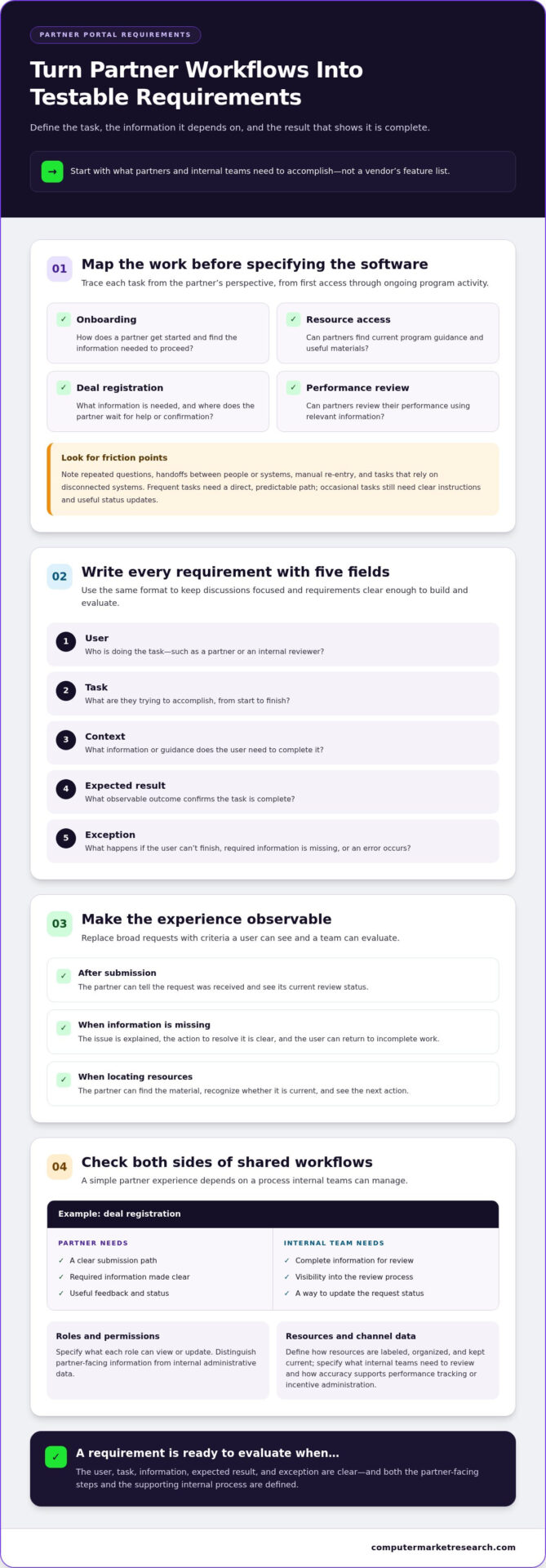
Map tasks from the partner’s perspective, from first access through ongoing program activity. Consider how a partner gets onboarded, finds current resources, registers a deal, and reviews performance. For each task, note the steps, required information, and points where the partner waits for help or confirmation.
Look for repeated questions, handoffs between people or systems, and manual work such as entering the same information more than once. Frequent tasks need a direct, predictable path; occasional tasks still need clear instructions and useful status updates. The goal isn’t to put every activity on one screen. It’s to make each important workflow understandable and actionable.
What should internal teams be able to manage?
Partner-facing simplicity depends on reliable administration behind the scenes. Channel teams need to manage program information, understand partner activity, and maintain accurate records. Depending on the program, requirements may also cover co-op/MDF funds, rebates and incentives, deal registration, or channel data workflows.
Some workflows serve both audiences. A partner submits a deal registration, then an internal team reviews it and updates its status. Partners need a clear submission path and useful feedback; administrators need complete information and visibility into the review process. Define both sides before evaluating software.
A portal is the partner-facing experience, while Partner Relationship Management (PRM) describes the broader approach to managing partner programs and relationships. For foundational context, see Partner Relationship Management (PRM). This distinction helps keep requirements focused on both the portal experience and the processes that support it. For a practical example of channel workflow support, explore channel sales management software.
Translate partner portal UX needs into software requirements
Once priority workflows are clear, turn each one into a requirement that a product team can build and evaluate. Broad requests such as “make deal registration easy” leave too much room for interpretation. Define who is doing what, the information they need, and what observable result confirms the task is complete.
A consistent format keeps discussions focused: user, task, context, expected result, and exception. For example, a partner submitting a deal needs to know which information is required, whether the submission was received, and what happens if a field is missing. Define the exception too: if the partner can’t finish, specify how the issue is explained and whether the work can be resumed.
How do you write a usable portal requirement?
Describe the workflow from start to finish, including decision points and feedback. Replace “show clear status” with an observable criterion: after submitting a request, the partner can tell it was received and see its current review status. Define how errors are explained, what action resolves them, and how the user returns to incomplete work. These details make partner portal software requirements testable rather than subjective.
Apply the same method to resource access. State what the partner is trying to find, what information or guidance they need, and how they can tell whether they have the current material. Use consistent navigation labels and make the next action apparent at each step. Clear requirements reduce ambiguity during design and evaluation.
How should access and information be organized?
Map partner roles to the information and actions each role needs. Specify what a user can view or update, and distinguish partner-facing information from internal administrative data. Permissions should support the workflow without exposing irrelevant details or blocking a legitimate task.
Define how resources are labeled, organized, and kept current. Program guidance should be findable where it helps a partner act, rather than buried in an undifferentiated library. For channel data, specify what internal teams need to review and how its accuracy supports processes such as performance tracking or incentive administration. This is where usability and data governance meet: a clean interface is useful only when the information behind it is dependable.
These criteria can guide an evaluation of PartnerPortal™ channel partner management software, a cloud-based platform that centralizes partner onboarding, deal registration, performance tracking, and channel workflows. Compare each requirement with the workflows and information the platform is designed to support.
Compare partner portal software by workflow, usability, and integration
A feature list may show what a platform includes, but it won’t tell you how much effort a partner or administrator needs to complete a task. Compare actual paths: what the user starts with, the steps they take, the information they receive, and what happens next. Apply the same criteria to each option so the comparison reflects your operating needs, not just vendor terminology.
Use a shared scorecard. Set priorities with your team, then record observable evidence from demonstrations, workflow reviews, or other evaluation activities. The examples below are prompts, not assumed product capabilities.
| Requirement | User | Priority | Evidence | Evaluation result |
|---|---|---|---|---|
| Complete onboarding and find required program guidance | Partner | Set by team | Steps to finish; location and clarity of guidance | Record what worked, gaps, and follow-up |
| Submit and review deal registration | Partner and administrator | Set by team | Required information, confirmation, status visibility | Record whether both users can complete their tasks |
| Review performance or incentive information | Partner and channel team | Set by team | Information available, consistency, administrative effort | Note missing data or manual steps |
Which requirements belong in a software comparison?
Include onboarding, deal registration, performance tracking, and applicable co-op/MDF or rebate workflows. Check whether partners can find relevant information and understand a request’s status without relying on internal staff to interpret it. Assess the administrator’s experience too: can the team review activity, manage program information, and access useful reporting? Partner portal software requirements should cover both audiences wherever their workflows meet.
Use the same evaluation method for each requirement. For example, record the steps a partner takes to submit a registration, the confirmation they receive, and the information an administrator can use to review it. Note friction, unclear handoffs, and extra administrative work instead of scoring a feature name in isolation.
How should you assess integration and data needs?
Document which records and updates need to pass between the portal and your CRM, ERP, or financial systems. Identify who owns each data element, who maintains it, and what users experience when information is missing or inconsistent. Make each required exchange explicit and evaluate it against your processes.
Consistent criteria help expose operational gaps, including mismatched information, unclear ownership, limited workflow visibility, or manual effort to reconcile records. For further context on data quality and channel information processes, see the channel data management systems guide.
Validate partner portal requirements before rollout
A requirement that sounds clear in a planning document may still be confusing in practice. Before rollout, test whether partners and internal users can complete the workflows the portal is meant to support. Testing early exposes friction while requirements and process details can still be refined.
How can teams test portal usability?
Use workflow prototypes with representative partner and internal users. Give participants realistic tasks, relevant content, and permissions that reflect their roles. For example, ask a partner to find program guidance or complete a deal registration, then ask an administrator to review the submission and determine its status. Observe the process without stepping in too quickly.
Record where participants pause, misread a label, look for missing information, or need assistance. Note whether they reach the intended outcome and understand what to do next. Use consistent observations across sessions, separating usability issues from gaps in the underlying process or data. Repeated confusion may mean a requirement, interface label, or workflow step needs revision.
Turn findings into specific changes rather than general feedback such as “make this clearer.” If users can’t tell whether a submission is complete, define the confirmation and status information they need. Update the requirement, revise the prototype, and test the critical workflow again before expanding rollout. Retesting shows whether the change addressed the observed problem or shifted it elsewhere.
How should requirements be prioritized?
Rank partner portal software requirements by partner impact, workflow importance, and operational dependency. Separate essential tasks that must work at launch from enhancements that can follow later. A task that blocks deal submission, for instance, may be more critical than a secondary convenience feature. An internal review process may also depend on accurate records or clearly assigned ownership.
Make dependencies visible. Identify requirements that rely on data from a CRM, ERP, or financial system, as well as those tied to permissions, process ownership, or information maintenance. If a dependency is unresolved, document the risk and who must address it. This helps teams distinguish an interface issue from a process or data issue, and keeps a polished prototype from masking an operational gap.
Use a consistent record for each test: task, user role, observed friction, outcome, requirement change, and retest result. This evidence gives stakeholders a practical basis for deciding what is ready and what needs more work. For sales-related workflows, channel sales management software provides relevant context for how partner activities connect with channel operations.
Connect requirements to a partner portal that supports channel operations
A useful requirements framework connects what partners need to do with the processes and information channel teams must manage. Keep evaluation grounded in actual workflows: partner onboarding, deal registration, performance review, incentive activity, and the internal steps that support each one. This alignment lets teams assess usability and operational fit together, rather than treating the portal as a separate interface.
How can PartnerPortal™ align with defined requirements?
PartnerPortal™ is a cloud-based channel management platform that centralizes partner onboarding, deal registration, performance tracking, co-op/MDF funds, rebates and incentives, and channel data workflows. Map these capabilities to documented tasks. For onboarding, assess the information partners need to provide and administrators need to manage. For deal registration, consider the partner submission path alongside the internal review process.
Centralizing partner activity gives channel teams a shared view of relevant workflows and information. That visibility supports administration, but it doesn’t replace clear ownership, accurate records, or well-defined processes. Review the PartnerPortal™ platform overview against your priorities, including the data and workflow needs identified during evaluation.
What are practical next steps for evaluation?
Bring your prioritized requirements into the evaluation, along with the users, critical workflows, and dependencies each one involves. Assess how partners complete the tasks that matter, then consider what internal teams need to manage and review. Where CRM, ERP, or financial system information is involved, compare the required data flow and responsibilities with your established processes.
Use the 90-day trial to assess fit against documented tasks and operational needs. Keep the evaluation focused: record whether users can complete priority workflows, find the information they need, and understand what happens next. Note process or data dependencies that need attention rather than assuming the portal alone will resolve them.
With clear criteria in hand, you can move from a feature-based shortlist to a practical assessment of workflow fit. Explore the 90-day trial and evaluate PartnerPortal™ against the requirements your channel program depends on.
Turn clear requirements into a more usable partner experience
Effective partner portal software requirements begin with the work people need to do. Define partner tasks and administrator responsibilities, translate them into observable criteria, then compare software by workflow completion, information quality, usability, and integration needs. Validate critical processes with representative users before rollout so unclear steps and missing information can be addressed early.
PartnerPortal™ brings partner onboarding, deal registration, and performance tracking together in a cloud-based channel management platform. Computer Market Research has specialized in channel management solutions since 1984, with a focus on the operational demands behind partner programs.
With your priorities documented, evaluate the platform against real partner and channel team workflows. Start evaluating PartnerPortal™ with a 90-day free trial and use your criteria to assess how its workflows align with your needs. A structured evaluation gives your team a clearer basis for choosing requirements that support partner usability and channel operations.
Frequently Asked Questions
What should partner portal software include?
Partner portal software should support the tasks partners and channel teams need to complete, such as onboarding, accessing program information, registering deals, and reviewing performance. Depending on the program, requirements may also include co-op/MDF management, rebates and incentives, lead management, or channel data workflows. Look beyond feature names: define the information each task needs, who can access it, and how users know what action or status comes next.
How do you define requirements for a partner portal?
Define partner portal software requirements by mapping priority tasks to the users, information, and processes involved. For each task, document the user’s goal, what they need before and during the workflow, the expected result, and exceptions such as incomplete information. Then write observable criteria, such as whether a partner can find current guidance or recognize that a deal registration was submitted. Review requirements with both partners and administrators.
Why is user experience important in partner portal software?
User experience matters because partners need to complete work without unnecessary steps or confusion. Clear navigation, familiar labels, relevant permissions, and useful status feedback help users understand where to go and what to do. But interface quality alone isn’t enough. The underlying process and information must also be accurate and dependable. Evaluate the full task, including handoffs and internal administration, rather than judging the portal by its appearance alone.
How can you measure partner portal usability?
Observe representative partners and internal users completing realistic tasks with appropriate content and permissions. Record whether they finish, where they pause, which labels they misinterpret, what information they can’t find, and when they need assistance. Use the same tasks and observation criteria across evaluations. Turn recurring issues into specific changes to requirements or workflows, then test critical tasks again to see whether users can complete them as intended.
What integrations should partner portal software support?
Integration requirements depend on the records and updates your channel processes need. Identify what information should move between the portal and your CRM, ERP, or financial systems, who owns each data element, and who is responsible for keeping it accurate. Also consider what happens when information is missing or inconsistent. Define required data flows before evaluating integrations, rather than assuming a particular connector or exchange method is necessary.
How do you encourage partners to use a portal?
Make the portal useful for tasks partners already need to complete. Prioritize straightforward paths to onboarding, resources, deal registration, and relevant program information. Use clear labels, show meaningful workflow status, and reduce repeated data entry or avoidable handoffs where the process allows. Ask representative partners to test critical tasks before rollout, observe where they encounter friction, and refine the workflow. A portal should make work clearer, not add steps without value.
What is the difference between a partner portal and PRM software?
A partner portal is the partner-facing workspace for accessing information and completing channel tasks. Partner Relationship Management (PRM) software is the broader system and set of processes used to manage partner programs and relationships. In practice, portal functions may be part of a PRM platform, connecting the external experience with internal administration, workflows, and channel data. Assess both the partner interface and the underlying operational capabilities when defining requirements.

Article by
Del Heles
Del Heles is the founder and CEO of Computer Market Research (CMR), a channel management software company he launched in 1984. With more than 40 years of experience, he’s known for helping manufacturers and distributors simplify complex partner programs through practical, customer-focused technology solutions.