

A transfer isn’t secure just because a partner can open the file. Secure file transfer for partner data should protect information in transit and at rest, authenticate both parties, and verify that files arrive intact. Common protocols include SFTP, FTPS, HTTPS, and AS2; TLS 1.2+ protects data in transit, while AES-256 can protect data at rest. These controls give secure file transfer for partner data a practical technical foundation.
Choosing a protocol is only one part of secure file transfer for partner data. A reliable process also defines who can access files, how activity is monitored, and which requirements apply. This article explains practical safeguards, including audit trails, alerts, multifactor authentication, role-based permissions, managed transfer options, and compliance considerations. Together, these controls support consistent partner exchanges and help reduce avoidable process risks.
Key Takeaways
- Choose transfer methods that protect files and verify their integrity, then match encryption and authentication controls to the data being shared.
- Use activity logs, alerts, and data-loss prevention to make unusual file access easier to detect and investigate.
- Limit access by role and need, and manage shared links so access can be controlled after files are sent.
- Centralize file-transfer workflows where possible to improve visibility, governance, and compliance reporting across partner exchanges.
- When fragmented partner processes affect channel operations, PartnerPortal™ can centralize partner onboarding, deal registration, and performance tracking.
What Are Secure File Transfer Standards?
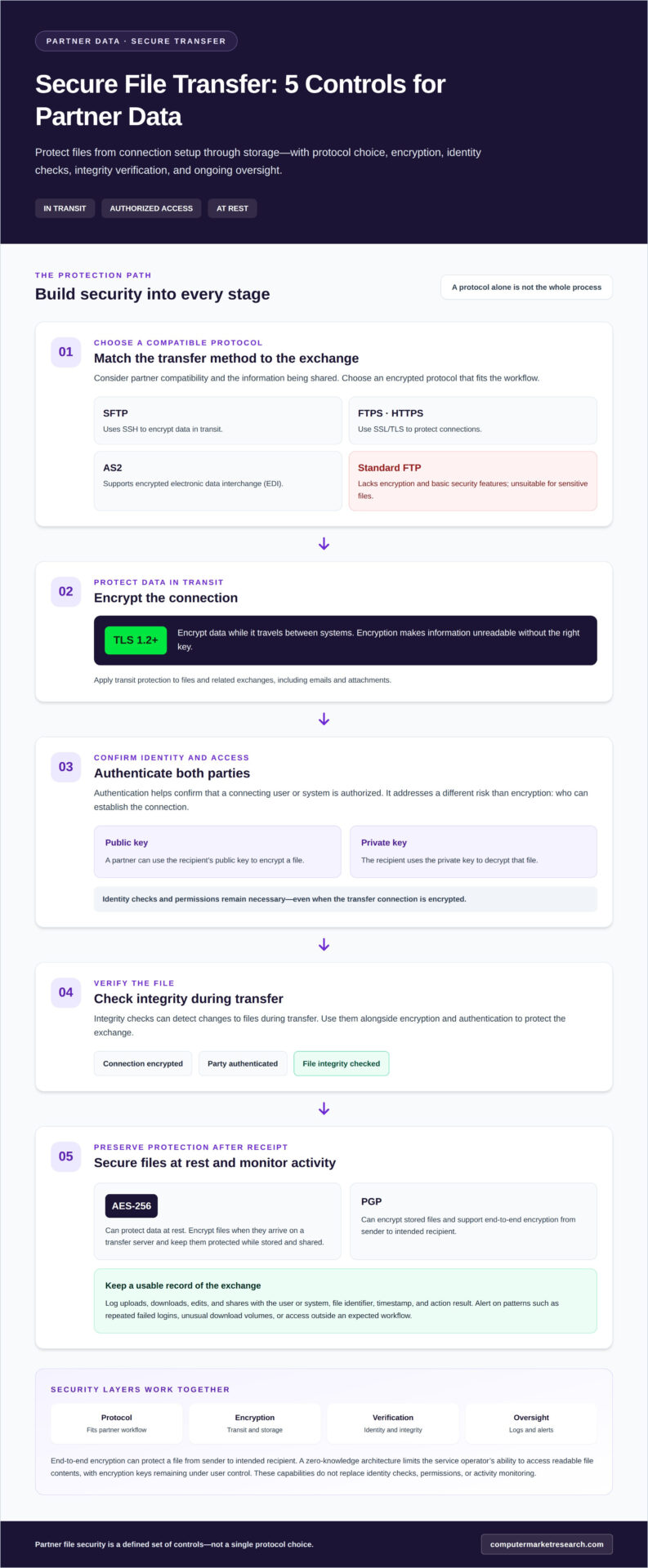
Secure file transfer standards define how systems protect files in transit and at rest. For secure file transfer for partner data, use TLS 1.2+ to encrypt data in transit and AES-256 for data at rest. Encryption makes information unreadable without the right key. Authentication helps confirm that a connecting user or system is authorized. Together, these controls reduce exposure during exchanges and support regulatory compliance.
Choose protocols that encrypt connections, authenticate clients and servers, and check data integrity. SFTP uses SSH to encrypt data in transit. FTPS and HTTPS use SSL/TLS, while AS2 supports encrypted electronic data interchange (EDI). Standard FTP lacks encryption and basic security features, making it unsuitable for sensitive files. Encrypt data in transit, including emails, attachments, and files transferred using FTP, SFTP, HTTP, or HTTPS.
Encryption and authentication address different risks. A secure protocol can encrypt a file’s connection, while authentication controls who can establish that connection. Asymmetric encryption uses two keys: a public key for encryption and a private key for decryption. For example, a partner can encrypt a file with the recipient’s public key, and the recipient can use the private key to decrypt it. Integrity checks can detect changes during transfer.
End-to-end encryption protects a file from the sender’s system to its intended recipient, rather than only across one network connection. A zero-knowledge architecture limits the service operator’s ability to access readable file contents, with encryption keys remaining under user control. These capabilities can reduce exposure if a transfer platform or storage environment is accessed without authorization. They do not replace identity checks, permissions, or activity monitoring.
Protect files throughout their lifecycle, not only during transfer. Encrypt documents when they arrive on a file transfer server, then maintain protection while they are stored and shared. PGP can encrypt stored files and support end-to-end encryption. For example, if a partner uploads a sensitive document for later retrieval, connection encryption protects it in transit while file encryption protects the stored copy.
For secure file transfer for partner data, select protocols based on partner compatibility and the information exchanged. Use SFTP, FTPS, HTTPS, or AS2 where the workflow fits, and avoid standard FTP for sensitive information. Pair encryption with authentication and integrity checks, then preserve protection after receipt. This makes security a defined set of controls, rather than a single protocol choice.
Audit trails, monitoring, alerts, and SIEM integration
An audit trail records file-transfer events so teams can reconstruct activity. For each upload, download, edit, or share, capture the user or system, file identifier, timestamp, and action result. For example, a partner’s failed download followed by repeated access attempts can be reviewed as a sequence. Consistent records help distinguish routine errors from activity that warrants investigation.
Monitoring turns those records into useful signals. Set alerts for patterns such as repeated failed logins, unusual download volumes, or access outside an expected workflow. An alert should identify the event, affected account, and file activity, giving an administrator enough context to respond. Review thresholds against typical partner activity so routine exchanges do not create unnecessary noise.
A security information and event management system, or SIEM, can combine file-transfer logs with identity and endpoint events. Correlation helps teams spot linked activity, such as a compromised account followed by sensitive data downloads. Map event fields consistently across systems, including account names, timestamps, and outcomes. This makes searches and incident reviews more useful than relying on isolated log entries.
Data classification gives monitoring rules context. Label files by sensitivity, such as public, internal, or confidential, then apply controls to each category. Data loss prevention tools can detect sensitive information in documents and, when configured, block downloads or notify administrators. For example, a policy can flag a spreadsheet containing restricted partner details before it leaves an approved transfer workflow.
Email and application integrations can reduce manual handoffs. A workflow might route an approved report from a business application into a protected transfer process while retaining an event record. Automation should preserve confidentiality, integrity, and availability: restrict exposure, detect unauthorized changes, and keep authorized users able to access needed files. Assign clear ownership for integrations so errors do not fall between systems.
For enterprise integration, connect transfer activity to identity management, business applications, and incident-response processes. Define which events generate alerts, who receives them, and how exceptions are documented. A password-protected email attachment, for instance, may still need classification and logging if it contains sensitive information. Regularly review access to logs and alert rules as partner workflows change.
Multi-factor authentication and access controls
Multi-factor authentication (MFA) requires two or more identity-verification factors. A password combined with a security token or time-based one-time password adds a second check. Verizon’s 2026 Data Breach Investigations Report states that 62% of data breaches involved a human element, including error, social engineering, credential compromise, or misuse. MFA helps reduce reliance on passwords alone, while user permissions determine which files each authenticated account can access.
Apply least-privilege access by assigning permissions according to job role and need-to-know. A partner who submits sales reports may need upload access to one folder, not visibility into every partner’s records. Separate permissions for viewing, uploading, editing, and downloading where the platform supports them. This makes access more precise and limits exposure if an account is misused.
For external sharing, use password protection and time-limited access. Set an expiration date for shared-file links, protect them with a password, and limit downloads where possible. Choose authentication suited to the workflow, such as username and password, public key infrastructure (PKI), or MFA. Do not treat a link as a user identity: access controls should still identify and authorize the person opening it.
Access management continues after a file is shared. Tie permissions to named accounts rather than broad groups, and remove access when a partner relationship, role, or business need ends. Review active sharing links and permissions as partner workflows change. Link controls can restrict future access, but they cannot recall a copy someone has already downloaded. Make careful sharing decisions from the outset, especially for sensitive files.
Retention and deletion should follow documented business, contractual, and applicable regulatory requirements. Define how long transferred files and related records remain available, then use a deletion process that covers stored files and expired sharing links. For incident response, preserve relevant activity records, disable compromised access, assess affected files, and follow established partner-notification procedures.
Managed transfer solutions can make controls consistent across employees, partners, and customers. Configure role-based permissions, MFA, link expiration, and review processes centrally, then record exceptions for investigation. For example, a partner’s temporary access to a sales file can expire automatically while an authorized internal team retains access. This reduces manual permission tracking and clarifies who remains responsible for each shared file.
Managed file transfer solutions
Managed file transfer (MFT) centralizes file exchanges for employees, partners, and customers. Instead of relying on separate email attachments and manual uploads, teams can route files through defined workflows. A managed process can apply access rules, record transfer activity, and support consistent cybersecurity practices. Authorized users send or receive files through approved channels, while administrators oversee the process.
Secure partner data exchange can use SFTP, FTPS, HTTPS, or AS2, depending on partner systems and workflow needs. MFT software can support these protocols through a centralized platform, giving organizations a place to manage transfers and related activity. The right setup depends on compatibility, file types, integration needs, and the controls required for the information being exchanged.
Cloud-hosted MFT places transfer workflows in a cloud environment rather than relying only on locally managed infrastructure. Employees can exchange operational files, partners can submit business data, and customers can receive documents through controlled processes. Centralized administration helps align permissions and transfer practices across these groups. Workflows regularly transferring files larger than 5 GB may require a purpose-built large-file transfer service.
OpenPGP can support file encryption within an MFT workflow. For example, a sender can encrypt a report before transfer so the intended recipient can decrypt it. PGP can also encrypt stored files and support end-to-end encryption. This adds file-level protection alongside the transfer connection, helping limit exposure if an encrypted file is stored or routed through another system.
Centralized MFT can also automate recurring exchanges. A scheduled partner report, for instance, can follow a defined route with consistent access and logging practices. Automation reduces manual handling, but teams still need to manage exceptions, review failed transfers, and keep workflows aligned with authorized business needs. These controls help detect process issues before they disrupt routine exchanges or expose sensitive information.
Typical MFT software and service costs vary by deployment model, transfer volume, integrations, security capabilities, and support requirements. Pricing is case-dependent and is provided after a quote request. These factors shape the configuration and operating needs, so a single typical price would not reflect the range of MFT requirements.
Secure file transfer for sharing data with business partners means using a controlled process to exchange files with the right recipient while protecting them in transit and, where needed, at rest. SFTP, FTPS, HTTPS, and AS2 can support exchanges when matched to partner systems. An MFT platform brings transfer workflows together, helping organizations manage activity across employees, partners, and customers.
Regulatory compliance for file transfers
No single framework applies to every US partner-data transfer. Relevant frameworks include HIPAA, GLBA, PCI DSS, FISMA, and CMMC; which applies depends on the data, industry, and organizational role. Healthcare information, payment card data, and government-related information each call for controls aligned with applicable requirements. Treat the framework as a starting point for defining transfer safeguards, not as a substitute for identifying the rules relevant to a specific exchange.
Centralized governance turns safeguards into repeatable practices. Set a transfer policy that defines approved protocols, access control, encryption, retention, and exception handling. Assign an owner to each partner workflow, then record what data is shared, who may access it, and whether onward sharing is permitted. The National Institute of Standards and Technology says organizations sharing personally identifiable information externally should document partner responsibilities, limits on further sharing, breach notification requirements, and minimum security controls.
Privacy obligations can also cross borders. The European Union’s General Data Protection Regulation is relevant when personal data falls within its scope. A transfer process should connect data classification with applicable privacy requirements, recipient permissions, and documented purpose. For example, a partner file containing personal information may need stricter access control than a general product catalog. Clear rules help organizations apply consistent file-sharing practices across networks and partner relationships.
Technical safeguards support governance, but they don’t establish compliance by themselves. AES-256 is compliant with FIPS 140-2, according to the stated standard relationship; organizations still need to assess the full transfer workflow. Combine encryption with authentication, least-privilege permissions, and detailed audit logs. These controls help show how information was protected, which accounts accessed it, and whether an unauthorized transfer occurred.
Security reporting makes controls reviewable. Maintain records of uploads, downloads, access changes, exceptions, and incidents, then organize reports by relevant partner, data category, and control. During an audit, a documented trail can show whether approved users accessed a file and whether the workflow followed policy. Review reports for repeated exceptions or unusual sharing, and update governance when partner responsibilities or regulatory requirements change.
To operationalize compliance, map each transfer to its data type, recipient, purpose, and applicable framework. Then enforce required permissions and safeguards through the transfer workflow, retain evidence of activity, and document incident handling. This creates a consistent basis for security reporting without assuming that every partner exchange follows the same regulatory rules.
Computer Market Research: PartnerPortal™
Computer Market Research offers PartnerPortal™ to help organizations manage channel partner operations through a centralized platform. It brings together partner onboarding, deal registration, and performance tracking, giving teams a consistent view of partner activity. Consider it when partner information is spread across disconnected tools or manual processes make accurate recordkeeping difficult.
PartnerPortal™ supports partner-management workflows, not the security controls of a file-transfer protocol. Encryption, authentication, permissions, and monitoring still need to be designed for the data exchange itself. The platform provides operational context around partner relationships and activity, while secure transfer practices govern how sensitive files are sent, accessed, and retained.
That distinction matters when channel teams exchange information alongside sales processes. A centralized partner record can help teams connect activity with the right partner, while deal registration provides a structured view of submitted opportunities. Performance tracking can also make channel data easier to review. These capabilities support organized operations, but they should complement, not replace, approved transfer safeguards.
Organizations managing partner programs may also need related channel workflows. Co-op/MDF Management supports the administration of partner marketing funds, while Rebates & Incentives addresses incentive programs. POS Data Management helps organize point-of-sale data. When these activities rely on fragmented spreadsheets and manual updates, aligning records becomes harder and errors can carry into downstream reporting.
PartnerPortal™ is worth considering when channel operations need a shared system for onboarding, deal registration, and performance visibility. It can help teams replace disconnected partner records with more coordinated data administration. It is designed for channel-management needs; businesses seeking only secure file-transfer infrastructure still need to select and configure transfer controls for their specific data and workflows.
For channel teams, the practical next step is to identify which partner processes need central coordination and where information gaps affect accuracy or visibility. That assessment can clarify how PartnerPortal™ and related channel-management offerings fit into existing operations, alongside the separate security measures used to transfer partner data.
Contact Computer Market Research about PartnerPortal™ to discuss your channel-management needs.
Frequently Asked Questions
What are secure data transfer solutions?
Secure data transfer solutions are tools and workflows that help organizations exchange files with controlled access and visibility. They can include SFTP connections, encrypted file-sharing platforms, or managed file transfer software. For example, a recurring partner report could move through an approved workflow instead of being attached to an untracked email. Consider how the solution handles authentication, automation, file records, and partner access needs.
What counts as a secure way to transfer files?
A secure transfer uses an approved channel, verifies the recipient, and limits access to people who need the file. For a sensitive report, that may mean using SFTP or a controlled sharing platform, applying appropriate encryption, and setting an expiration for external access. For sensitive data, use a transfer method that provides encryption and appropriate security controls. Keep a record of the transfer for later review.
How does SFTP compare with FTPS, HTTPS, and managed file transfer?
SFTP uses SSH, while FTPS and HTTPS use SSL/TLS encryption for data transfer. AS2 can support encrypted electronic data interchange. Managed file transfer is different: it organizes and automates file workflows, and may support protocols such as SFTP or HTTPS. Select based on partner-system compatibility and the type of exchange. A browser-based download may suit one workflow; recurring system-to-system exchanges may need automation.
What encryption, authentication, and access controls should partner file transfers use?
Use TLS 1.2+ for data in transit and AES-256 for data at rest. Pair encryption with authentication, such as multifactor authentication or public key infrastructure, so access is tied to verified identities. Set permissions by partner, role, and business need. For a shared link, apply password protection and an expiration date. Separate viewing, uploading, and downloading permissions where the platform allows it.
How should organizations set up secure file transfer access for partners?
Start by assigning each partner a named account and granting access only to the folders and actions required for its work. For instance, a distributor submitting sales data may need upload access without permission to view other partners’ files. Require suitable authentication, document an access owner, and set a process for removing permissions when responsibilities change. Use expiring links for one-time exchanges rather than indefinite access.
How can organizations monitor, audit, and verify partner file transfers?
Record transfer events with the account, file, timestamp, and action, then review them for unexpected access or failed exchanges. Connect relevant records to a SIEM where available, so file activity can be analyzed alongside identity events. To check file integrity, compare a SHA-256 checksum before and after transfer. Keep reports organized by partner and workflow, making an investigation easier to reconstruct.
What are the risks of sharing files with partners and how can they be reduced?
Common risks include sending a file to the wrong recipient, granting excessive access, exposing data through an unprotected channel, or retaining copies longer than needed. Reduce exposure by verifying recipient identity, limiting permissions, using approved transfer methods, and setting clear retention and deletion procedures. Train employees on approved practices. If an incident occurs, preserve relevant activity records, restrict compromised access, and follow documented response and notification procedures.

Article by
Del Heles
Del Heles is the founder and CEO of Computer Market Research (CMR), a channel management software company he launched in 1984. With more than 40 years of experience, he’s known for helping manufacturers and distributors simplify complex partner programs through practical, customer-focused technology solutions.