

A PRM launch is a starting point, not proof that partner performance is improving. Optimizing your PRM after implementation means aligning workflows and settings with business goals, then monitoring adoption, partner activity, feedback, and system effectiveness. Use those signals to refine the platform and focus support where it helps users take the right next steps.
It’s reasonable to expect a new platform to streamline partner operations, but results depend on consistent use and whether the information it captures supports better decisions. If reports are too broad, key fields are missing, or workflows create friction for partners, targeted adjustments may be more useful than a complete overhaul.
This article explains how to connect PRM use to performance goals, choose meaningful measures, review platform data, and prioritize post-launch improvements. It also covers how ongoing training, feedback, and support can keep the platform aligned with changing partner needs. The aim is a practical optimization process that turns day-to-day activity into clearer insight and more effective partner management.
Key Takeaways
- Link each PRM workflow to a specific partner-performance goal so platform activity supports measurable business priorities.
- Prioritize post-launch improvements that reduce friction, improve data flow, and make the next partner action clear.
- Define success measures before changing configurations, then shape reports around the decisions leaders need to make.
- Monitor adoption, partner participation, leads, and opportunities to spot where workflows or training need adjustment.
- Use partner and internal-user feedback to guide ongoing support and keep the platform aligned with changing program needs.
1. Connecting PRM use to performance goals
A PRM needs a defined role in the channel strategy; otherwise, teams can create avoidable workflow challenges. Start by identifying the business problem the platform should address, such as slow lead assignment or limited visibility into partner activity. Then decide which partner action should become easier. If the goal is stronger follow-up, for example, make lead status updates clear and accessible to partners and internal sales teams.
Translate each goal into platform use. A broad target such as “improve partner performance” doesn’t tell users what to do or managers what to review. Specify the behavior that matters, such as submitting qualified leads, completing deal registration, or using approved marketing materials. Connect that behavior to a business result, such as improved lead progression or more consistent campaign participation. This link helps distinguish useful adoption from logins alone.
Next, assign ownership across the internal team. Channel leaders can define partner expectations, sales managers can clarify lead-handling steps, and operations staff can maintain workflows and reports. Internal owners need to decide how each process supports the strategy, even when an implementation team helps configure the system. Document who handles exceptions, reviews results, and approves workflow changes. Optimizing your PRM after implementation starts with clear responsibilities.
Use PRM reporting to monitor liaison activity, issues, and progress toward quarterly performance goals. Choose fields that explain what happened, not merely that an interaction occurred. For example, record the purpose of a partner meeting, the issue raised, the follow-up owner, and the next action. Managers can review whether follow-up is completed and whether recurring issues slow partner progress. If categories are too general, refine them to reveal actionable patterns.
Incentive programs should connect platform activity to defined performance outcomes. PRM applications can manage incentives that reward partners for meeting sales targets or milestones. Set the relevant target or milestone, explain which activity or result qualifies, and make progress visible to partners. Clear criteria show how actions relate to program goals, while channel managers can review participation and results together.
Before changing several settings at once, test the relationship between each goal and its workflow. Select one partner journey, trace its steps from entry to completion, and identify where the platform supports or obstructs the desired action. If the goal is deal visibility, check whether partners can submit registration details and internal reviewers can see status and ownership. Record the intended outcome, supporting report data, and review owner. This gives teams optimizing your PRM after implementation a practical basis for aligning system use with performance goals.
2. Post-launch platform improvements and ongoing support
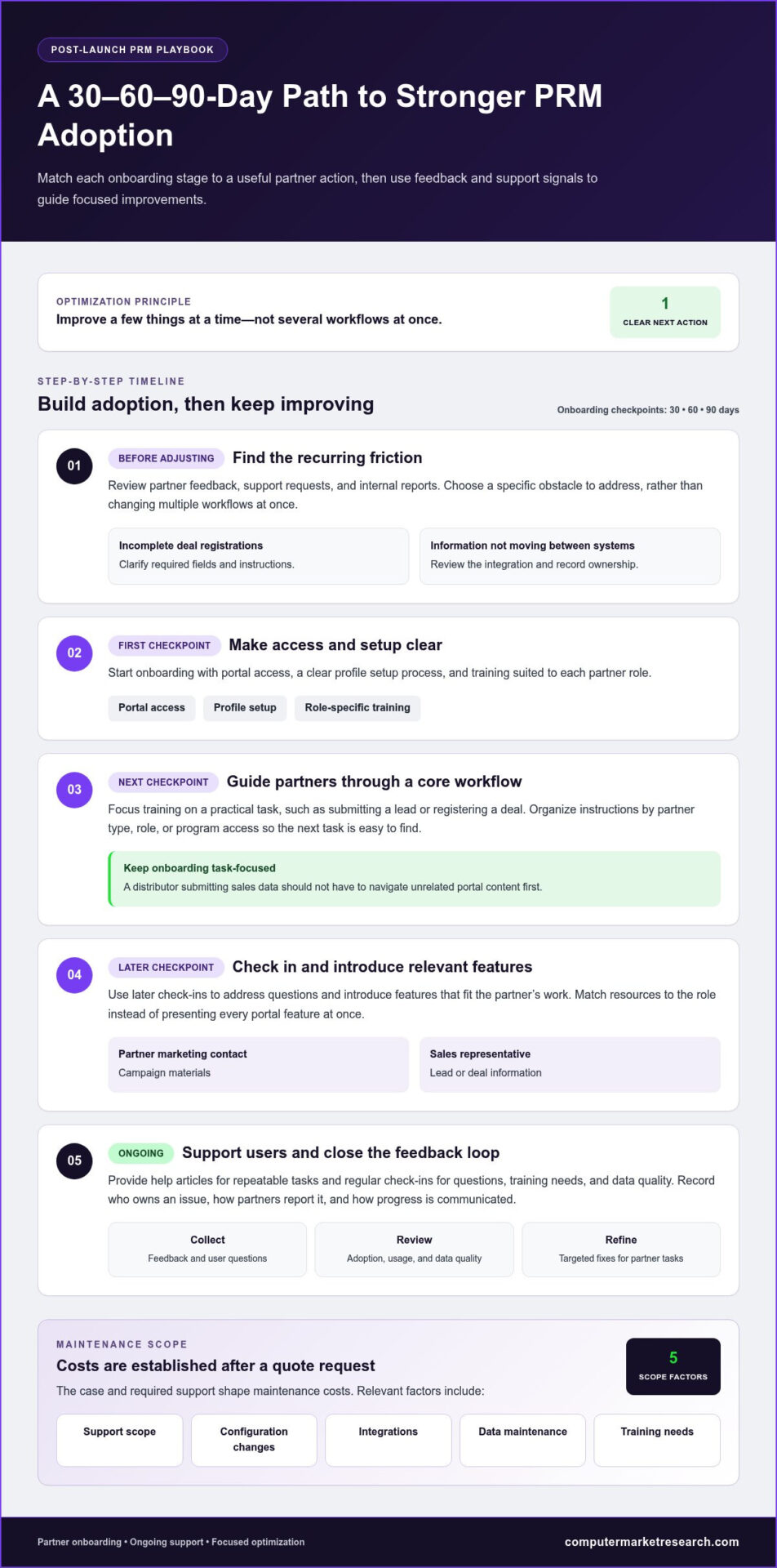
PRM maintenance costs depend on the case and are established after a quote request. Key factors include support scope, configuration changes, integrations, data maintenance, and training needs.
After launch, prioritize a few improvements instead of changing several workflows at once. Review partner feedback, support requests, and internal reports to identify recurring friction. If partners repeatedly submit incomplete deal registrations, for example, clarify required fields and instructions. If information fails to move between systems, review the integration and record ownership. Each adjustment should address a specific obstacle in the partner relationship.
How do you improve partner onboarding after launching a PRM system? Set expectations across 30, 60, and 90 days, then match each stage to a useful action. Start with portal access, a clear profile setup process, and role-specific training. Next, guide partners through a core workflow, such as submitting a lead or registering a deal. Use later check-ins to address questions and introduce relevant program features.
Keep onboarding focused on the partner’s next task. A distributor who needs to submit sales data shouldn’t have to navigate unrelated portal content first. Organize instructions by partner type, role, or program access. Include concise guidance for common tasks, such as updating contact details or checking submission status. A defined onboarding path helps partners understand how the platform supports their work.
How can you increase partner adoption and engagement in a PRM portal? Make useful resources easy to find, clarify the next action, and provide training suited to each role. A partner marketing contact may need campaign materials, for example, while a sales representative needs lead or deal information. Share changes through targeted communications, then collect feedback on navigation, content gaps, and workflow obstacles.
Support should continue after initial training. Offer help articles for repeatable tasks, and schedule regular check-ins to review user questions, training needs, and data quality. Internal teams can use these conversations to identify patterns, such as partners abandoning a particular workflow. Train users incrementally, beginning with activity reports before introducing more advanced lists or initiatives. This keeps learning connected to current responsibilities.
Define the response path for an issue before it becomes routine. Record who owns the problem, how partners report it, and how internal teams communicate progress. Review unresolved issues alongside adoption and usage feedback. Then prioritize fixes by their effect on partner tasks and program goals. This creates a practical improvement cycle: identify friction, assign ownership, make a focused change, and assess whether the workflow is easier to complete.
Costs are determined case by case after a quote request, based on support scope, configuration changes, integrations, data maintenance, and training needs.
4. Defining implementation goals and measures
Set the measurement plan before changing PRM settings. Define the business problem, the partner action the platform should make easier, and the evidence that will show whether the change works. If partners struggle to access campaign materials, for example, define the desired action as finding and using approved assets. Then identify the platform activity or program result that can demonstrate progress.
What KPIs should you track in a partner relationship management program? Choose measures tied to organizational objectives, such as partner engagement, sales volume, deal closure rates, and participation in marketing activities. Pair each KPI with a clear definition, its data source, and the team responsible for reviewing it.
Separate activity measures from outcome measures. Portal logins and content use show engagement, but don’t establish business impact on their own. Sales volume and deal closure rates can indicate commercial outcomes, while lead progression or campaign participation can help explain the process behind them. Reviewing both types gives managers a more useful view than relying on a single headline metric.
Build reporting around the decisions leaders need to make. If leadership needs to understand campaign performance, align reporting fields with the campaign and partner activities being evaluated. Specific activity categories add context; a broad label such as “growth” may conceal whether an interaction concerned a campaign, account opportunity, or training need. Refine categories so users can record consistent, decision-ready information.
Set expectations across the first 90 days of partner activation. A 30/60/90-day onboarding plan can define the partner’s milestones, internal ownership, and review points. For example, early milestones may focus on access and profile completion, followed by using a core workflow and then reviewing progress with the channel team. The sequence should reflect the partner program’s processes, not merely the platform’s available features.
Include integration and data quality in the measurement design. Identify which system supplies each report field, how updates move between systems, and which system owns important records. If a partner’s sales activity appears in a PRM report, confirm that definitions and timing align with the source system. Otherwise, teams may mistake inconsistent records for changes in performance.
Assign an owner to review each measure and decide what action follows. A KPI without an accountable reviewer becomes a dashboard number, not an improvement tool. During scheduled reviews, compare results with the intended goal, investigate data or process gaps, and document any configuration change. This creates a repeatable basis for evaluating PRM effectiveness as organizational objectives and partner needs evolve.
5. Post-implementation monitoring and optimization
How do you optimize PRM workflows and automate partner processes? Map each workflow from partner entry to completion, then identify repeated manual steps. Use software automation for tasks such as distributing leads, tracking status, and sending partners feedback. Keep a human owner for exceptions, including incomplete submissions or records that need review.
Monitor whether the technical setup supports the workflow in practice. Review system performance, integration results, and data integrity together, because a successful screen update may still rely on stale source data. If partner records fail to sync, trace the field from its originating system through each handoff. Assign responsibility for correcting the record and communicating the resolution.
How do you collect partner feedback and use it to improve a PRM program? Gather comments through onboarding conversations, support requests, and structured follow-ups, then group them by workflow or issue. Repeated questions about lead status, for example, may point to unclear labels or missing guidance. Assign an owner, make a focused change, and review later feedback to assess whether the problem has eased.
Use teamwide check-ins to surface implementation risks that individual reports may miss. Include channel, sales, operations, and technical stakeholders who depend on PRM data. Ask each team to identify blocked partner actions, recurring errors, and fields needed to monitor campaign results. If a required field is absent, coordinate with the department that owns the source data before changing reports.
Common post-implementation problems include low adoption, inconsistent records, confusing workflows, and limited reporting context. Address adoption barriers with role-specific training; resolve inconsistent records by tracing ownership and data flow. Simplify workflows when partners cannot identify their next action, and refine activity categories when reports hide meaningful differences. Each fix should address an observed issue, not add features without a clear use.
Monitor logins alongside partner participation in marketing activities, leads, and opportunities generated. These signals reveal different points in the journey: access, engagement, and commercial activity. If logins rise while campaign participation remains low, review content relevance and the path to the campaign task. If leads appear without status updates, examine assignment rules and follow-up ownership.
Track whether individual liaisons need additional training or can take on more functionality. Teach report use and interpretation so field intelligence is recorded consistently and supports pre-call planning. Compare user feedback with performance data during regular reviews, then document each adjustment and its intended effect. This feedback loop keeps partner relationship management aligned with changing onboarding needs and program objectives.
Continue these reviews as partner needs and program objectives change. Monitor PRM application performance after implementation and make adjustments to keep it aligned with evolving needs and objectives. Compare observed workflow outcomes with the intended process, then prioritize changes that address documented gaps rather than adding complexity.
Coordinate with internal departments to obtain the data fields liaisons need to monitor campaign success. Hold teamwide check-ins to identify and address risks associated with PRM implementation. Record agreed actions and revisit them during later reviews to determine whether the adjustments resolved the risks and supported program objectives.
5. How do you measure PRM performance after implementation?
Start with the data’s origin before interpreting a PRM report. Identify which system supplies each field, who updates it, and what each value represents. For example, a “closed” deal may mean different things across CRM stages. Aligning definitions helps managers compare partner activity with sales outcomes without mistaking inconsistent records for performance changes.
Build a measurement path from platform activity to business results. A login confirms access, while a submitted lead shows workflow use; neither alone proves revenue impact. Connect these signals to lead progression, deal closure rates, or sales volume. If partners register deals but few progress, inspect review delays, follow-up ownership, and qualification data before changing the platform.
Shape reports around specific leadership decisions. A channel leader assessing partner engagement may need activity by partner type, campaign, or region. A sales manager may need deal status, owner, and next action. Select fields that answer those questions, and remove categories that combine unrelated activity. This makes reporting more useful than a dashboard built from every available field.
Activity labels need enough detail to explain results. At one healthcare organization, 90% of PRM activity entries used the category “growth,” which was too vague for meaningful insights. Separate topics such as campaign planning, account development, and training when they represent distinct work. Give users clear definitions so they classify similar interactions consistently.
Check data completeness before comparing partner results. Review whether lead records include status, source, assigned owner, and outcome. If one partner’s deals appear less successful, determine whether records are missing or updates arrive late. Compare like with like, using consistent definitions and time periods. Keep the analysis focused on meaningful differences, not rankings distorted by incomplete inputs.
Use report reviews to turn measurement into action. For each notable change, ask whether it reflects partner behavior, a workflow issue, a data gap, or a system problem. Falling campaign participation alongside steady portal access, for example, may point to content relevance rather than login friction. Assign an owner to investigate, document the finding, and track the effect of any adjustment.
Keep a concise measurement record with the KPI definition, source system, report owner, and resulting decision. Revisit these details as partner processes and business objectives change. This discipline makes PRM results easier to interpret and supports targeted improvements instead of broad configuration changes. To put partner performance data into a clearer operational framework, explore the PRM platform with a free trial.
As the program’s questions and priorities evolve, confirm that each measure still has a clear interpretation and that its source supports the decision being considered. If leadership needs to understand a different aspect of partner work, revise report fields to capture that information rather than relying on broad or ambiguous entries. Choose activity categories and topics that users can apply consistently. This context helps reviewers interpret patterns and decide what to examine next. Treat reporting as an ongoing fit between available data, the information leadership needs, and the actions the organization should consider.
Computer Market Research: Co-op/MDF Management
Computer Market Research offers Co-op/MDF Management for organizations refining how they administer channel partner programs. If PRM reviews show that co-op or market development funds need clearer administration, this offering can be a relevant next step. It can complement broader efforts to improve program visibility and manage partner activity alongside related areas such as rebates and incentives, deal registration, and POS data.
Consider this support when fund administration creates fragmented records or makes program activity difficult to assess. Aligning the management process with your partner strategy can help your team maintain a clearer view of program operations and the information used to review them.
To discuss Co-op/MDF Management in the context of your partner program, contact Computer Market Research or visit computermarketresearch.com.
Make Your Next PRM Improvement Deliberate
Treat PRM optimization as an ongoing operating discipline, not a one-time configuration project. As your partner strategy evolves, revisit whether the platform still supports the actions and decisions your team needs. Optimizing your PRM after implementation works best when each adjustment has a clear purpose, an accountable owner, and a way to assess its effect.
For teams reviewing their portal approach, Computer Market Research’s PartnerPortal™ may be relevant to partner management needs. The right platform and program processes should work together, giving partners a practical way to engage while helping internal teams maintain useful operational data.
Choose one improvement area, define the change you want to make, and use the resulting evidence to guide the next decision. This measured approach keeps refinement connected to partner performance rather than activity for its own sake.
Explore the PRM platform with a free trial and take a considered next step toward stronger partner operations.
Frequently Asked Questions
What PRM features should you configure or customize after implementation?
Prioritize settings that remove friction from a partner’s most important tasks. Review role-based permissions, portal navigation, notification rules, approval paths, and partner form fields. For example, show a distributor the resources and actions relevant to its program while restricting access to internal approval controls. Adjust dashboards and content visibility to match partner roles, then test the revised experience with representative users before wider changes.
How often should you review and optimize a PRM system?
Set a recurring review cadence that fits your reporting cycle, and reassess sooner when a program changes or partners encounter workflow problems. Compare current usage and data quality with a saved baseline, and record which configuration changed and why. After revising an approval path, for example, monitor whether submissions move through the intended stages. This keeps reviews responsive to operational evidence without changing settings just to keep the platform active.

Article by
Del Heles
Del Heles is the founder and CEO of Computer Market Research (CMR), a channel management software company he launched in 1984. With more than 40 years of experience, he’s known for helping manufacturers and distributors simplify complex partner programs through practical, customer-focused technology solutions.