

A lead form should control access as carefully as it captures opportunity details. A partner portal for lead submission should define who can submit leads, collect the information needed to assess each opportunity, and route entries through a consistent workflow. Separate partner groups and non-partners with appropriate forms or access rules so each audience has a clear submission path.
It’s easy to focus on form fields and overlook the process around them. Unclear access, inconsistent details, and unreviewed submissions can make lead management harder than it needs to be.
This guide explains how to set up lead forms for partner groups, choose and customize fields, review submissions, and manage access. It also covers how to account for non-partners while maintaining visibility and control. The goal is a practical process that gives your team useful lead data and makes the next step clear for every submitter.
Key Takeaways
- Set up submission forms around partner groups so each audience follows a clear, relevant process.
- Choose required, optional, and hidden fields carefully to capture useful details without adding unnecessary friction.
- Use a consistent review workflow to assess submissions and decide whether to convert or reject each lead.
- Control when submissions are open and which users can access the form to keep lead intake organized.
- Plan a separate, clearly defined submission path for non-partners when your process accepts leads from outside the partner network.
Creating lead registration forms for partner groups
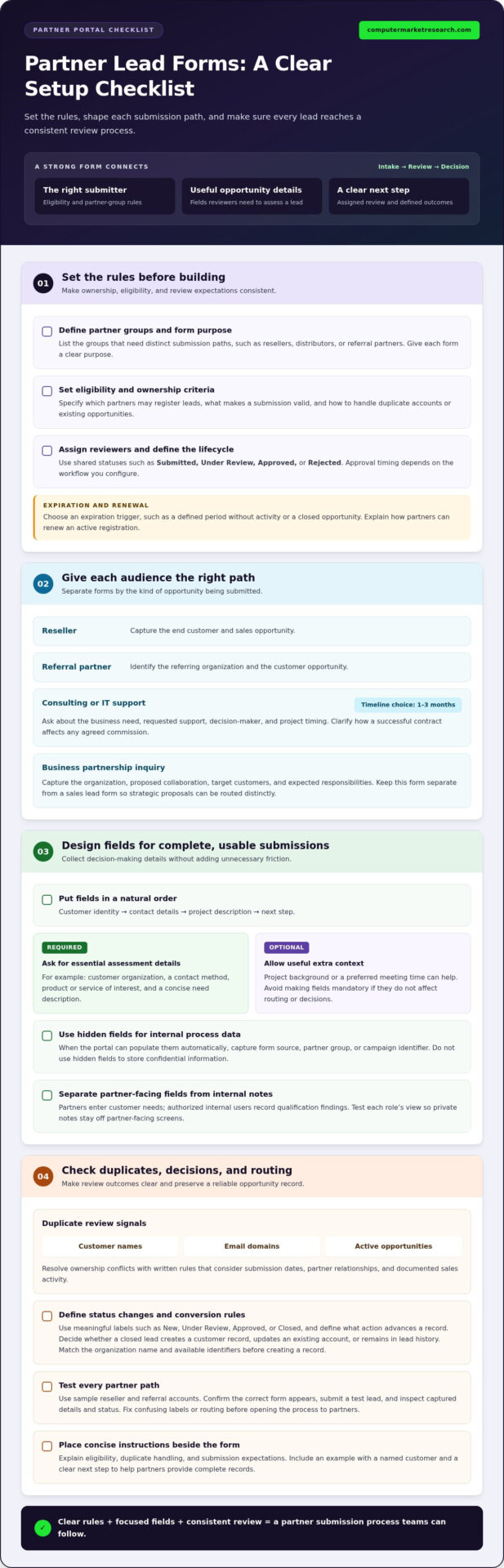
Define ownership, duplicate-opportunity, review-stage, and expiry rules before building a form. Approval timing and expiration depend on the workflow you configure, including who reviews each submission and what event closes or renews a registration.
A portal can authenticate partners, display the form assigned to their group, capture opportunity details, and route submissions for review. Statuses such as submitted, under review, approved, or rejected give partners and internal teams a shared record.
- Define each partner group. List the groups that need separate submission paths, such as resellers, distributors, or referral partners. Assign a clear purpose to each form. For example, a reseller form can capture the end customer and sales opportunity, while a referral form can identify the referring organization.
- Set eligibility and ownership rules. Specify which partners may register leads and how you’ll handle duplicate accounts or existing opportunities. State what information establishes a valid submission. Clear criteria help reviewers apply the same decision process across partner groups.
- Build the partner lead submission form. Arrange fields in the order partners can answer them: customer identity, contact details, project description, and next step. A partner portal for lead submission should make the submission path easy to follow and preserve the information reviewers need.
- Tailor consulting and IT support forms. Ask about the business need, requested support, decision-maker, and project timing. A project timeline choice of 1-3 months can help organize follow-up. For consulting or IT support referrals, define how a successful contract affects any agreed commission, rather than leaving the process ambiguous.
- Separate business partnership inquiries. A business partnership form should capture the organization, proposed collaboration, target customers, and expected responsibilities. Keep it distinct from a sales lead form. That separation helps reviewers route strategic proposals without confusing them with individual customer opportunities.
- Explain approval and expiration. Describe the review stages and how partners will see a decision. Set an expiration trigger, such as a defined period without activity or a closed opportunity. Include the renewal process so partners know what action keeps an active registration current.
- Test each group’s submission path. Use a sample reseller account and a sample referral account to confirm the right form appears. Submit a test lead through each path, then review the captured details and status. Correct confusing labels or routing before opening the process to partners.
- Publish concise instructions. Place eligibility rules, duplicate-handling guidance, and submission expectations beside the form. Include a practical example, such as a project with a named customer and a clear next step. Partners can then submit complete records, while reviewers spend less time resolving missing context.
Typical rules cover lead ownership, duplicate accounts or existing opportunities, eligibility, and the information required for a valid submission. Set review stages and assign reviewers; approval timing depends on the workflow. Expiration can follow a defined period without activity or a closed opportunity, with a renewal process to keep registrations current.
Customizing required, hidden, and optional form fields
Check for duplicates by matching submissions against customer names, email domains, and active opportunities. Resolve ownership conflicts using written rules that consider submission dates, partner relationships, and documented sales activity.
- Make essential fields required. Require the information reviewers need to identify and assess an opportunity. For example, collect the customer organization, a contact method, the product or service of interest, and a concise need description. If a field doesn’t affect routing or decisions, don’t make it mandatory.
- Keep optional fields focused. Let partners add useful context without blocking submission. A project background or preferred meeting time can help sales teams prepare, while lengthy narrative fields can slow completion. Use clear labels and examples, such as “Describe the current challenge,” to guide concise answers.
- Use hidden fields for process data. Capture values such as form source, partner group, or campaign identifier when the portal can populate them automatically. These fields can support routing and reporting without asking partners to enter internal tracking details. Don’t use hidden fields to store confidential information.
- Separate field visibility by audience. Show partners the questions they can answer, and reserve internal notes for authorized reviewers. For example, a partner-facing form can collect customer needs, while internal users record qualification findings. Test each role’s view to ensure private notes don’t appear in partner-facing screens.
- Customize lead statuses. Use status labels that describe meaningful workflow stages, such as New, Under Review, Approved, or Closed. Define the action that moves a record forward. For example, move a lead to Approved only after the reviewer accepts ownership and confirms the opportunity meets registration criteria.
- Set the closed-lead conversion rule. Decide whether a closed lead should create a customer record, update an existing account, or remain only in lead history. Match the organization name and available identifiers before creating a record. This reduces duplicate customer entries and keeps opportunity history connected.
- Design for duplicate checks. Collect consistent identifiers, such as customer name and business email, then compare incoming entries with active leads. Establish which record takes precedence when two partners submit the same opportunity. Apply the rule consistently, documenting the decision and its reason in the record.
- Test changes with sample records. Submit one example with all required fields, then another with optional information omitted. Review field visibility, validation messages, status transitions, and customer creation after closure. Adjust confusing labels or unnecessary requirements before publishing the revised form to partner users.
If referral compensation affects partner decisions, make the relevant terms visible before submission and capture the referral type clearly. The example real estate referral form suggests a flat referral bonus of 500 – 5,000 per closed deal. The example affiliate or partner sales lead form suggests a commission of 10-20% on the first deal. These examples show why a single generic payout field may not fit every program; use labels that distinguish a flat bonus from a commission and clarify the event that triggers payment.
For consulting and IT support referrals, the example form suggests a commission payout of 5-15% per successful contract. Keep these terms aligned with the applicable partner arrangement, and avoid asking partners to infer which payout applies. Where terms vary, use a clear selection or route the submission for internal review rather than presenting a value as universal.
Reviewing, converting, and rejecting submitted leads
Use a consistent review sequence to guide each submission toward a documented decision. Protect customer contact details by limiting portal access, collecting only necessary information, and restricting internal notes to authorized roles.
Review Leads and Update Their Statuses
Open each new record and compare its customer, contact, and opportunity details with the submitted information. Check for duplicates, missing details, and existing ownership before changing the status. Use labels such as New, Under Review, or Approved only when each has a defined meaning. Add a brief review note so the next person can understand the decision without repeating the assessment.
Convert or Reject Submitted Leads
Convert a submission when it meets the program’s criteria and the sales team accepts responsibility for follow-up. Link the resulting opportunity to its original lead record to preserve partner attribution and decision history. Reject submissions that fall outside the rules or duplicate an existing opportunity, and record a clear reason. Avoid deleting rejected entries immediately, since reviewers may need the context to resolve later questions.
Track Status, Attribution, and Commissions
Give partners a status view showing the current stage and relevant decision updates. Keep the submitting partner and original submission date attached to the lead through review and conversion. If commissions apply, show the governing program terms and recorded outcome used for calculation. Separate partner-visible updates from internal comments so confidential sales notes remain restricted.
- Create a lead on a partner’s behalf. Select the correct partner account before entering customer and opportunity details. Record who submitted the information and why an administrator created it, then make the record visible to the appropriate partner users. This preserves attribution when a partner shares details through another channel.
- Use a decision checklist. Compare the customer, opportunity need, and existing account activity against the program’s written criteria. Update the status only after completing those checks. If information is missing, request the specific detail through the portal rather than changing the record based on an assumption.
- Archive inactive records; delete selectively. Archive closed or outdated leads when their history may support reporting or future ownership reviews. Delete a record only when the process permits removal and its information has no continuing operational purpose. Keep the action and reason visible to authorized administrators.
- Review attribution before closing. Confirm the partner association remains intact after conversion, rejection, or archiving. For a commission-bearing opportunity, compare the recorded outcome with the applicable program terms. This gives partner teams a traceable basis for understanding status and attribution without exposing internal review notes.
Enabling and disabling lead submission
Set submission access deliberately rather than treating the form as permanently open or closed. A clear control process aligns partner access with program needs and maintains continuity for leads already in progress.
- Define when submissions should be available. Identify the business event that opens or pauses intake, such as launching a partner program or updating eligibility criteria. Write the reason into an internal operating procedure. That gives administrators a consistent basis for changing access, rather than relying on informal requests.
- Choose the right access scope. Decide whether the change applies to every partner, a specific group, or one form. For example, pause submissions for a product category while keeping other partner lead forms available. A narrow change prevents an operational pause from blocking unrelated submissions.
- Assign control to authorized roles. Limit enable and disable permissions to designated portal administrators. Record who may change access and who approves the change. If a partner manager requests a pause, route that request through the defined approval process before altering the form.
- Communicate the change before it takes effect. Tell affected partners what changed, when access changes, and where they should direct urgent opportunity details. If a form closes during a campaign, explain whether partners can save drafts or must wait until submissions reopen. Clear instructions reduce misdirected entries.
- Protect submissions already in progress. Before disabling a form, review drafts and open leads. Decide whether partners can finish saved submissions or whether administrators must preserve the details another way. For example, keep existing records available to reviewers while preventing new entries.
- Test the updated access. Use a partner test account from each affected group. Confirm that the intended form is visible when enabled and unavailable when disabled. Also test an administrator view, so staff can still access existing records and manage submissions during the pause.
- Make the closed state clear. Replace an inactive form with a concise notice explaining that submissions are paused and identifying the next step. Avoid leaving a blank page or a broken form. If partners need to contact their assigned representative, name that role in the notice.
- Reopen through a controlled check. Before restoring access, confirm eligibility rules, form fields, routing, and reviewer assignments remain current. Submit a test entry, then verify it reaches the correct queue. Record the reopening decision so partner managers can explain the change consistently.
Lead submission by partners and non-partners
Choose a submission route for each audience, then make its access rules clear. Partners should use their assigned portal process; non-partners need a separate intake route if your program accepts outside referrals.
Identify the Submission Path
Separate partner submissions from outside referrals before opening either route. Give authenticated partners a form tied to their account so submissions retain partner attribution. For non-partners, use a distinct public or invitation-based intake path with its own eligibility and review rules. Don’t let outside submitters use a partner’s credentials or claim another organization’s account.
Submit a Lead Successfully
Sign in through the partner’s own account and select the relevant lead form. Enter the customer and opportunity details consistently, then review them before submitting. A complete record gives the receiving team enough context to assess the opportunity and associate it with the right partner. Save the submission reference and follow its status in the portal.
- Confirm eligibility. Check that the opportunity fits the program’s submission criteria and isn’t already registered by another partner. If the customer or opportunity appears in existing records, follow the stated duplicate and ownership process before creating another entry.
- Use the correct route. Sign in to the designated partner account for partner submissions. A non-partner should use the separate referral route, if available, and identify their organization accurately. This distinction preserves attribution and prevents an outside referral from appearing under a partner account.
- Enter identifiable details. Provide the customer’s organization, a usable contact method, and a concise description of the opportunity. Include the business need and relevant context, such as a requested product discussion. Avoid unrelated personal details that don’t help evaluate or route the lead.
- Review before sending. Check names, contact details, account association, and required answers. Confirm that the described opportunity matches the intended customer. Correct errors before submission, since inconsistent records can make ownership reviews and follow-up harder.
- Record the submission. Save the confirmation or reference shown after submission, along with the date and partner account. For non-partner referrals, retain the confirmation associated with the referral route. These details help identify the correct record if a status question arises.
- Track the next action. Return to the portal to view status updates and respond to requests for additional information. If a partner submits on behalf of a colleague, keep the responsible partner contact clear. Non-partners should use their referral confirmation when asking about the submitted lead.
Computer Market Research: PartnerPortal™
Computer Market Research offers PartnerPortal™ for organizations managing partner lead workflows alongside channel operations. When partner submissions, deal registration, and performance information are scattered across manual processes, a centralized platform can support clearer oversight and consistent records. PartnerPortal™ brings together partner onboarding, Deal Registration, and performance tracking to help teams manage channel activity in one place.
Consider PartnerPortal™ when your team needs structured partner lead management connected to broader channel processes. Computer Market Research also offers Co-op/MDF Management and Rebates & Incentives to support related program administration. A useful next step is to map your submission process, partner groups, and review needs to the workflows you want to manage.
Contact Computer Market Research to discuss how PartnerPortal™ can fit your channel operations.
Build a submission process that can grow
Once the initial workflow is live, treat it as an operating process, not a one-time form setup. Review how partners and internal teams use the fields, statuses, and access rules. Regular feedback can reveal unclear instructions, unnecessary steps, or handoffs that delay opportunity follow-up. Adjust the process deliberately and communicate changes to affected users.
A well-managed partner portal for lead submission connects partner activity with broader channel operations. Computer Market Research offers PartnerPortal™, Co-op/MDF Management, and Rebates & Incentives to help organizations coordinate partner workflows and program administration. Consider whether a more structured platform fits your current processes and the visibility your team needs.
Explore the next step with Computer Market Research and assess how PartnerPortal™ could support your partner operations. A clear process is a practical foundation for stronger channel execution.
Frequently Asked Questions
What is a partner portal for lead submission?
It’s an online workspace where authorized partners can register business opportunities and follow their progress. Unlike an email inbox or shared spreadsheet, a portal can link each entry to a partner account and the organization’s review process. For example, a manufacturer can organize opportunities from its reseller network while keeping partner activity distinct from internal sales notes.
What information is required to submit a lead through a partner portal?
Required information depends on the organization’s form and review criteria. Beyond basic customer and opportunity details, a form may ask about the customer’s buying role, preferred follow-up method, or existing relationship with the organization. For example, knowing whether a contact is evaluating options or requesting a product discussion can help route the submission appropriately. Partners should provide accurate, relevant details and avoid unrelated customer information.

Article by
Del Heles
Del Heles is the founder and CEO of Computer Market Research (CMR), a channel management software company he launched in 1984. With more than 40 years of experience, he’s known for helping manufacturers and distributors simplify complex partner programs through practical, customer-focused technology solutions.