

A resource center can contain every document partners need and still leave them unsure what to do next. The problem is often how content for a partner resource center is organized: folders grouped by file type don’t reflect the tasks partners are trying to complete.
When guidance is scattered across shared drives, email, and business systems, partners can struggle to find current information for onboarding, sales, deal registration, or program participation. Your team may have useful materials, but without a clear structure and ownership process, those resources can be difficult to find and keep up to date.
This guide explains how to build a resource center around partner needs and workflows. You’ll learn what content to include, how to group and label it so partners can find relevant guidance, and how to keep materials current. It also covers how to connect resource planning with partner operations, including onboarding, deal registration, and performance tracking, so the center supports partners’ work instead of becoming another disconnected library.
Key Takeaways
- Define the resource center by the partner tasks it supports, not by the types of files it contains.
- Map content for a partner resource center to partner journey stages, while distinguishing shared guidance from role-specific materials.
- Compare task-, topic-, and role-based structures to choose an approach that makes priority resources easier to find.
- Set clear ownership, review triggers, and version practices to keep guidance accurate and retire obsolete materials.
- Connect resource planning to partner workflows and channel operations, while recognizing the distinct roles of content destinations and relationship-management systems.
What Content for a Partner Resource Center Should Accomplish
A partner resource center is more than a place to store documents. It’s a structured destination where partners can find information to complete program tasks, understand expectations, and move work forward. A useful center connects guidance to partner activity, so each resource supports a clear next step instead of sitting in a folder.
A partner resource center organizes current enablement content around partner needs. The content for a partner resource center should answer practical questions: How does a new partner get started? What material supports a sales conversation? Where can a partner find campaign guidance or program requirements? Clear answers help partners avoid searching scattered files or relying on informal explanations.
How a resource center supports partner work
Partners engage with a program across several stages. During onboarding, they need orientation and process guidance. When selling, they may need product information, positioning, or steps for submitting a deal. Marketing activity can require approved messaging and campaign materials, while program participation may involve guidance on incentives, claims, or reporting.
Organizing resources around these activities helps partners see what applies to the task at hand. Consistent guidance helps partners follow repeatable processes and gives internal teams fewer recurring questions and conflicting instructions to resolve. This is one practical part of Partner Relationship Management (PRM), which connects partner-facing support with the broader work of managing channel relationships. For more context on that discipline, see this partner relationship management guide.
Resource center versus general file repository
A general repository is often organized around where files are stored: folders, departments, or file types. That may help an internal team archive material, but partners usually arrive with a different question: “What do I need to do?” Make that question the organizing principle, and guide partners to the relevant instructions, forms, or supporting content.
Findability depends on more than folder structure. Each item needs enough context for partners to judge its purpose and relevance. Use plain, specific labels such as “Submit a deal registration” rather than a vague title like “Program documents.” If guidance applies only to a particular role, region, or activity, make that context visible. Partners should also be able to distinguish current instructions from superseded versions; otherwise, easier access can still lead to inconsistent actions.
A resource center depends on a clear information structure, trustworthy content, and a connection between each resource and a partner need. With those fundamentals in place, it becomes a working part of the partner program, not just another collection of files.
Map Partner Resource Center Content to the Partner Journey
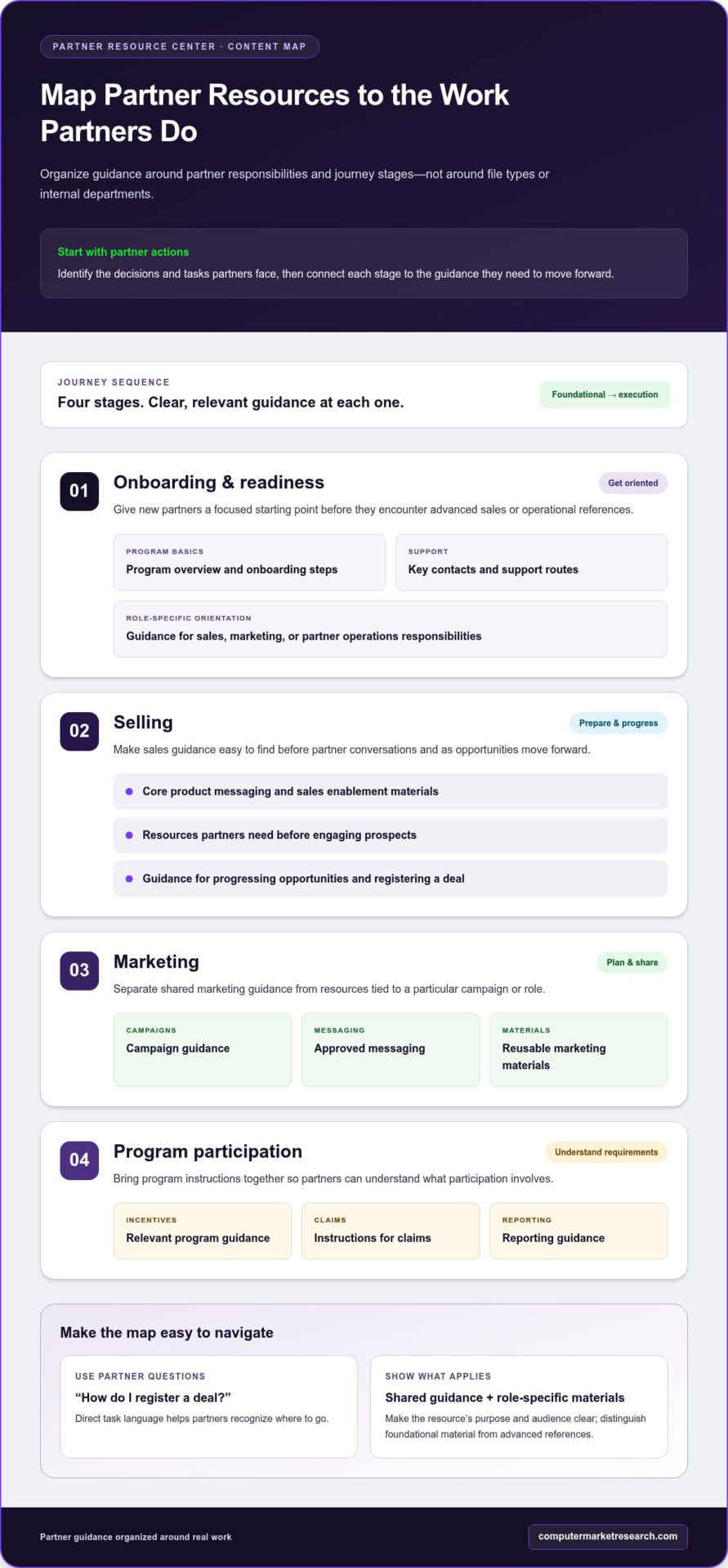
A useful content map starts with partner responsibilities, not your internal department chart. Identify the decisions and actions partners face as they join the program, prepare to sell, market your offerings, and participate in program activities. Then connect each stage to the guidance they need to move forward. This helps you prioritize essential content instead of uploading every available file at once.
Use partner questions to shape navigation labels. “How do I get started?” or “How do I register a deal?” is more direct than internal terms partners may not recognize. A broader channel partner management approach helps teams consider how partner-facing guidance relates to onboarding, deal registration, and performance tracking.
Content for onboarding and readiness
Start with the information every new partner needs to understand the program: who to work with, where to find key guidance, and what steps are required to become ready. Keep foundational materials distinct from advanced sales and operational references. Then add role-specific orientation for responsibilities such as sales, marketing, or partner operations.
- Getting started: Program overview, onboarding steps, and key contacts or support routes.
- Preparing to sell: Core product messaging and the resources a partner needs before engaging prospects.
- Understanding program processes: Plain-language instructions for actions such as deal registration or submitting information.
- Role-specific guidance: Materials that apply to a partner’s responsibilities rather than every participant.
Keep these entry points focused. A new partner looking for onboarding steps shouldn’t have to sort through advanced operational documentation to find basic program information. Use labels that reflect the question or task, and make the relationship between foundational guidance and deeper references clear.
Content for selling, marketing, and program participation
As partners become active, their needs shift from orientation to execution. Map resources to the work they’re doing, and distinguish shared sales guidance from materials tied to a specific campaign, role, or program. This makes content for a partner resource center more actionable than an undifferentiated list of materials.
- Selling: Product messaging, sales enablement materials, and guidance for progressing opportunities.
- Marketing: Campaign guidance, approved messaging, and reusable marketing materials.
- Program participation: Instructions relevant to incentives, funds, reporting, or other program activities.
For example, a partner preparing a campaign should find the approved materials and participation instructions together, while a sales partner should have a clear route to deal-related guidance. Include incentive or market development fund instructions where they apply to partner responsibilities, and separate them from general sales content. Review the map from a partner’s perspective: can they identify their next task and find the right guidance without needing to understand your internal terminology?
Choose a Resource Center Structure Partners Can Navigate
The structure should make the next useful resource easy to identify, whether a partner is completing a process, learning about a subject, or looking for role-specific guidance. Each navigation model solves a different discovery problem. Choose a primary path based on how partners typically look for information, then add only enough supporting categories to cover distinct needs.
Start with a small set of recognizable entry points, such as “Complete a task,” “Explore a topic,” or “Find guidance for my role.” Too many top-level categories create another sorting task before partners reach the information they need. A clear structure also gives your team a practical way to assess whether each resource has a defined place and audience.
Task-based, topic-based, and role-based organization
Task-based navigation works well when partners arrive with a specific action in mind. Topic-based navigation supports broader exploration, while role-based entry points help separate material for audiences with different responsibilities. One approach may not suit every visitor, so select a primary structure and use secondary labels where they add clarity.
| Structure | Best suited to | Potential discovery challenge |
|---|---|---|
| Task-based | Defined processes, such as registering a deal or submitting program information | Partners exploring a subject may not know which task category contains the background they need |
| Topic-based | Browsing a subject area, such as sales guidance or marketing | Related resources can be spread across topics even when partners need them for one workflow |
| Role-based | Distinct audiences, such as sales, marketing, or partner operations | Shared guidance may be duplicated or harder to locate if partners cross roles |
Navigation works best when its labels match partners’ language and tasks. If partners routinely ask how to submit a deal, “Register a deal” is clearer than an internal label that describes the responsible department. Validate labels against real partner questions, then use consistent terminology across navigation and resource titles.
Make individual resources easier to identify
Once the main paths are set, make each item recognizable before a partner opens it. Use a descriptive title, a short summary of its purpose, and consistent naming conventions. Where relevant, show the intended audience, content owner, and review or version date so partners can judge whether the resource applies to them and is current.
For example, a channel POS and Ship & Debit whitepaper is a focused reference asset that can be labeled by subject and intended use. Avoid titles that rely on internal project names or vague terms such as “overview.” A useful summary tells partners what question the resource addresses and what they’ll be able to understand or do after using it.
Keep the architecture manageable as the library grows. If partners need several clicks through overlapping categories, simplify the path or add a clear cross-reference. To connect resource planning with broader partner workflows, explore the PartnerPortal 90-day free trial.
Govern, Maintain, and Improve Partner Resource Center Content
A resource center can become another stale repository if no one is accountable for its content. A practical governance process prevents that: give each resource a clear owner, define what prompts a review, control versions, and remove material that no longer supports current partner work. These steps make upkeep part of program operations rather than an occasional cleanup project.
Set clear ownership and review practices
Assign a responsible owner to each content category or business process. The owner should know who can validate the information and how a change is approved. For instance, the person responsible for deal registration guidance should coordinate an update when the process changes, rather than leaving partners to rely on an outdated document.
Set review triggers around meaningful changes, not only calendar reminders. A product update, program adjustment, revised process, or policy change may make existing guidance inaccurate. For each resource, record its owner and review date, and establish a consistent way to distinguish current guidance from archived material.
- Assign an owner who is accountable for accuracy and can coordinate subject-matter review.
- Define review triggers tied to product, policy, process, and program changes.
- Maintain versions by identifying the current resource clearly and recording relevant revision details.
- Retire obsolete material from active navigation, preserving an archive only where it serves a clear operational need.
When a change affects partner actions, make the update visible. Revise the resource and its summary, then use the program’s established communication channels to tell affected partners what changed and where to find the current instructions. This reduces the risk that partners continue following a saved or forwarded older copy.
Learn whether the content is useful
Maintenance should respond to how partners use the center, not just whether a review date has arrived. Look at available usage information alongside partner questions and feedback from the teams supporting the program. No single signal tells the whole story: frequent use may indicate value, while repeated questions about the same topic can reveal that a resource is hard to find or incomplete.
- Review findability: Note searches or navigation paths that don’t lead partners to a clear answer.
- Check usage patterns: Identify resources partners access and topics that receive little attention.
- Collect feedback: Track partner comments and recurring questions from internal teams.
- Improve the content map: Clarify labels, revise instructions, or fill gaps based on observed friction.
For example, if partners repeatedly ask how to complete a program step, determine whether the instructions are missing, difficult to locate, or written in internal terminology. Address the underlying issue rather than adding another document to the collection. A disciplined review cycle keeps content for a partner resource center relevant as workflows evolve, while clear ownership ensures updates don’t depend on memory or manual cleanup alone.
Connect the Resource Center to Broader Partner Operations
A content destination and a partner management system serve related but different purposes. A resource center organizes guidance so partners can find and use it. Partner operations systems manage activities and information such as onboarding, deal registration, and performance tracking. Planning them together can make the partner experience more coherent, without requiring every system to perform both roles.
A standalone resource structure can be simpler to establish and maintain when the primary need is to organize information. The trade-off is that partners may need to move between separate destinations to access guidance and complete program workflows. A broader partner operations environment can coordinate those activities, with planning that accounts for workflow ownership, data quality, and technical requirements. The right approach depends on where partners encounter friction today.
PartnerPortal centralizes partner onboarding, deal registration, and performance tracking as part of a broader channel-management approach. These workflows provide a practical context for resource planning: identify the guidance partners need to complete each task and keep it aligned with the processes they follow. See the partner management software overview to understand the broader operational context.
What to assess when connecting content with workflows
Start by mapping partner actions and the information each action depends on. For example, identify what a partner needs to know before registering a deal, what information the registration process captures, and which internal teams use that information afterward. The goal is to make dependencies visible and connect guidance to the workflow it supports.
Existing CRM, ERP, or financial-system processes may also shape partner information needs. A change to a program workflow could affect instructions, data requirements, or the teams responsible for keeping guidance aligned. Document those dependencies and account for how systems and processes connect when planning updates. This helps keep operational plans grounded in the workflows and information your business manages.
A practical next step for evaluating your approach
Bring the resource strategy and operational picture into the same review. Summarize the priority partner audiences, the essential resources each audience needs, the owners responsible for those materials, and the workflows or systems those resources support. Then compare the current process with the desired partner experience: where does a partner search, repeat information, switch systems, or need help from your team?
Use that comparison to identify specific gaps, such as unclear ownership, duplicated guidance, or a disconnect between instructions and a program process. Prioritize improvements that address the most consequential friction first, and keep resource planning connected to the partner data and workflows your business already manages. To explore a structured approach to partner operations, claim your 90-day free trial.
Turn Your Resource Strategy Into a Clear Next Step
A partner resource center doesn’t need to be perfect before it becomes useful. Start with one high-priority partner journey, make the essential guidance easy to access, and establish how you’ll learn whether the approach works. That creates a practical foundation you can refine as partner needs and program workflows change.
As you plan, treat content for a partner resource center as part of a wider operational decision: how should partners move between information, program tasks, and the systems that support their work? A deliberate approach can help your team replace ad hoc fixes with a more consistent partner experience.
Computer Market Research supports channel operations through PartnerPortal, which centralizes partner onboarding, deal registration, and performance tracking. Its solutions serve global enterprises, including Fortune 500 and Global 2000 companies.
Claim your 90-day free trial to explore a more structured approach to partner operations and identify the next steps for your program. Start with a clear priority and a process for improvement, then build a resource experience partners can rely on.
Frequently Asked Questions
Is a partner resource center useful for a small partner program?
Yes. A small program can benefit when partners need consistent answers, even if the resource center starts with only a few materials. For example, if new partners repeatedly ask where to begin or which form applies to a common task, focused guidance can reduce uncertainty. Use partner questions to decide what to publish first, then expand when new needs or recurring gaps emerge.
What is the difference between a partner resource center and a customer knowledge base?
A partner resource center supports external business partners, while a customer knowledge base generally helps customers use or troubleshoot a product or service. A partner may need instructions for program participation, sales processes, or marketing activities; a customer may need help resolving a product issue. Even when the subject overlaps, adapt the content to the audience’s responsibilities instead of simply copying customer-facing support articles.
Can distributors and resellers use the same partner resource center?
Yes. They can use one central destination, provided the organization makes relevant materials easy to distinguish. Keep shared program information in a common area, then label resources that apply to a particular partner role or process. This can help avoid maintaining duplicate versions of the same foundational guidance. Review role-specific materials with partner-facing teams as responsibilities, program participation, or common partner questions change.
How can partners find a resource if they don’t know its exact title?
Use labels and descriptions that reflect the words partners use to describe their work. A clear title such as “Submit a deal registration” is easier to recognize than an internal project name. For content for a partner resource center, concise summaries can also help distinguish similar documents before partners open them. If search queries are available, review unsuccessful or unclear searches and revise titles and descriptions accordingly.
Who should own content in a partner resource center?
Assign ownership to the person or team closest to each resource’s accuracy and use, with a program or operations lead coordinating shared standards. Define who can approve changes, who must review them, and who removes outdated guidance from active use. For instance, a process owner can validate revised instructions, while the coordinating lead ensures the change is reflected consistently wherever partners encounter that process.
Should every partner receive access to every resource?
Not necessarily. Make access decisions based on the material’s intended audience, partner responsibilities, and sensitivity. A general program overview may be relevant to all partners, while instructions for a specific activity may apply only to participants in that activity. Document these distinctions as part of content planning, and revisit them when partner roles or program responsibilities change to help prevent irrelevant or inappropriate guidance from reaching the wrong audience.

Article by
Del Heles
Del Heles is the founder and CEO of Computer Market Research (CMR), a channel management software company he launched in 1984. With more than 40 years of experience, he’s known for helping manufacturers and distributors simplify complex partner programs through practical, customer-focused technology solutions.