

Automating partner performance reviews isn’t about handing performance decisions to software. It means replacing fragmented tracking with a consistent process for collecting partner data, managing deadlines, and routing approvals. When information is scattered across spreadsheets and disconnected systems, it can be difficult to maintain a clear view of partner performance.
Automation can handle repeatable tasks such as assigning reviews, sending reminders, collecting data, routing approvals, and tracking completion. People assess context and decide what action to take. A reliable process also depends on accurate information flowing between the systems that hold partner and channel data.
This article explains how automated performance management works, how it compares with manual reviews, and where software can improve consistency, timeliness, and process control. You’ll learn what to consider when evaluating integrations, data quality, permissions, and human oversight, so automation supports better-informed partner conversations rather than simply moving forms faster.
Key Takeaways
- Automate repeatable review tasks such as assigning reviews, collecting partner data, routing approvals, and tracking completion, while keeping performance decisions with people.
- Use clear deadlines, task-specific email reminders, and documented escalation rules to keep reviews moving without exposing review details unnecessarily.
- Replace spreadsheet handoffs with structured workflows to reduce manual follow-up and make review information easier to track consistently.
- Measure review quality alongside completion, and standardize forms, rating guidance, permissions, and calibration processes.
- Assess how review tools connect with channel data systems, and consider PartnerPortal™ when centralized partner performance tracking is part of a broader channel management need.
What Is Automated Performance Management?
Automated performance management uses software to coordinate review tasks, collect feedback, and track progress against expectations. In a partner review workflow, the system can assign each partner to a responsible manager, gather performance data, request feedback, and route the assessment for approval. Software handles repeatable administration; managers interpret the results and decide what action suits the partnership.
A structured workflow starts by defining review criteria, such as sales activity, training participation, or program engagement. The system then connects each partner record to the relevant review form and manager. A central workspace holds submissions, status, schedules, and supporting information, so teams can see which reviews are underway and where follow-up is needed. Related channel data management systems can help organize partner information used in those assessments.
Centralized information also makes review history easier to use. Instead of searching through spreadsheets and email threads, a manager can review a partner’s goals, previous feedback, and current results together. For example, if a partner has not completed agreed training, the review can note the gap alongside relevant progress data. The next discussion can then focus on a specific coaching action, such as setting a training target or clarifying program expectations.
Approval workflows add control without requiring someone to manage every handoff manually. The system can send a submission to the partner’s responsible manager, record approval, or return it with comments. If a review needs correction, the manager can identify missing evidence before sharing the final assessment. This creates a traceable handoff while keeping ratings and decisions under human control.
Actionable insights depend on useful, current information. An AI agent could draft review bullet points from data collected throughout a six-month cycle, but managers still need to review, edit, and submit them. They should use those insights to guide coaching, not replace it. A review becomes useful when its findings lead to clear goals, development actions, recognition, or a follow-up conversation.
The cost depends on the case and is provided after a quote request; key factors include user access, integrations, workflow scope, and support needs. Those requirements determine the software configuration and the level of administration the review process needs.
Automated deadlines, reminders, and escalation
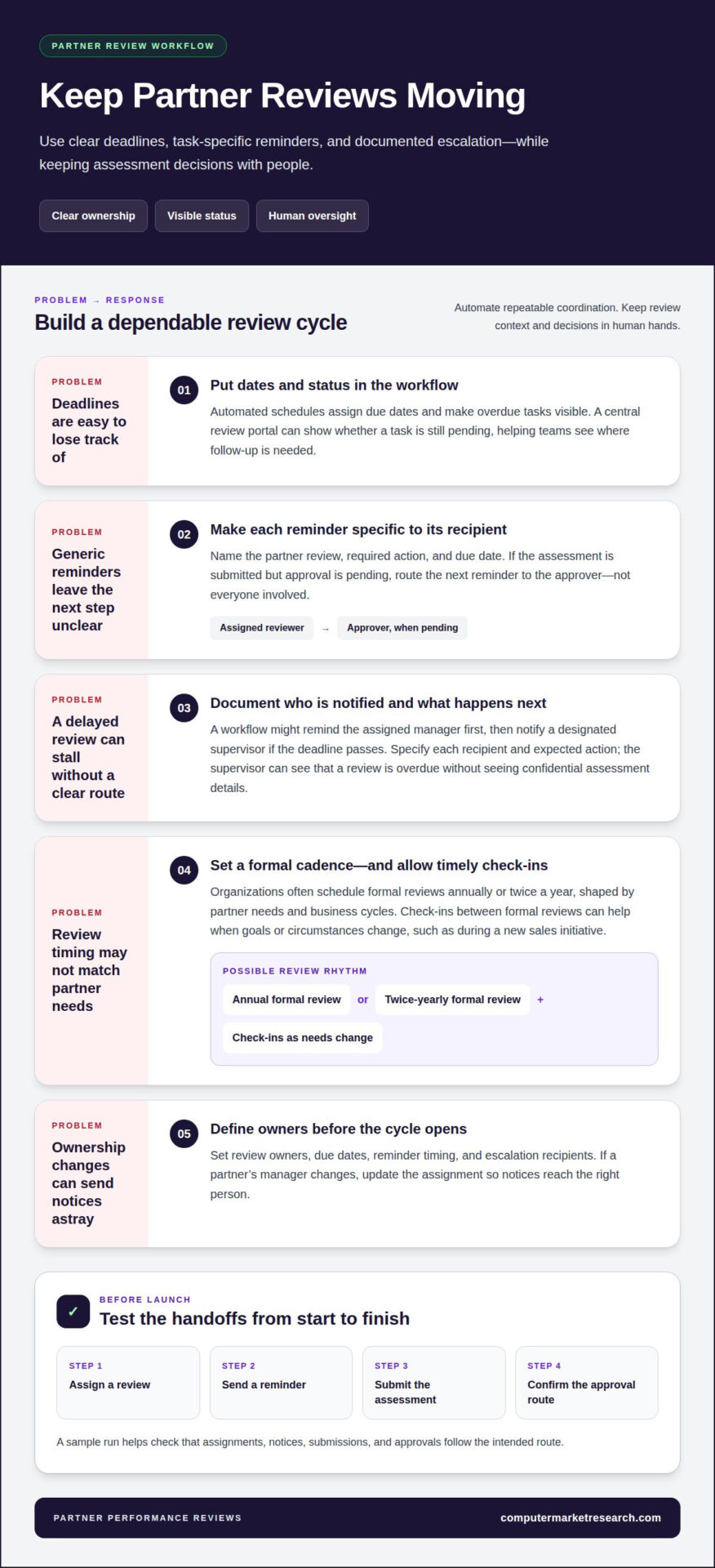
Automated schedules assign due dates to partner reviews and make overdue tasks visible. A clear sequence helps each department plan submissions, approvals, and follow-up.
Automated Review Reminders
An automatic reminder tells the assigned reviewer which task is due and when. For example, an email can prompt a channel manager to complete a partner assessment by its deadline. This reduces reliance on calendar notes and manual follow-up. A review portal can also show whether a task is still pending, helping the organization focus on unfinished reviews.
Effective reminders are specific. An email might name the partner review, identify the required action, and state the due date. If a manager has submitted the assessment but approval is still pending, the next reminder should go to the approver. This step-by-step routing makes each person’s responsibilities visible and supports productivity without sending everyone the same generic message.
Review Timing and Frequency
Review frequency is the planned interval for assessing partner performance and discussing results. Organizations often schedule formal reviews annually or twice a year, with timing shaped by partner needs and business cycles. For example, a review aligned with a partner program cycle can assess progress against the expectations set for that period.
Teams can also schedule check-ins between formal reviews when a partner’s goals or circumstances change. A new sales initiative, for example, may make an earlier progress discussion useful. Automated scheduling can fit these conversations into the main review cycle, helping managers provide timely feedback rather than waiting for the next formal assessment.
Escalation helps move delayed reviews through a documented route. A workflow might remind the assigned manager first, then notify a designated supervisor if the deadline passes. Specify who receives each notice and what action is expected. A supervisor can then see that a review is overdue without seeing confidential assessment details.
Before opening a review cycle, define owners, due dates, reminder timing, and escalation recipients. Test a sample workflow by assigning a review, sending a reminder, submitting the assessment, and confirming the approval route. If a partner’s manager changes, update the assignment so notices reach the right person. Clear ownership prevents outdated records from disrupting the schedule.
Manual and automated performance review comparisons
Manual reviews rely on people moving information between forms, spreadsheets, and email. Automated workflows assign repeatable tasks to software, while managers assess partner results and provide context.
Manual Review Challenges
A manual review might start in a spreadsheet, move through email, and finish in a separate report. Each handoff creates another chance to miss a field or use an outdated partner record. For example, a manager may compare current sales results with the previous cycle’s figures but overlook a newer file saved elsewhere.
Timing and recall also affect review quality. Traditional employee performance reviews often happen once or twice a year, and managers may overlook achievements or challenges from earlier in the cycle. That work can also crowd out partner conversations.
Reducing Manual Work
Automation reduces administration by assigning forms, collecting feedback, and tracking completion in one workflow. For example, a review can pass from the partner owner to an approver without someone copying comments into another document. Managers can spend less time chasing submissions and more time discussing a partner’s goals, results, and development needs.
To implement this approach, define review criteria and assign each partner to an owner. Then configure the workflow to collect relevant evidence, notify reviewers, and record approvals. A review dashboard can show pending tasks alongside completed assessments, replacing manual status updates across spreadsheets.
Preventing Human Error
Automation can reduce avoidable errors by applying the same form fields and routing rules to each review. A required performance field, for example, can prompt a manager before submission, while the workflow directs the assessment to the responsible approver. These controls help prevent omissions and misrouted reviews, but they don’t verify whether the underlying partner data is accurate.
Before a cycle opens, confirm partner records, ownership, permissions, and review criteria. Test a sample submission from assignment through approval. Managers still need to examine the evidence behind each rating: software can standardize the process, but context determines whether a result reflects the partnership fairly.
The difference is operational control. In a manual process, managers must remember each handoff, find the latest file, and track outstanding work. An automated process records assignments and status in a shared workflow, making exceptions easier to spot. Neither method replaces thoughtful assessment. The stronger approach combines reliable data and consistent steps with human judgment, so feedback reflects a partner’s actual results rather than administrative gaps.
Review process compliance and standardization
A standardized review process applies the same criteria, evidence requirements, and approval steps across partner assessments. Automation makes progress visible, but teams still define the expectations and controls.
Consistent Review Processes
Standardization means every review uses an agreed template, rating guidance, and workflow. For example, the same form can request sales results, program participation, and supporting evidence from every partner in a defined group. This makes performance easier to compare fairly than when each department creates its own fields or rating scale.
For US partner performance reporting, privacy controls should reflect the data collected, applicable requirements, and contractual terms. Limit access to people who need the information, and collect only data used in a review or defined decision.
Review Quality and Process Success
Review quality depends on whether an assessment is complete, evidence-based, and useful for a partner discussion. Process success also considers completion status, missing fields, workflow exceptions, and consistent use of rating guidance. A dashboard can flag an empty evidence field before a meeting, while managers assess the context before changing a rating.
Completion alone isn’t enough. After a cycle, compare review records with the intended criteria and note recurring gaps. If managers repeatedly omit a field, clarify its purpose or remove it if it doesn’t inform a decision. This keeps templates focused and improves the process.
Replacing Paper-Based Appraisals
Replace paper appraisals by moving the review form into a centralized digital workflow. Convert each paper prompt into a clear field, assign an owner, and route submissions for approval. For example, an approver can return an incomplete assessment with comments instead of sending a paper copy through internal mail.
Before launch, test form submission, permissions, reminders, approvals, reporting, and result delivery. Confirm that authorized reviewers can access the right records and that others cannot view confidential assessment details. These checks can reveal process problems before the full review cycle begins.
Partner KPI Tracking
Partner KPIs are measures chosen to assess performance against business expectations. Select indicators tied to the partnership’s purpose, such as sales results, deal registration activity, lead follow-up, inventory availability, or co-op fund utilization. Track only measures that inform a review conversation or a defined decision.
For each KPI, define its meaning, data source, reporting period, and relevant target. For example, a sales measure should use a consistent reporting period and an agreed source. Managers can then discuss progress against expectations, explain exceptions, and identify a specific follow-up action instead of relying on an isolated score.
Automated review software platforms and integrations
Review software brings partner assessments, scorecards, and cycle tracking into a structured workspace. Connections to relevant business systems matter because reviewers need consistent, current information. Sales activity, for example, may sit in a CRM, while point-of-sale results live elsewhere. Integrations can reduce duplicate entry, but teams should understand which fields transfer and how updates appear.
Start by mapping each review measure to its source. A sales KPI might come from a CRM, while inventory availability comes from inventory records. Define which partner identifier links the systems and which fields populate the scorecard. This mapping helps reviewers trace a displayed result to its source instead of treating a dashboard value as unexplained evidence.
Annual review cycles need a defined data period and reporting cut-off. For example, a cycle might assess partner activity over the year and then collect manager feedback against those results. A dashboard can distinguish submitted reviews from incomplete ones and flag missing data. Before launch, test assignments, permissions, reports, result delivery, and development follow-up with sample records.
To set up automated partner scorecards, select KPIs tied to review decisions, define each measure, and connect it to its source. Set the reporting period, access rules, and dashboard view, then compare sample results with source records. This helps reviewers interpret scores consistently and spot incomplete or unexpected data before a meeting.
When automating partner performance reviews, account for data changes and exceptions, not just the initial integration. Test which fields sync, how often updates occur, and what happens when a partner record is missing or mismatched. For example, if a CRM ownership change doesn’t transfer, a review could go to the wrong manager. Document an exception route so the operations team can correct the record.
Keep human review in the workflow. Managers should examine the records behind generated summaries or dashboard results before assessing a partner. If an integration shows declining lead activity, the underlying entries may reveal a reporting gap or a genuine change. Software organizes tracking; managers interpret evidence, discuss context, and agree on follow-up actions.
A sound approach to automating partner performance reviews treats software as part of a data workflow, not as a standalone form. Map source systems, define review measures, test data movement, and confirm that dashboard results are traceable. A well-designed annual cycle depends on these connections, clear ownership, and access that matches each person’s role.
Computer Market Research: PartnerPortal™
Computer Market Research is a next step when partner performance data and channel processes are difficult to manage together. PartnerPortal™ is a cloud-based SaaS platform that centralizes partner onboarding, deal registration, and performance tracking. It supports channel management workflows, while managers remain responsible for review decisions.
Consider PartnerPortal™ when your team needs clearer visibility into partner activity across indirect sales and marketing operations. Deal registration information, for example, can provide context about a partner relationship, while performance tracking can contribute to a broader assessment. Bringing related information into a shared platform helps teams organize channel processes instead of relying on disconnected records.
Partner performance reviews may also involve financial programs. Co-op/MDF Management supports the administration of co-op and market development funds, while Rebates & Incentives addresses partner incentive programs. These offerings are relevant when a review considers program participation or incentive activity. They complement performance discussions without replacing managers’ criteria and decisions.
Deal Registration is another part of channel management to consider when registered opportunities inform your view of partner activity. For instance, deal registration records can provide context for a manager discussing opportunity participation. PartnerPortal™ brings deal registration and performance tracking together in its broader channel management platform.
The right fit depends on the workflow your organization needs to coordinate. If the priority is consistent review administration, define criteria, ownership, and approval steps first. If fragmented partner onboarding, deal registration, and performance tracking also create operational friction, PartnerPortal™ can support that broader channel management need. Co-op/MDF Management and Rebates & Incentives are relevant when those programs are part of the picture.
A useful next step is to map the partner information and channel processes that need better coordination. Identify which records inform performance discussions, where program administration fits, and which decisions remain with managers. This clarifies how PartnerPortal™ and related offerings align with your channel operations without overstating what software can decide.
Contact Computer Market Research to discuss your partner management needs.
Frequently Asked Questions
Can automated reviews really be as fair as manual ones?
Consistent criteria can support fairer comparisons when they are relevant to each partner. Automation can standardize forms and make missing information easier to spot, but it can’t determine whether a metric reflects a partner’s circumstances. For example, a scorecard may show lower lead activity without explaining a territory change. Managers should review the evidence and context before reaching conclusions.
How does AI help in the performance review process?
AI can organize review information and draft summaries or talking points from available data. For example, it might highlight a change in program participation for a manager to explore. Treat generated content as an input, not a final assessment: incomplete records can omit important context. Managers should compare suggestions with the underlying information, correct inaccuracies, and lead the feedback conversation themselves.
How much time can my team save by automating reviews?
Time savings depend on how much effort currently goes into collecting records, chasing submissions, and assembling reports. Establish a baseline by recording the effort required for these tasks during a review cycle. After introducing automation, measure the same activities again. For example, compare time spent compiling partner results with time spent discussing findings to see where the workflow helps.
What Should Not Be Fully Automated?
Keep performance ratings, calibration, final feedback, and decisions about partner development under human control. Software can flag an incomplete record or surface a trend, but it can’t weigh every business circumstance reliably. A missed target, for example, may reflect a data gap rather than poor execution. Managers should review the evidence, discuss relevant context, and determine appropriate next steps.
Will an automated system make feedback feel less personal?
Not if automation supports the conversation instead of replacing it. A system can organize goals, results, and prior commitments so a manager can prepare specific feedback. For example, a discussion can recognize a partner’s progress on a shared initiative and agree on a practical next action. Personal relevance comes from the manager’s understanding and response, not from whether information was gathered manually.
What is an automated partner performance review process?
It’s a coordinated workflow for gathering partner information, reviewing results, and recording follow-up. A system can associate a partner with an assigned reviewer, provide a structured assessment, and record approval status. This is useful when teams need a consistent record of discussions and actions. People still interpret performance, agree on priorities, and manage the partner relationship.
What data sources and integrations are needed to automate partner reviews?
Use sources that provide evidence for the measures in your review, such as CRM opportunity records, sales activity, lead follow-up, or inventory information. The right connections depend on the KPIs and decisions involved. For example, a review of registered opportunities needs a reliable way to identify partner activity. Define record matching, update timing, and exception handling so missing or mismatched data doesn’t mislead reviewers.
What software platforms automate partner performance reviews, and how do they compare?
Platforms differ in how they manage review workflows, connect business data, and support channel operations. Compare them against your partner processes, data sources, access needs, and reporting requirements. PartnerPortal™ is Computer Market Research’s cloud-based SaaS platform for centralizing partner onboarding, deal registration, and performance tracking. Its broader channel management focus can suit organizations coordinating those activities alongside partner reviews.

Article by
Del Heles
Del Heles is the founder and CEO of Computer Market Research (CMR), a channel management software company he launched in 1984. With more than 40 years of experience, he’s known for helping manufacturers and distributors simplify complex partner programs through practical, customer-focused technology solutions.