

A partner data feed can arrive on schedule and still be unreliable. Automating data collection from partners improves decisions only when teams monitor whether incoming records are complete, current, consistent, and usable.
Manual file handling makes it harder to catch missing fields, changing formats, duplicate records, and failed loads before they affect reporting. A structured intake process can extract partner data, standardize it to shared definitions, and flag exceptions for review, while giving teams clear measures of data quality and pipeline performance.
This article explains which metrics to monitor, how extraction and standardization fit together, and when APIs, EDI, SFTP, or webhooks can support partner data intake. It also covers how connector choices, validation rules, monitoring, and recovery processes help maintain a dependable flow of retail data across partner relationships.
Key Takeaways
- Monitor data completeness, freshness, consistency, and load failures to identify ingestion issues before they undermine reporting.
- Reliable partner data flows combine extraction with normalization, validation, and clear handling of exceptions.
- Automation reduces repetitive manual work, but teams still need controls for changing formats, errors, and failed loads.
- Choose connectors based on how partners share data and what the receiving systems need to process it accurately.
- POS Data Management can help organize partner point-of-sale information when fragmented submissions make channel reporting difficult.
Automated extraction and standardization
Automated extraction retrieves information from different sources without requiring staff to download and re-enter every file. A retailer, for example, may receive sales reports through a partner portal, email attachments, and data feeds. An extraction process identifies each source, reads the submitted records, and transfers them into a processing workflow. Automating data collection from partners starts with defining how each source enters that workflow.
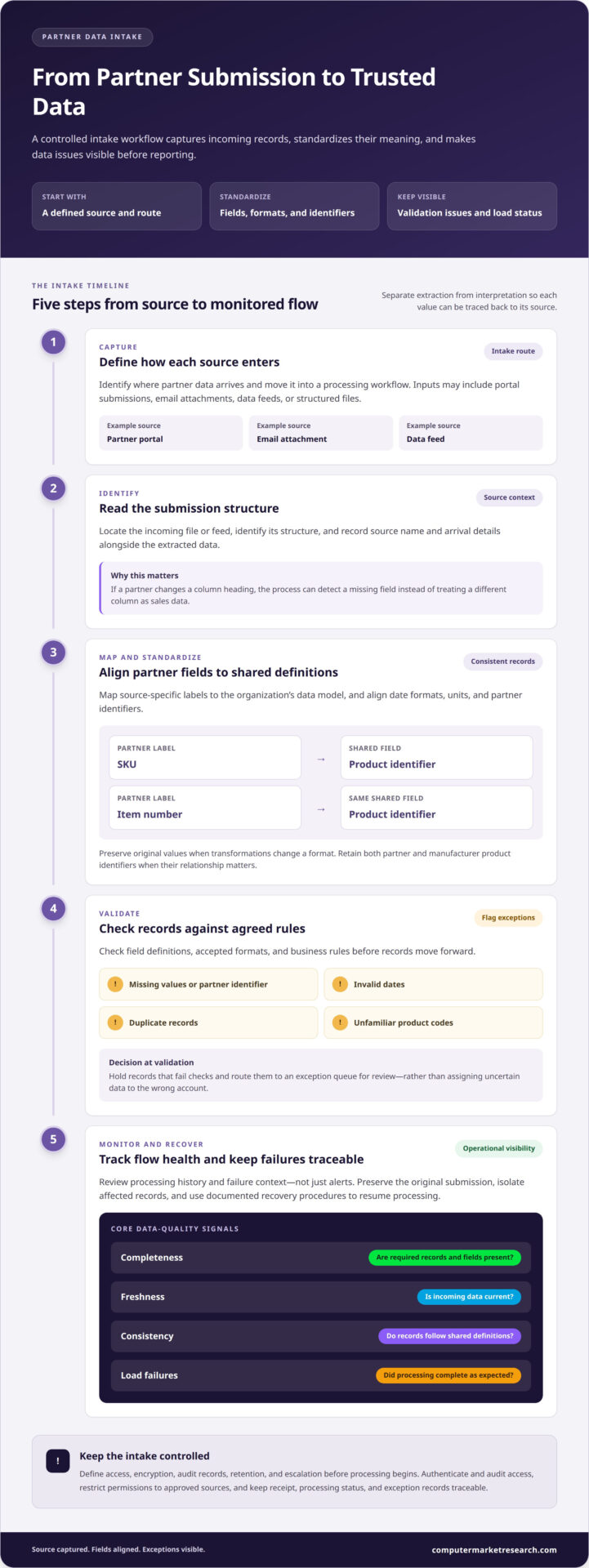
Standardization makes records comparable. One distributor might label a product field “SKU,” while another calls it “item number.” A mapping rule can direct both to the organization’s shared product identifier. The process can also align date formats, units, and partner identifiers. Without consistent labels, reports may split one measure across several categories.
A practical workflow separates extraction from interpretation. First, the system locates an incoming file or feed and identifies its structure. Next, it maps source fields to the internal data model. Validation rules then flag missing values, invalid dates, or unfamiliar product codes. For example, a sales record without a partner identifier can be routed for review instead of assigned to the wrong account.
- Capture the source name and arrival details alongside each extracted file.
- Map partner-specific labels to shared field definitions.
- Preserve the original value when a transformation changes its format.
- Route records that fail validation to an exception queue.
These steps make it possible to trace each value back to its source. If a retailer changes a column heading, the extraction process can detect the missing field rather than treating another column as sales data. A logged exception gives operations teams the context to adjust a mapping and assess affected records before reporting.
Standardization should preserve meaningful differences, not erase them. A partner’s product identifier may differ from the manufacturer’s, so the data model should retain both values and their relationship. For teams automating data collection from partners, this distinction supports consistent aggregation while keeping partner-level detail available for reconciliation.
The result is a controlled intake process: sources are captured, fields are mapped, and exceptions are visible. This gives downstream reporting a consistent foundation without assuming every partner provides data in the same format.
Automated data extraction tools can retrieve information from different sources without manual intervention or custom coding. This makes it possible to automate retrieval across those sources.
Automating partner data ingestion and normalization
Automating data collection from partners requires a defined route from each submission to its destination. Intake moves files or feeds into systems that can process them, while standardization aligns records for consistent use.
U.S. privacy and security obligations depend on the data collected, applicable rules, and partner agreements. A secure workflow should define access, encryption, audit records, retention, and escalation before processing begins.
One retailer might send a sales report by email, while another partner provides a structured feed. A pipeline can collect each input, apply technical handling rules, and deliver processed records to a database. Automated flows can run on a schedule or start when new data arrives.
Validation and Error Handling
Validation checks records against agreed field definitions, accepted formats, and business rules. For example, a transaction without a partner identifier should be held rather than assigned to the wrong account. Checks can also flag duplicate records, invalid dates, or product codes that do not match reference data.
Monitoring should show processing history and failure context, not just an alert. If a load fails, the provider can isolate affected records, preserve the original submission, and route exceptions for correction. Documented recovery procedures give teams a consistent way to resume processing.
To automate data collection from partners securely, encrypt sensitive information, authenticate and audit access, and restrict permissions to approved sources. Records of receipt, processing status, and exceptions give operations teams a traceable path for investigating processing or access issues.
Collection for Partners with Limited Technical Resources
Partners without integration teams can submit data through a structured file process. A workflow can define a template and submission channel, then automate intake when a file arrives. For example, a distributor can send a spreadsheet with agreed column names for conversion to the organization’s database format.
Partner capabilities should shape the technical design. If a partner sends periodic reports, an incremental batch load may run every 15 minutes, or another schedule may match the agreed delivery pattern. The provider can monitor arrivals, identify missing submissions, and flag format changes without requiring every partner to build an API connection.
Automating data collection from partners also requires documented field definitions, accepted formats, access permissions, and clear ownership of exceptions. These decisions give partners a clear submission path and establish how unexpected values or delayed reports are handled.
Benefits and limitations of automated ingestion
Automated intake replaces repeated manual transfers with a pipeline that collects, transforms, and delivers partner records. For example, a retail sales spreadsheet can move into a reporting database without staff rekeying each row. This reduces routine handling and creates a consistent processing trail, but automation cannot determine whether every unusual value is an error or a valid business exception.
The main benefit is repeatability. Once a partner’s file format and field mappings are defined, the workflow can process later submissions using the same rules. Teams can integrate partner data with reporting or operational systems and spend less time consolidating spreadsheets. However, a changed column, renamed product code, or new reporting period can break an assumption and require a mapping update.
Automation also makes processing status easier to monitor. A pipeline can record when a file arrives, whether it loads, and which records fail validation. That visibility helps teams investigate a delayed report or isolate incomplete transactions. But a successful technical load does not prove the data is commercially correct. A valid sales amount assigned to the wrong retailer, for example, can still distort a channel report.
Security risks include exposed credentials, unauthorized access to partner files, and sensitive information reaching an unintended system. These risks can be reduced by encrypting sensitive data, authenticating and auditing access, and restricting permissions to approved sources. Access controls should follow the data path, from file receipt through processing and storage, so spreadsheets are not available to staff who do not need them.
Costs for integration software and implementation depend on the project and are established after a quote request; key factors include partner count, source formats, transformation rules, security controls, and connections to existing systems. A single recurring spreadsheet may require different configuration from varied partner feeds that must map into multiple databases. Ongoing effort also depends on how often formats change and how exceptions are handled.
To assess fit, define the process the pipeline must support before selecting an approach. Identify source systems, required fields, destination applications, exception owners, and recovery procedures. If partners submit spreadsheets, account for format changes and missing values in the design. Automation is most useful when repeated, stable tasks dominate. Human review remains important for disputed records, unfamiliar values, and decisions that need business context.
Retail, e-commerce, and distributor connectors
Connectors move partner information into the systems that use it, such as retail sales reporting software or inventory tools. The right design depends on each partner’s source, data format, and operational needs.
Available Partner Connectors
Retailers may provide point-of-sale reports, e-commerce partners may share order records, and distributors may submit shipment or inventory files. A connector links a source to a receiving system and applies agreed mappings so fields such as product ID, sales date, and quantity reach the right destination.
Check whether a connector supports the partner’s actual submission method and the data your target system needs. A distributor sending periodic spreadsheets, for example, may need file intake and field mapping, while a retail platform may provide an API. Confirm that the workflow can flag missing fields and preserve partner-level identifiers for reconciliation.
Connector design should account for what each record represents. An e-commerce order may include order status and product details, while a retail sales report may summarize transactions by store or item. Mapping these records into a shared structure can support accurate comparisons, but their definitions should remain distinct when they describe different events.
Operational fit matters as much as technical compatibility. A connector should account for file arrival, processing status, and the destination application. If a partner changes its report format, the process should identify the change rather than place a new value in an unrelated field. This control helps keep downstream reports usable.
Data Collection Method Comparisons
APIs let software exchange structured requests and responses, making them useful when partners expose data through an application interface. EDI exchanges business documents in agreed electronic formats. SFTP transfers files between systems and can suit scheduled reports. A webhook sends a notification between web services when an event occurs, such as a new record becoming available.
These methods suit different operating patterns. A retailer with a system interface may support API exchange; a distributor sending recurring files may use SFTP or EDI. A webhook can signal that new data is ready, while another process retrieves or handles it. The choice depends on partner capabilities, data frequency, file structure, and destination requirements.
Compare methods by tracing one record from the partner’s source to its business use. For an order update, identify how it is transmitted, how the connector maps its fields, and how the receiving software handles duplicates or failures. This walkthrough can reveal integration gaps before the data enters operational reporting.
Finally, define ownership for changes and exceptions. If a partner alters an EDI document or API field, the connector’s monitoring should flag the issue for review. A clear change process helps maintain accurate data flows without assuming every partner uses the same technology.
How do APIs, EDI, SFTP, and webhooks compare for collecting partner data?
APIs, EDI, SFTP, and webhooks move partner data through different exchange patterns. An API supports system-to-system requests; EDI exchanges structured business documents; SFTP transfers files; and a webhook notifies another web service when an event occurs. The best fit depends on partner capabilities, data structure, operating schedule, and the receiving system.
An API can suit a retailer whose platform exposes sales or inventory information for software integration. The receiving system sends a request and processes the response according to the interface. This can support targeted retrieval, such as requesting order updates, but both parties need compatible access and agreed field definitions. Interface changes may require updates to the integration.
EDI is designed for exchanging structured business documents between organizations. A distributor might use it to send purchase orders, invoices, or other agreed records in a consistent format. The receiving workflow must interpret the document structure and map its fields to internal data. EDI can support repeatable exchanges, but partners need compatible document definitions and processes for rejected or changed submissions.
SFTP transfers files between systems, making it useful when a partner provides scheduled reports rather than a live interface. A retailer, for example, could deliver a sales file for later processing. The receiving pipeline can retrieve the file, validate its format, and load its records. This approach suits batch exchanges, but file transfer alone does not resolve inconsistent fields or missing data.
A webhook lets web services communicate with each other. A partner system can send a notification when an event occurs, such as a new order record becoming available. The notification can trigger a separate workflow, but it does not determine what other systems do. The receiving process still needs to retrieve or interpret the relevant data and handle failures.
Compare the options by tracing a partner record from its source to its business use. For an order update, identify how the partner sends it, how fields are mapped, and how duplicates or failed transfers are handled. Then consider partners’ technical resources, data volume patterns, and whether information must be collected on demand or through scheduled files. These criteria show whether one method fits or different partners need different connectors.
Whichever method you select, define ownership for interface changes, file exceptions, and recovery. A new API field, altered EDI document, missing SFTP file, or webhook failure should have a clear handling path. This connects the transfer method to reliable downstream processing.
Computer Market Research: POS Data Management
Computer Market Research provides POS Data Management to help organizations manage partner point-of-sale information. Consider this offering when retailer submissions are difficult to organize, channel reporting relies on scattered POS records, or teams need clearer visibility into partner data.
POS data can support channel performance analysis, but its usefulness depends on consistent access to partner-reported information. When submissions arrive through different processes, teams may spend time locating records and resolving gaps before they can use them. POS Data Management addresses this operational need by focusing on point-of-sale data within partner relationships.
POS Data Management is relevant when an organization needs to manage POS information alongside broader channel operations. PartnerPortal™ centralizes partner onboarding, deal registration, and performance tracking, providing a related framework for partner activity. The capabilities serve different needs: POS Data Management focuses on point-of-sale information, while PartnerPortal™ supports partner program processes.
Other channel programs may also depend on reliable partner information. Co-op/MDF Management supports the administration of co-op and market development funds, while Rebates & Incentives supports incentive programs. When POS reporting informs channel performance or program decisions, organized data management can help teams work from a more coherent view of partner activity.
Start by defining which POS information matters to your reporting and how partners provide it. Relevant details may include partner identity, product information, sales periods, and intended reporting use. Clarifying these needs helps establish where POS Data Management fits and how it relates to existing partner workflows, without treating every data issue as a connector problem.
Consider POS Data Management when collecting partner records is only part of the challenge and your organization also needs a structured way to manage POS data. It may not be the right fit if your core requirement is unrelated to point-of-sale information; the appropriate channel offering depends on the operational need. Keeping that distinction clear helps align the solution with the work your teams need to do.
For organizations assessing partner data processes, Computer Market Research can discuss how POS Data Management relates to their channel requirements. Contact Computer Market Research to discuss your needs.
Frequently Asked Questions
What metrics should teams monitor for automated data ingestion?
Track both pipeline health and partner-program outcomes. Useful operational measures include load completion, processing duration, rejected records, and time taken to resolve exceptions. For program reporting, monitor total leads generated, co-sell win rate, and co-sell deal sales cycle duration. Reviewing these measures together helps distinguish a technical delay from a business change, such as a shift in partner lead activity or deal progression.
How can a provider automate data collection from business partners?
A repeatable intake workflow can be set up for each partner’s submission capabilities. For example, one partner may submit a structured form that routes responses to a back-end system, while another supplies a scheduled file. The workflow defines how each submission is identified, processed, and assigned to the right partner account, then directs exceptions to an owner. This keeps partner records traceable through downstream reporting.
What tools and platforms support automated partner data exchange?
Supporting partner data intake typically takes a combination of integration methods and data-processing components, rather than a single connector. An API, EDI exchange, SFTP transfer, or webhook can carry or signal partner information; a processing layer then maps it for the receiving application. A shared data model helps different channels feed consistent reporting. Some partner relationships may use a mix of methods, depending on their systems and operational constraints.
How can a provider onboard partners and standardize data formats for automated collection?
A consistent onboarding process agrees with partners on field meanings, identifiers, submission schedules, and ownership of corrections. A field dictionary clarifies whether “item number” and “product ID” represent the same value, while a sample submission tests the mapping before routine processing begins. Versioning the template helps identify format changes later. This gives partners a clear data agreement and operations teams a controlled way to manage updates.
How can a provider monitor, troubleshoot, and measure partner data pipeline performance?
Monitor pipeline runs through status records, failure context, and alerts tied to specific sources or partner submissions. When a run fails, an operator can trace the affected input, isolate the cause, and follow documented recovery steps. Performance reviews should compare processing duration and exception trends over time, then connect findings to reporting needs. A controlled replay process also helps recover records without obscuring their original processing history.
What U.S. privacy, security, and compliance rules apply to collecting data from partners?
U.S. privacy and security obligations depend on the data collected, applicable rules, and partner agreements. Define access, encryption, audit records, retention, and escalation before processing begins.

Article by
Del Heles
Del Heles is the founder and CEO of Computer Market Research (CMR), a channel management software company he launched in 1984. With more than 40 years of experience, he’s known for helping manufacturers and distributors simplify complex partner programs through practical, customer-focused technology solutions.