

Manual inventory records lose value as soon as goods move between suppliers, warehouses, and customers. To understand how to track inventory through distribution, use a system that records each stock movement in a shared inventory record, so teams can see what is available and where it is.
It’s reasonable to expect a stock count to match what’s physically on hand. In practice, delayed updates and disconnected records make that difficult across distribution channels. A cloud-based approach brings inventory information together and keeps it accessible as goods are received, stored, transferred, and shipped. This article explains distribution inventory management, how automated tracking follows products through the supply chain, and what to consider when choosing and implementing a system. Reliable inventory data gives teams a clearer basis for managing stock movements, replenishment, and fulfillment.
Key Takeaways
- Choose a tracking method that fits your operation’s complexity, from simple records to barcode, RFID, or warehouse management systems.
- Prioritize a system that connects inventory data with order and accounting information to reduce disconnected records.
- Track each product movement from procurement through storage and shipment to improve visibility across distribution.
- Use barcode and RFID processes to capture item-level movement and support more accurate stock records.
- Consider cloud-based tracking when teams need access to consistent inventory information across locations and channels.
What Is Distribution Inventory Management?
Distribution inventory management records stock levels and movements across warehouses, transit points, and fulfillment locations. By connecting inventory with orders and supplier activity, it helps teams see what is available, where it is, and what needs replenishment.
Tracking Across Warehouses and Transit Points
Distribution tracking follows goods as they move between suppliers, warehouses, storage zones, and customer destinations. Each transfer should update the item’s location and status, including when stock is in transit rather than physically stored at a facility.
This view matters when the same product is held at different locations. Warehouse teams can distinguish available stock from goods allocated to orders or moving between sites. Delivery records and receiving updates also help explain discrepancies, such as a shipment marked as dispatched but not yet received. Together, these records provide a clearer picture of stock across the supply chain.
Inventory Tools and Tracking Technologies
Spreadsheets, barcode labels, RFID, warehouse management systems, inventory software, and ERP systems support different levels of tracking. Spreadsheets can suit very small warehouse operations with under roughly 50 SKUs. As locations, transactions, and users increase, manual updates become harder to maintain consistently.
Barcode labels let staff scan items during receiving, picking, transfers, and shipping. Mobile inventory tools make scanning practical on the warehouse floor, where workers can record transactions beside the stock. RFID captures item information through radio-frequency identification. A warehouse management system coordinates warehouse activity, while an ERP system can connect inventory records with wider business processes. The right fit depends on your locations, transaction volume, and data-sharing needs.
Lot, Batch, Serial, and Expiration Tracking
Lot, batch, serial number, and expiration tracking attach identifying details to stock records and transactions. At receiving, staff record the relevant identifier alongside the product and quantity. Later scans or entries preserve that link during storage, transfers, picking, and shipment.
Lot and batch records group items produced or received together, while serial numbers distinguish individual units. Expiration dates help teams identify aging stock before it becomes unsellable. Management software can use these fields to locate affected inventory, support traceability, and help prevent unsuitable goods from being distributed. Clear receiving and picking procedures are essential because missing identifiers can break the link between the record and the physical item.
Costs of Scanners, RFID, and Software
The cost of barcode scanners, RFID systems, and distribution inventory software depends on the equipment, system scope, and operational requirements. Budget planning should account for scanner quantities, RFID readers and tags, software capabilities, integrations, implementation, and ongoing support.
Compare the complete operating setup, not just the device or software license. A barcode process requires labels, scanners, and staff workflows for recording each movement. RFID adds tags and reader infrastructure, while software costs depend on features and the number of locations or users. Supplier performance and delivery reliability also affect inventory planning: lead times and fulfillment capability help teams decide when to replenish. Track supplier measures alongside inventory data to spot risks and improve supply chain decisions.
Selecting and implementing an automated tracking system
Choose a system that matches your inventory volume, warehouse workflows, and demand patterns. Automated inventory systems can track goods from the initial supply-chain stage through storage and shipping. They can also connect inventory data with accounting and order information, giving teams a shared record instead of separate manual updates.
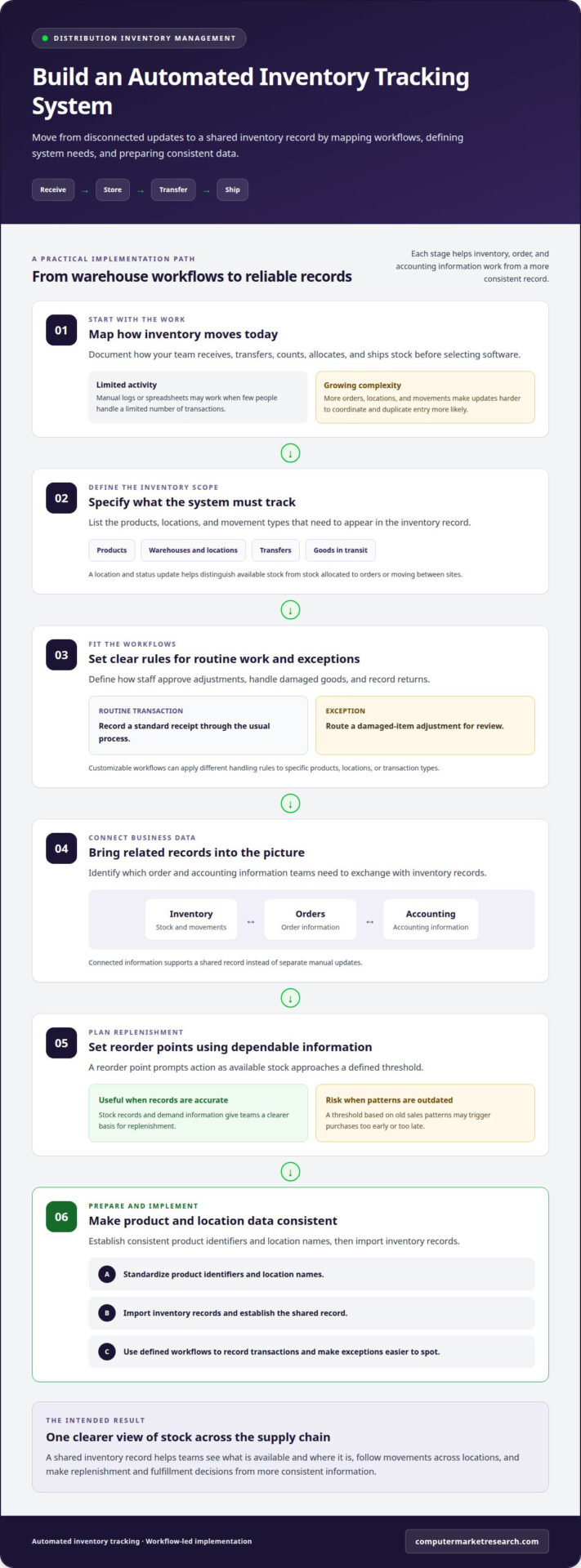
Manual logs and spreadsheets may work when few people handle a limited number of transactions. As orders, locations, and stock movements grow, updates become harder to coordinate. One person might record a receipt while another allocates the same stock to an order. Automated tracking records transactions within defined workflows, reducing duplicate entry and making exceptions easier to spot. Before choosing software, map how your team receives, transfers, counts, allocates, and ships inventory.
Then assess the operational requirements that shape system selection:
- Inventory scope: List the products, locations, and movement types the system must record, including transfers and goods in transit.
- Workflow fit: Define how staff approve adjustments, handle damaged goods, and record returns.
- Data connections: Identify the order and accounting information teams need to exchange with inventory records.
- Replenishment rules: Set reorder points that prompt action as available stock approaches a defined threshold.
Reorder points help teams plan replenishment before shortages occur. Their usefulness depends on accurate stock records and demand information: a threshold based on outdated sales patterns may trigger purchases too early or too late. Customizable workflows let businesses apply different handling rules to specific products, locations, or transaction types. For example, a team might route a damaged-item adjustment for review while recording routine receipts through a standard process. Clear rules make exceptions visible without adding unnecessary steps to every order.
Plan implementation around data movement, not just software installation. First, establish consistent product identifiers and location names, then import inventory records and connect relevant order and accounting data. Test typical transactions, such as receiving a shipment, transferring stock, and fulfilling an order. Compare system records with physical counts, correct mismatches, and train staff on their daily steps. A staged rollout can help isolate workflow or data issues before the system covers every warehouse.
Automation can also extend beyond software. Automated storage and retrieval systems (ASRS) combine storage equipment with inventory management software to locate and move goods. Jazz Aviation used two Vertical Lift Modules integrated with inventory management software to manage over 20,000 SKUs. This example shows how an integrated setup can support a large item catalog; whether automated equipment fits depends on warehouse layout, item handling, and throughput needs.
Tracking goods from procurement and production through storage and distribution
End-to-end tracking connects procurement, production, storage, transfers, and shipment records. Recording each movement helps teams understand inventory levels and identify where a delay or discrepancy occurred.
Tracking Goods Through Distribution Stages
Stage-based tracking records goods as they move from procurement and production to storage and distribution. At each handoff, capture the product, quantity, location, transaction, and movement status so the next team can continue the record.
For U.S. food distribution, the Food and Drug Administration (FDA) is a relevant regulatory framework; applicable traceability requirements depend on the product and activity. Transaction, audit, and inspection records help document origin and movement and support regulatory inquiries.
For example, a receiving record can connect a supplier shipment to a production lot, then to a warehouse receipt and customer order. If a shipment is delayed, its status and last recorded handoff show where follow-up is needed.
Recording Movements Across Facilities and Zones
Facility-level tracking records stock by warehouse, storage zone, and location, including goods in transit. A record such as “50 units of Product A in Warehouse B” becomes more useful when it also identifies the storage zone and status.
At every transfer, record the item, quantity, source location, destination, and transaction time. These details distinguish a transfer in progress from stock available for orders. Common risks include missed scans, duplicate entries, incorrect quantities, and unrecorded damage. Require staff to record each handoff and investigate mismatches against receiving and shipping records.
Standardized Locations and Cycle Counts
Standardized storage locations use consistent names or codes for facilities, zones, and individual slots. A location format such as “Warehouse B, Zone 2, Rack 4” gives workers and inventory systems a shared reference during put-away, picking, and transfers.
Cycle counting checks selected inventory records against physical stock without waiting for a full count. Assign counts by location or item category, then record and investigate each variance before adjusting system levels. One-third of surveyed distributors reported inventory data accuracy below 95% in 2023, making routine counts a practical way to find discrepancies.
ABC analysis can help prioritize count attention: roughly 20% of a distributor’s SKUs may generate about 80% of revenue. Review item rankings quarterly as demand changes, while still including lower-priority stock in a count plan.
Labeling Inventory and Storage Locations
Labels connect physical goods and storage positions to inventory records. Use a consistent product identifier on inventory labels and a distinct location code for each shelf, bin, or zone.
At receiving, match the product label to its record before put-away. During picking, scan or read both the item and destination location. This two-part check helps prevent a correct item from being stored or picked from the wrong place. If labels are damaged or unreadable, replace them and update the record before the next movement.
What Is Inventory Tracking?
Inventory tracking records, monitors, and analyzes stock levels, movements, and transactions, either in real time or periodically. Barcode scanning, RFID, and inventory software help teams choose how each movement enters the record.
Barcode and RFID Tracking Methods
A barcode identifies an item or package for scanning, while RFID uses radio-frequency identification to capture information from a tagged item. Both methods connect physical stock to software records, but they capture data differently. A barcode requires a readable label and scanner; RFID readers can capture tag data without the same direct line-of-sight scan.
That distinction affects warehouse efficiency. For example, staff can scan a barcode when receiving a carton and scan it again during picking. An RFID-enabled process can capture tag information as goods move through a reading area. Both methods rely on accurate product identifiers and defined transaction steps; otherwise, digital records can diverge from physical stock.
Study results illustrate why process design matters. In the Auburn University RFID Lab and GS1 US Project Zipper study, 69% of orders processed without RFID contained data errors. RFID-enabled processes reached 99.9% order accuracy in the study, which covered more than 1 million items. Those results describe that study, not a guaranteed outcome for every warehouse.
Scanning QR Codes for Real-Time Visibility
QR codes are two-dimensional codes that a compatible scanner or mobile device can read to retrieve an encoded identifier. In an inventory workflow, that identifier can connect a product or location to a software record. A scan during receiving, transfer, or dispatch creates a transaction that improves visibility when the system records it promptly.
For example, a worker scans a QR code on a storage location, then scans the product being placed there. The system can link the item to that location, making it easier to find during picking. A scan after shipment can record the changed status; a delayed or missed scan leaves the record behind the physical movement.
Real-time visibility depends on more than the code. Inventory software must accept the scan, apply the correct transaction, and make the updated record available to relevant users. Periodic uploads may show changes later, while connected workflows can update records as staff scan. Set clear procedures for unreadable labels, duplicate scans, and quantity changes so every exception has a consistent resolution.
Cloud-based inventory tracking
Cloud-based inventory tracking keeps records in a shared system that authorized teams can access across distribution operations. For teams deciding how to track inventory through distribution, the cloud model can make location and transaction data available without relying on separate warehouse spreadsheets. Its value depends on accurate entries, clear ownership, and workflows that reflect how stock actually moves.
Consider a transfer between facilities. The sending warehouse records the dispatched quantity and destination, while the receiving team records what arrives. The shared record can show whether the transfer is complete or needs investigation. This distinction helps planners separate available goods from stock allocated to orders or still in transit.
Cloud access can help warehouse, sales, and operations teams coordinate. A fulfillment employee, for example, can view current stock status while preparing an order, while a manager reviews movement records from another location. Mobile access may help staff record transactions where they happen. To keep updates consistent, define who can enter adjustments and who reviews exceptions.
Integration is another key design choice. Inventory records can connect with order and accounting information, helping teams link a stock change to its business transaction. Before implementation, map which system owns product identifiers, location codes, order status, and quantity adjustments. Test scenarios such as a partial receipt or split shipment to reveal mismatched fields and duplicate records before they affect routine operations.
Cloud-based processes still need controls for errors. Set procedures for unreadable labels, missed transactions, damaged goods, and network interruptions. Staff can record an exception when they discover it, then reconcile it against the physical count and shipment record. Scheduled cycle counts also help identify differences between recorded and actual stock. Assign a reviewer to investigate the cause before changing the balance.
When deciding how to track inventory through distribution, account for future operational changes. As channels, product lines, or facilities shift, review access permissions, location structures, and data connections. Inventory histories can inform demand planning when teams compare movement patterns with historical sales, seasonal trends, and market dynamics. Cloud tracking can therefore provide more than a shared stock list: it creates a consistent data foundation for fulfillment and replenishment decisions.
For channel operations that need structured partner workflows, explore the inventory management trial as a practical next step.
Computer Market Research: PartnerPortal™
Computer Market Research offers PartnerPortal™, a platform that centralizes partner onboarding, deal registration, and performance tracking. If your distribution process also depends on accurate channel data, PartnerPortal can bring partner activity into a clearer operational view. It complements warehouse tracking rather than replacing the inventory system that records physical receipts, transfers, and shipments.
Turn to PartnerPortal when fragmented partner processes make it difficult to manage deal registrations and assess performance alongside distribution operations. Computer Market Research also offers Co-op/MDF Management and Rebates & Incentives to support related channel workflows.
To discuss how these tools fit your channel operations, contact Computer Market Research or visit computermarketresearch.com.
Build a More Controlled Distribution Process
Deciding how to track inventory through distribution also means defining operational ownership. Assign clear responsibility for maintaining item records, approving adjustments, and resolving exceptions. Then decide how teams will review system performance using measures that reflect your priorities, such as fulfillment accuracy, inventory discrepancies, or replenishment delays.
Keep the process adaptable. As product ranges, distribution partners, or warehouse workflows change, review whether system rules and data connections still reflect how goods move. Ongoing governance helps prevent a new platform from inheriting old inconsistencies and gives teams a consistent basis for operational decisions.
For channel operations that need structured partner processes, Computer Market Research offers PartnerPortal™, Co-op/MDF Management, and Rebates & Incentives. Consider how those capabilities align with your broader workflow needs as you plan your next improvement.
Explore the next step with Computer Market Research and continue building a distribution process your teams can manage with confidence.
Frequently Asked Questions
What are warehouse distribution metrics?
Warehouse distribution metrics measure how accurately and efficiently a facility handles stock and orders. Common examples include inventory accuracy, order-picking accuracy, fulfillment rate, backorders, stockouts, and order cycle time. A warehouse might review picking accuracy alongside error causes, such as wrong-item picks or missed scans. Reviewing several measures together helps managers distinguish a staffing or process issue from a stock availability problem.
What is inventory tracking in a distribution network?
Inventory tracking in a distribution network is the ongoing record of stock status across connected suppliers, facilities, and delivery routes. For example, a distributor can distinguish stock reserved for a customer from stock available to promise, even when both quantities belong to the same product. Linking each record to its location and status helps sales, warehouse, and operations teams make decisions using consistent information.
How to track inventory from receiving through warehousing, picking, shipping, and delivery?
Record a transaction at each handoff, starting with the received quantity and item identity. Assign the stock to a warehouse location, then record picking against the relevant order. At dispatch, capture shipment details and mark the inventory as in transit rather than available. When delivery is recorded, reconcile the shipped quantity with the amount received. Enter a short shipment or damaged item as an exception for investigation.
What inventory tracking methods are used in distribution, such as barcodes, RFID, and serial numbers?
Distributors use manual records, spreadsheets, barcode labels, RFID tags, and inventory software. Barcodes identify products or packages during scans; RFID readers capture information from tagged items. Serial numbers distinguish individual units, while lot or batch identifiers group related products. A distributor might scan barcodes for routine carton movements and use serial-level records for equipment requiring unit-specific traceability. Choose a method that matches the level of detail operations need to capture.
How do WMS, ERP, and inventory management systems track stock across multiple locations?
A warehouse management system (WMS) focuses on warehouse activity, while an enterprise resource planning (ERP) system connects inventory with broader business records. Inventory management software maintains stock quantities and movements across defined locations. When these systems exchange consistent item, location, and transaction data, a transfer can reduce stock at one facility and increase it at another. Define which system owns each record to prevent conflicting updates.
How to track inventory in transit and reconcile shipments with deliveries?
After dispatch, change the shipment status to in transit and link it to the shipment record, destination, and expected items. Keep in-transit quantities separate from stock available for new orders. On receipt, compare delivered quantities with dispatch records and record shortages, overages, or damage as exceptions. For example, a partial delivery should update received stock while keeping the undelivered balance linked to the open shipment.
What inventory accuracy targets and KPIs should distributors monitor?
Set accuracy targets from a verified baseline, then track inventory accuracy, picking accuracy, fulfillment rate, stockouts, backorders, and cycle-count variances. Best-in-class distribution centers achieve order-picking accuracy of 99.68% or higher, while median performers reach around 99.30%. Treat these as reported benchmarks, not automatic targets for every operation. Review errors by product, location, and transaction type to identify where process changes can improve results.

Article by
Del Heles
Del Heles is the founder and CEO of Computer Market Research (CMR), a channel management software company he launched in 1984. With more than 40 years of experience, he’s known for helping manufacturers and distributors simplify complex partner programs through practical, customer-focused technology solutions.