

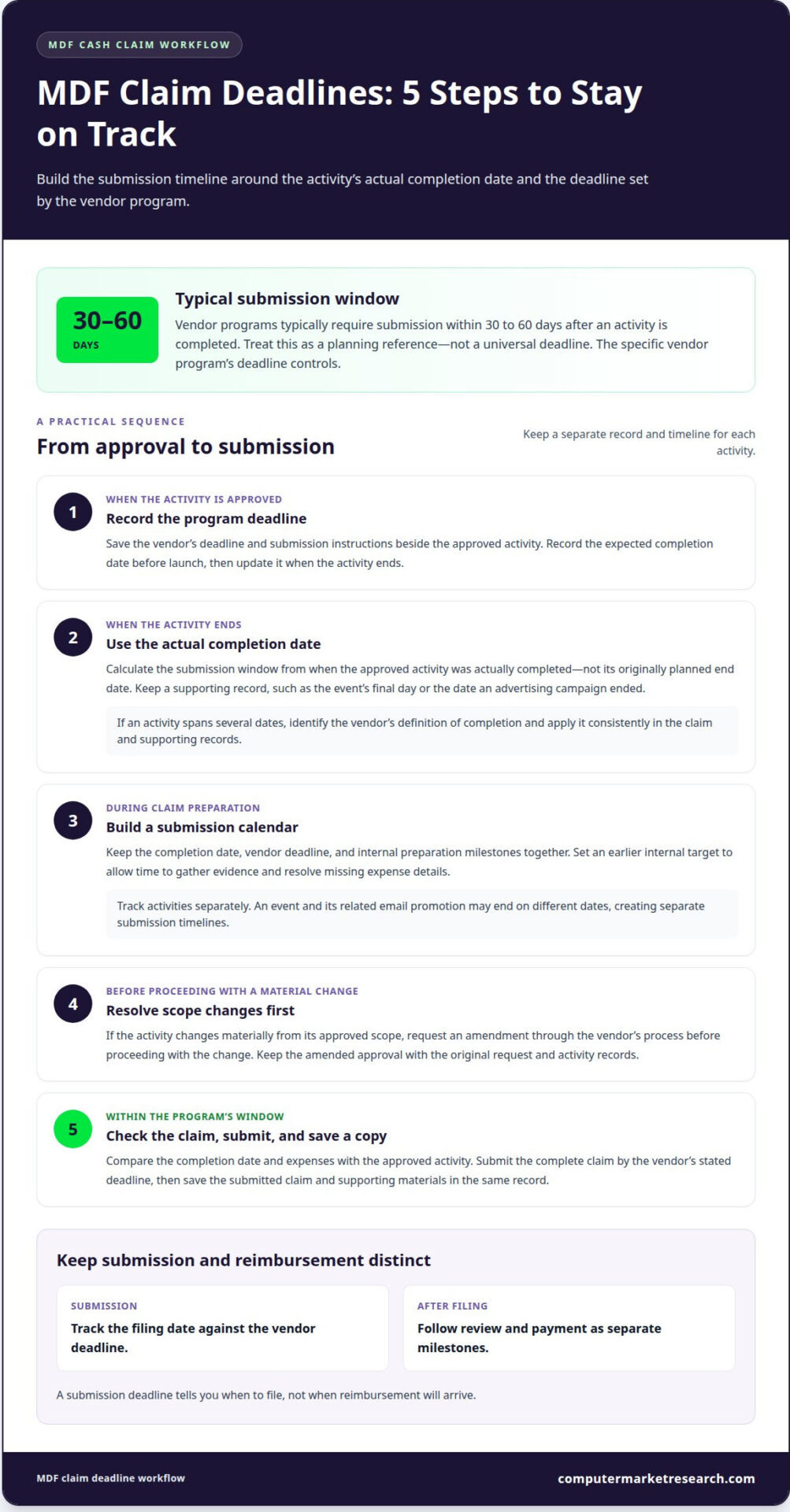
A complete MDF claim processing workflow begins with pre-approval and ends with evidence-backed reimbursement. Vendor programs typically require partners to submit claims within 30 to 60 days after the activity is completed. The claim should match the approved request and document the activity’s actual completion date and eligible expenses.
It’s frustrating when a completed campaign leads to a delayed or rejected claim. Missing evidence, ineligible costs, or changes to an approved activity can complicate review. A clear process matters just as much as meeting the deadline.
This guide explains how to prepare and submit cash claims, organize evidence for events, email, advertising, and content, and avoid common rejection reasons. It also covers what happens during review, how reimbursement records are handled, and how to track a claim after submission.
Key Takeaways
- Submit cash claims within the vendor program’s deadline, typically 30 to 60 days after the activity is completed.
- Keep each claim aligned with its approved request, eligible expenses, and actual activity details.
- Build an evidence file that shows the activity took place and the expenses were incurred for eligible purposes.
- Address scope changes before submitting, and track review and reimbursement as separate workflow stages.
- Use a structured Co-op/MDF management process to improve visibility and reduce manual claim-handling gaps.
Cash claim submission deadlines
- Record the deadline when the activity is approved. Vendor MDF programs typically require partners to submit claims within 30 to 60 days after an activity is completed. Treat that range as a planning reference, not a universal deadline. The controlling date is the deadline in the specific vendor program. Record it beside the approved activity, along with the program’s submission instructions.
Record the expected completion date before launch, then update it when the activity ends. This gives you a reliable starting point for calculating the submission window. For example, if a campaign runs through an event, use the actual completion date, not the date the event was originally planned.
- Use the activity’s actual completion date. A claim documents when the approved activity was completed, so calculate the deadline from that date. Keep a supporting record, such as the event’s final day or the date an advertising campaign ended. Don’t rely on an estimate entered during planning.
If an activity spans several dates, identify the vendor’s definition of completion and apply it consistently in the claim and supporting records. A precise date helps reviewers connect the claim to the approved activity and assess whether it was submitted within the applicable window.
- Build a submission calendar for each claim. Record the completion date, the vendor’s deadline, and internal preparation milestones in one place. Set an earlier internal target to leave time to assemble evidence and resolve missing expense details. The internal target does not replace the vendor’s deadline.
Track each activity separately, even when several activities share a campaign or budget. An event and a related email promotion may end on different dates, creating separate submission timelines. A distinct record for each activity makes deadlines easier to monitor and helps prevent overlooked claims.
- Resolve changes before submitting. If an MDF-funded activity changes materially from its approved scope, request an amendment before proceeding with the change. Keep the amended approval with the original request and activity records. This preserves a clear link between the approved plan and the work being claimed.
For example, a significant change to an event’s format may affect what the vendor approved. Raise the change through the program’s process instead of waiting until claim preparation. A late amendment request can leave less time to align approvals, actual expenses, and the submission deadline.
- Submit a complete claim within the program’s window. Work backward from the vendor’s stated deadline and prepare the claim while activity records are accessible. Before submitting, compare the completion date and expenses with the approved activity. Save a copy of the submitted claim and supporting materials in the same record.
A submission deadline tells you when to file, not when reimbursement will arrive. Track the filing date separately from review and payment milestones. This keeps deadline management focused on submission while allowing you to follow reimbursement independently.
What are the most common reasons MDF claims are rejected and how can partners avoid them?
Review each claim against its approval and expense rules before filing. A focused pre-submission check can uncover issues that may lead to denial or reduced reimbursement.
-
Review Common Claim Rejection Reasons
Compare the completed activity with its approved MDF request before preparing the claim. Claims for marketing activities conducted without prior MDF approval will typically be declined. Check each expense against the vendor’s eligible categories, too. Ineligible expenses can lead to rejected line items or rejection of the full claim.
For example, list eligible campaign costs separately from unrelated expenses instead of combining them into one total. This makes each amount easier to assess.
-
Identify Common Claim Issues
Check for differences between the approved activity, the work performed, and the expenses submitted. A changed campaign scope, unclear expense description, or total that combines eligible and ineligible costs can complicate review. Reviewers need to assess the claim against its specific approval and program rules.
Flag mismatches before filing and resolve them through the vendor’s process.
- Confirm approval before the activity begins. Match the planned marketing activity to its approved MDF request. If approval is missing, don’t treat the activity as eligible for reimbursement. For instance, a partner planning an event should retain approval for that event, rather than rely on approval for a different campaign. Keep approval records with the activity documents so the person preparing the claim can trace its authorization.
- Review expenses line by line. Compare every claimed cost with the vendor’s eligible expense categories. A cost doesn’t qualify automatically just because it supported the marketing activity. Separate expenses by type and purpose, then remove those outside the program’s eligible categories. If a charge covers multiple purposes, identify and document the portion tied to the approved activity.
- Reconcile the claim with the approved scope. Compare the planned activity and approved scope with what actually took place. If the activity changed materially, request a pre-approval amendment before proceeding with the changed scope. For example, a revised campaign format may affect whether the original approval still describes the activity accurately. Keep any amendment alongside the original approval to give reviewers a clear record of the change.
- Run a final consistency check. Confirm that the activity description, expense breakdown, and reimbursement request all relate to the same approved request. Correct inconsistent descriptions or totals before submission. Trace each expense from the approved activity to its category and amount. If that connection isn’t clear from the claim, clarify the entry or remove it before filing.
Event, email, advertising, and content claim evidence
Build an evidence file connecting the approved activity to what happened and what it cost. Requirements vary by vendor and activity, so organize records around the specific claim.
-
Gather Campaign Evidence
Collect evidence showing that the activity took place, and link each item to the approved campaign. For an event, this might include event materials or records showing it occurred. For email, advertising, or content, retain examples of the campaign output. These help document execution; the vendor’s program determines which evidence is required.
Label files by activity and date instead of storing unrelated campaigns together. A clear file structure helps reviewers match evidence to the claim without confusing one promotion with another.
-
Confirm Eligible Expenses and Activities
Compare the activity and each claimed expense with the vendor’s approved request and eligible expense categories. Eligible activities and costs must be approved under the vendor’s MDF program and allowed by its rules. There is no universal list, so apply the criteria for the specific claim.
Separate costs by purpose. For example, don’t combine a campaign expense with an unrelated charge on one line. This makes it easier to identify the amount tied to the approved activity.
- Connect proof of execution to actual costs. Pair evidence of the activity with records supporting the expenses. For example, match an advertising example with the corresponding expense record, or connect event materials with costs tied to the event. The link between each activity and claimed cost should be clear.
Use consistent activity names across the claim, evidence files, and expense records. If one file uses an internal nickname and another uses the approved campaign title, add an identifier that clearly links them.
- Check evidence completeness before submission. Review the claim line by line: does the file show that the activity occurred and that each expense relates to an eligible purpose? A screenshot may show campaign execution, while a separate expense record supports the cost. Neither replaces the other when both need to be documented.
Remove duplicate or unrelated records that could obscure the evidence. Keep the final file focused on the activity and expenses under review.
- Prepare for activity-specific review. An event claim may require different execution evidence from an email or content claim. Organize each claim by activity type and follow the vendor’s evidence instructions. If the activity changed from its approved scope, include the relevant amendment so the evidence reflects the approved version.
Before filing, confirm that the evidence, activity description, and expense breakdown tell a consistent story. This helps reviewers assess completion and eligible costs together.
Difference between an MDF request and an MDF claim
Use the MDF request to seek approval before an activity and the claim to request reimbursement afterward. Keep the records connected, because the claim should correspond to the specific request the vendor approved.
- Submit the request before the activity. Describe the proposed marketing activity and the funding you’re seeking. The request is for planning and approval, not proof that the activity took place or that expenses were incurred.
For example, a partner planning an event uses the request to seek approval for that event. Keep the vendor’s approval with the request so the approved activity and funding amount are clear when preparing the claim.
- Wait for approval before treating the activity as approved. A claim must relate to a marketing activity pre-approved under the vendor’s MDF program. Record the approved scope and amount: these are the reference points for evaluating the activity and reimbursement request.
If the planned activity changes materially, request an amendment before proceeding. Keep the original request and any amendment together to show what the vendor approved before the activity took place.
- Use the approved request to prepare the claim. After completing the activity, submit a post-activity request for reimbursement of eligible expenses. Identify the specific MDF request the vendor approved instead of presenting the activity as a new funding request.
Match the claim’s activity description to the approved request. If the vendor approved an event, for example, document that event’s completion and expenses, not costs from a different campaign.
- Document what actually happened. Record the activity’s actual completion date and actual eligible expenses incurred. The request describes the planned activity; the claim reports the completed activity and its costs.
Keep planned details distinct from final details. If the final date or expense total differs from the original plan, report the actual information in the claim. This gives the reviewer a clear account of the completed work rather than an outdated proposal.
- Keep the reimbursement request within the approved amount. Request reimbursement only up to the amount the vendor pre-approved. Compare eligible expenses with that amount and make sure the request is consistent with both.
The request and claim serve different stages: one seeks advance approval, while the other requests reimbursement after completion. Keeping both records lets reviewers trace the process from proposed activity to actual expenses and the final amount requested.
MDF claim review and reimbursement workflows
Track each claim through validation, review, approval, and payment as distinct stages. A structured mdf claim processing workflow helps teams see a claim’s status and identify the next action.
-
Validate Claims Against Budgets and Rules
Match each claim to the approved activity, program rules, and relevant MDF budget. Check every expense against eligible categories, then compare the requested amount with the funding approved for that activity. Reimbursement rates, caps, and payment terms depend on the vendor’s program and approval. The approved amount limits the request; eligible costs and program terms determine what may be reimbursed.
Keep the budget reference and approval with the claim record. This helps reviewers trace the funding allocation and catch mismatches before the claim advances.
-
Apply Claim Review Controls
Use documented checks for authorization, expense eligibility, supporting records, and consistency with the approved activity. These controls help identify duplicate or unsupported requests and keep decisions aligned with program rules. For example, compare each expense entry with its supporting record and flag duplicate charges or descriptions that don’t match the activity.
Record review outcomes and requested corrections. A clear audit trail shows what was examined, which evidence informed the decision, and how exceptions were handled, making the review easier to follow.
-
Review Claims and Track Status
Track each claim by stage, such as submitted, under review, returned for correction, or approved. A vendor may route reviews based on the partner’s region, claim amount, and activity type. Keep the claim identifier, submission record, and status updates together so the partner can see what has happened and what needs follow-up.
Approval and payment are separate milestones. For AWS cash MDF, claim approval and invoice submission are separate workflow steps; submitting an invoice doesn’t mean payment has been received. Track invoice submission and payment status separately.
-
Resolve Claim Disputes
Compare a disputed decision with the approved request, claim details, expense records, and program rules. Identify the line item or eligibility question, then gather evidence addressing that issue. A focused response helps clarify whether the concern is missing documentation or an expense that doesn’t meet program criteria.
Submit the clarification through the vendor’s review process and record its response against the claim. Records for approved-claim reimbursement can be generated in formats compatible with a vendor’s finance system. Follow the finance handoff rather than treating approval as payment. A consistent mdf claim processing workflow keeps review and payment records connected.
Computer Market Research: PartnerPortal™
Computer Market Research offers PartnerPortal™ and Co-op/MDF Management to help organizations manage channel programs and MDF funds. PartnerPortal™ centralizes partner onboarding, deal registration, and performance tracking; Co-op/MDF Management supports co-op and MDF fund administration. These tools are relevant when fragmented records and manual processes make it harder to track partner activities.
If your team is refining how it administers MDF alongside broader channel operations, consider whether a centralized platform fits your workflow. Explore PartnerPortal channel management to learn more about the platform. For guidance on your channel management needs, contact Computer Market Research or visit computermarketresearch.com.
Make your next claim easier to manage
Use your next campaign to strengthen the process behind MDF claims. Assign clear ownership for approvals, activity records, expense documentation, and status follow-up. When responsibilities are visible across the team, claim preparation becomes part of campaign operations instead of a last-minute administrative task.
A reliable mdf claim processing workflow also creates a useful record for future planning. Reviewing submitted claims can reveal where handoffs slow down, which evidence is difficult to assemble, and where internal guidance on program rules needs clarification. Use those findings to refine templates and responsibilities before the next activity begins.
If manual coordination makes MDF administration difficult to oversee, consider a more structured approach. Computer Market Research supports channel program operations through PartnerPortal™, Co-op/MDF Management, and Rebates & Incentives. Explore the next step for your MDF workflow and give your team a clearer foundation for managing claims. With consistent processes and better visibility, your next campaign can start with stronger operational control.
Frequently Asked Questions
What is an MDF Claim?
An MDF claim is a partner’s request for reimbursement after completing a vendor-approved marketing activity. It records what happened and the eligible expenses incurred, connecting the request to the original approval. For example, after a pre-approved campaign ends, the partner submits actual costs and supporting information. The claim is not an initial funding request, and submitting an expense doesn’t mean it qualifies.
What proof-of-execution documentation is typically required in an MDF claim?
Evidence should show that the approved activity took place. The specific materials depend on the vendor and activity: an event file might include event materials, while an email or advertising claim could include a copy of the campaign. Content claims can include the published material. Pair execution evidence with expense records, and label files so reviewers can identify the activity being claimed.
What is MDF (market development funds) claim processing?
MDF claim processing is the administrative path from a partner’s post-activity reimbursement submission through review and finance handling. It connects the approved marketing activity, evidence of completion, eligible expenses, and requested reimbursement. For channel teams, the process also records claim status and decisions. Clear ownership helps teams distinguish a submitted claim from an approved claim or completed payment.
What documents are required to submit an MDF claim?
Prepare the vendor’s claim details, the approved MDF request, evidence that the activity occurred, and records supporting the expenses. Depending on program requirements, examples may include campaign materials and expense documentation such as receipts or invoices. If the approved activity changed, retain the relevant amendment. Organize files under one activity identifier so reviewers can connect approval, execution, and costs.
What are the steps in the MDF claim approval and reimbursement workflow?
Start with the approved MDF request, complete the activity, then assemble evidence and expense records. Submit the claim through the vendor’s process and track it through validation and review. Respond to clarification requests with relevant records. After approval, follow any separate finance steps, such as invoice submission, and track payment independently. Approval is a review outcome, not proof that funds have been received.
What are typical MDF claim submission deadlines and processing times?
Vendor programs typically set claim deadlines of 30 to 60 days after activity completion. Use the specific program deadline to schedule submission. Processing time follows a different path: review routing may depend on partner region, claim amount, and activity type. The need for corrections and any separate finance steps also affect progress. Track the submission, review, approval, invoice, and payment milestones separately instead of treating them as one date.
What are common reasons MDF claims are rejected or delayed?
Claims may be declined if an activity lacked prior MDF approval or expenses fall outside eligible categories. Review can also be difficult when the claim doesn’t clearly connect the activity, costs, and supporting evidence. Before submitting, compare each expense with the vendor’s rules and make sure records identify the activity they support. If a reviewer questions an item, respond to that issue with relevant documentation rather than resending unrelated files.
How do MDF reimbursement rates, caps, and payment terms work?
A claim requests reimbursement for eligible expenses, up to the amount the vendor pre-approved.

Article by
Del Heles
Del Heles is the founder and CEO of Computer Market Research (CMR), a channel management software company he launched in 1984. With more than 40 years of experience, he’s known for helping manufacturers and distributors simplify complex partner programs through practical, customer-focused technology solutions.