

A portal earns repeat visits by helping partners get work done, not by storing more files. To understand how to get partners to use your portal, make key tasks such as deal registration and reward tracking straightforward, keep useful content current and easy to find, and use the portal as the main channel for program updates. Partners are more likely to return when the portal supports their daily work instead of adding another step.
If partners still rely on email, spreadsheets, or direct requests, the problem may not be a lack of reminders. A portal that is difficult to navigate or irrelevant to a partner’s role gives them little reason to change their habits. Make portal use practical: organize it around partner needs, reduce friction in common tasks, and make it clear where to find current information.
This guide explains how to improve portal value, relevance, usability, and repeat visits. You’ll learn to focus the experience on partner tasks, keep resources organized, gather usability feedback, and use communications to bring partners back. The goal is a portal that supports your program and makes routine channel work easier to manage.
Key Takeaways
- Make the portal useful for real partner tasks, with clear access to program details, deal registration, and reward information.
- Ask partners where they encounter friction, then use their feedback to improve navigation, terminology, and role-specific content.
- Use newsletters and everyday communications to highlight timely portal resources and link partners directly to them.
- Build confidence with clear expectations, consistent communication, and reliable follow-through on partner questions.
- Onboard partners with a practical action plan that explains access, key tasks, responsibilities, and how they can share feedback.
Making valuable program features available through the portal
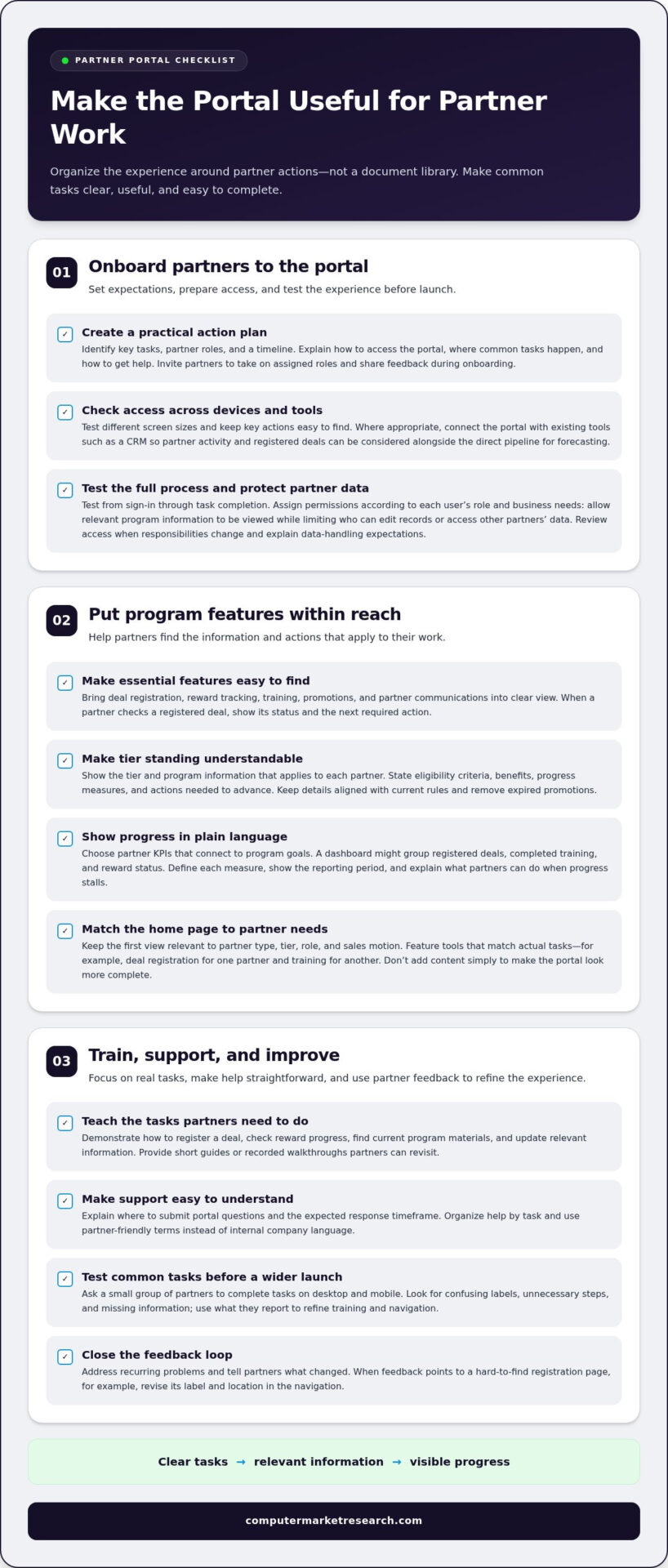
Give partners a reason to use the portal by making essential program tasks clear, accessible, and useful. Organize the experience around partner actions, then make responsibilities and progress easy to understand.
-
Onboard Partners to the Portal
Start onboarding with a practical action plan that identifies key tasks, partner roles, and a timeline. Explain how users access the portal, where they complete common tasks, and how to get help. Invite partners to take on their assigned roles and share feedback during onboarding, following the approach recommended by the U.S. Environmental Protection Agency.
Make mobile access straightforward by testing the portal on different screen sizes and checking that key actions remain easy to find. Where appropriate, connect the portal with existing tools such as a CRM, so partner activity and registered deals can be considered alongside the direct pipeline for forecasting. Before launch, test the entire process, from sign-in through task completion.
Protect partner data by assigning permissions according to each user’s role and business needs. For example, let users view relevant program information while limiting who can edit records or access other partners’ data. Review access when responsibilities change, and explain data-handling expectations during onboarding.
-
Expose Program Features and Tiers
Put useful program features where partners can act on them, rather than treating the portal as a document library. Make deal registration, reward tracking, training, promotions, and partner communications easy to find. For example, a partner checking a registered deal should also be able to see its status and the next required action.
Show each partner the tier and program information that applies to them. State eligibility criteria, benefits, progress measures, and any actions needed to advance. Partners shouldn’t have to interpret internal labels or search separate files to understand their standing. Keep tier details aligned with current program rules and remove expired promotions.
Choose partner KPIs that connect to program goals, then show progress in an easy-to-use format. A dashboard might group registered deals, completed training, and reward status into clear sections. Define each measure in plain language, show the reporting period, and explain what partners can do when progress stalls.
Keep the home page relevant to partner type, tier, role, and sales motion. A distributor focused on deal registration may need a different first view from a partner focused on training. Make sure featured tools match actual partner tasks, and don’t add content simply to make the portal look more complete.
-
Provide User Training and Support
Train users on real tasks, not on every page in the portal. Demonstrate how to register a deal, check reward progress, find current program materials, and update relevant information. Provide short guides or recorded walkthroughs that partners can revisit when completing those tasks independently.
Set a clear process for portal questions, including where to submit them and the expected response timeframe. Organize help content by task, using partner-friendly terms rather than internal company language. When users report a recurring problem, address it and communicate the change so partners can see that their feedback improved the experience.
Before launch, ask a small group of partners to complete common tasks on desktop and mobile. Watch for confusing labels, unnecessary steps, and missing information. Use their feedback to refine training and navigation before inviting the wider partner network.
Gathering partner usability feedback
Ask partners where the portal creates extra work, then use their examples to prioritize fixes. Two-thirds of partners report disappointment with the portals they use most often, particularly because of limited personalization.
Common barriers include confusing internal terminology, hard-to-find content, and pages that don’t fit a partner’s role. Address them by observing real tasks and asking focused questions.
-
Identify Reasons Partners Avoid Portals
Ask partners to walk through a real task, such as finding a promotion or checking program requirements. Note where they pause, backtrack, or switch to email or a spreadsheet. These actions reveal practical barriers more clearly than a general question about whether the portal is easy to use.
Check whether labels use internal language that partners may not recognize. For example, replace a department-specific acronym with the phrase partners use in sales conversations. Look for duplicate documents, outdated content, and a home page that hides the information partners need first.
-
Address Usability Feedback
Turn feedback into specific changes, then tell partners what changed. If users can’t find a registration page, revise its label and location in the navigation. If a partner type needs different resources, adjust its page to make relevant actions prominent. Avoid changing several elements at once without noting what each change is intended to fix.
Use short partner pulse surveys with 1-3 questions instead of relying only on annual or semi-annual surveys. Ask what task was difficult, what information was missing, or what would reduce effort. Keep each question tied to an action, such as improving search terms or clarifying a program page.
- Test proposed changes with users before applying them across the portal. Ask partners in different roles, partner types, and regions to complete common tasks. Check whether the right information stands out for each group, and note where people interpret a label differently. Their task results and comments can reveal issues internal reviews miss.
For example, a regional sales partner and a distributor may need different information first. If both groups struggle to find the same resource, improve its shared navigation. If only one group struggles, tailor that group’s view rather than adding more links for everyone.
- Maintain a feedback log that connects each reported issue to an owner, a planned change, and a follow-up test. Group recurring comments by theme, such as navigation, terminology, or personalization. This helps portal managers distinguish an isolated preference from an obstacle affecting multiple partner workflows.
After making a change, ask the original users to repeat the same task. Compare their route through the portal and ask whether the revised labels make sense. Close the loop with a brief update explaining the adjustment, so partners know their feedback led to a visible improvement.
Using newsletters to encourage portal visits
Use newsletters to connect each partner update with a useful destination in the portal. For a portal launch, tell partners what’s changing, which tasks they can complete there, and where to sign in.
Make the portal the clear destination for launch instructions, current program resources, and follow-up updates. Link directly to the relevant page so partners can act without searching through email or navigating from the home page.
- Announce the launch with a practical, partner-focused message. Explain what partners can do in the portal, such as find program resources or review updates, and identify the first action to take. Include the sign-in path and a direct link to launch information. Avoid a broad announcement that lists features without explaining how they support partner work.
For example, direct partners to the page where they can start a task, rather than sending them to a general home page. State which communications will continue through the portal so partners know where to find future program information.
- Send a monthly newsletter featuring selected portal content and links to the original material. Choose timely items, such as a new promotion, updated program guidance, or an upcoming training resource. A short summary helps partners decide what matters, while the link takes them to the authoritative version in the portal.
Keep the selection focused. If every newsletter contains a long list of unrelated documents, partners may stop distinguishing useful updates from routine announcements. Organize items by partner task or program topic, and use clear labels that match the language partners use.
- Use each newsletter item to explain why it’s worth visiting the portal. Instead of writing “new content available,” tell partners what they can do with it. For example, a message about updated promotion details can link to the portal page where partners can review eligibility and next steps.
Link to the source page, not a downloaded copy attached to the email. This helps partners return to the current version and avoids confusion between old attachments and updated portal information.
- Make internal communications point to the same destination. Ask partner-facing teams to direct partners to the portal for routine questions, and add the portal link to email signatures. Consistent references help partners learn where to find program information instead of expecting separate materials from each employee.
Pair the link with a short explanation, such as “Find current partner program resources here.” Avoid sending partners to the portal without context, especially when the message concerns a specific task or update.
- Review newsletter engagement alongside partner questions and portal activity. If an update generates repeated questions, clarify the newsletter summary or improve the linked page. If partners click a link but still ask for the same information, check whether the destination answers their question clearly.
Use each issue to remind partners of relevant portal benefits and enhancements. A concise note about a changed page or newly available resource gives returning users a reason to visit again. Explore partner portal workflows as you plan how communications can direct partners to useful tasks.
Building trust and relationships with partners
Build trust through consistent communication, transparent program decisions, and dependable follow-through. Every portal interaction should reinforce that partners can find accurate information and get a clear response.
- Set clear expectations for partner questions. Explain where users should submit a portal request, what information to include, and when they can expect a response. For example, ask partners to include a deal reference when requesting a status update. Set a realistic response timeframe and apply it consistently across the team.
When a response needs more time, acknowledge the request and explain the next step. Silence can leave partners unsure whether their issue reached the right person. A brief status update gives them a reliable point of reference.
- Make program decisions easy to understand. For each promotion or incentive, explain eligibility, required actions, and how progress is evaluated. If a partner’s submission needs correction, identify the missing information and explain how to resolve it. Specific guidance is more useful than a generic rejection message.
Keep explanations aligned with the program information in the portal. If an internal team changes a requirement, update the relevant partner-facing material before directing users to it. Conflicting instructions in emails and portal pages can undermine confidence in both.
- Use self-service to support partners, not to distance them. Let partners complete routine tasks through the portal, while making it clear how to get help with exceptions. For example, a partner may update a standard record independently but need direct assistance when a submission involves unusual circumstances.
Avoid completing every portal task on a partner’s behalf. Doing so can create dependency and hide where users encounter friction. Instead, guide them through the process once, then improve the instructions if the task remains difficult.
- Make communication relevant to each partner relationship. A new partner may need clear explanations of program processes, while an established partner may value timely updates about changes affecting active work. Address partners by role or program context, and connect each message to an action they can take.
Partner managers can also use conversations to understand business priorities beyond portal activity. Record recurring needs, such as confusion about a program rule, and use that information to improve shared resources. Keep sensitive, partner-specific discussions in appropriate channels.
- Close the loop after feedback or support requests. Tell partners what changed, what remains unresolved, and where to find updated information. For example, if an instruction was unclear, point directly to the revised section and summarize the improvement.
Consistency matters across the partner team. Align responses so sales, operations, and program staff don’t give conflicting explanations. A shared record of decisions and updates helps every representative maintain a dependable relationship with partners.
How do you onboard partners to a new portal step by step?
Use a staged onboarding plan that takes partners from access setup to independent task completion. The U.S. Environmental Protection Agency recommends identifying key tasks, partners, and a timeline, then inviting partners to take on roles and give feedback.
- Define the onboarding outcome before sending invitations. List the partner tasks the portal should support, such as finding program guidance or submitting a registration. Assign an internal owner to each task, then set a sequence for preparation, access, practice, and launch. This gives partner-facing teams a shared plan to follow.
Separate required launch tasks from optional exploration. For example, ask users to test the sign-in process and complete a priority workflow. Keep secondary features available for later learning so the first session stays focused on what partners need immediately.
- Identify which partners need access and who should approve each account. In a Centers for Disease Control and Prevention program, a partner must be identified as needing application access before registering. Apply the same clear sequence to your workflow: establish the partner’s need, assign the right access, then explain the next registration step.
Keep an access record that connects each user with their organization and role. This helps administrators resolve account questions without confusing one partner’s access with another’s. Give partners a clear way to report sign-in problems.
- Assign partner roles before opening the portal. Tell each partner which action they own, who supports that work internally, and what information they need to complete it. For example, a designated sales contact might handle deal submissions, while another user manages program resources.
Check that assigned roles match actual partner responsibilities. Don’t give every user identical access by default. Clear ownership prevents duplicate submissions and helps users understand where their work begins.
- Prepare a guided practice task using realistic but non-sensitive examples. Ask partners to sign in, find a named resource, and complete a sample workflow. Observe the steps without taking control of the screen. Note unclear instructions, access barriers, and points where users need help.
After the walkthrough, ask partners to explain the process in their own words. If they can’t identify the next action, revise the instructions or navigation before onboarding more users. This checks understanding, not just successful login.
- Invite partners to take on their planned roles and give feedback during onboarding, as the U.S. Environmental Protection Agency recommends. Provide a simple way to report a blocker, such as a missing permission or confusing task label. Record each issue, its owner, and the next step toward resolving it.
Close the loop by telling partners what changed or how to proceed. After launch, review access requests, incomplete workflows, and recurring support questions. Use those signals to refine the onboarding sequence for the next partner group.
Computer Market Research: PartnerPortal™
Computer Market Research offers PartnerPortal™ to centralize partner onboarding, deal registration, and performance tracking. It’s a practical next step when scattered information and manual workflows make program participation harder to manage.
For programs that also need structured funding or incentive processes, Co-op/MDF Management and Rebates & Incentives can help. These offerings support clearer administration of channel activity and partner programs.
If you’re looking to make your partner portal more useful and manageable, contact Computer Market Research or visit computermarketresearch.com.
Make portal adoption part of your partner strategy
The practical answer to how to get partners to use your portal is to treat adoption as an ongoing operating discipline, not a launch task. Assign ownership for reviewing partner activity, resolving friction, and keeping program information aligned with current processes. This gives your team a repeatable way to respond as partner needs and workflows change.
Start with one focused improvement. Review a frequently used task, identify where partners struggle, and assign an owner to address it. Then assess whether the change makes the task easier to complete. Small, deliberate improvements can keep your portal relevant without adding unnecessary content or complexity.
When you’re ready to explore a portal approach that supports partner program management, take the next step with Computer Market Research. A clear adoption plan can help turn your portal into a more useful part of everyday partner work.
Frequently Asked Questions
Partner Portal Usage: How do I increase it?
A practical answer to how to get partners to use your portal is to identify where partners abandon key workflows and remove the obstacles. Compare activity across partner groups and tasks instead of relying on total visits alone. For example, frequent logins with few completed registrations may point to unclear requirements. Review the process with affected partners, make a focused improvement, and track whether more users complete the task afterward.
How do you drive partner portal adoption?
To get partners to use your portal, connect it to work they already need to do. Start with a limited partner group, observe real tasks, and resolve access or workflow issues before expanding invitations. Give internal teams consistent guidance on where to direct partners. A coordinated rollout helps establish a shared routine instead of relying on one announcement or expecting partners to discover the portal independently.
Is the portal easy to use?
A portal is easy to use when partners can complete a relevant task without internal translation or repeated assistance. Ask someone unfamiliar with a page to find a specific item and explain what they would do next. Watch for hesitation, misread labels, or unnecessary navigation. Successful sign-in alone doesn’t prove usability; task completion and user understanding offer a more meaningful assessment.
What features make a partner portal useful and easy to use?
Useful features help partners find information, understand its status, and act on it. Clear search and navigation, concise instructions, visible progress indicators, and current program materials can reduce uncertainty. For example, a submission page should show its status and explain any next action. Prioritize features according to partner workflows, since extra tools can add complexity without improving the work users need to complete.
How can you motivate partners to adopt and regularly use a portal?
Give partners a practical reason to return by making the portal a dependable place for program work. Recognize useful participation through relevant updates, enablement, or communications, and connect those benefits to partner goals. Don’t measure success by logins alone. If visits don’t lead to completed tasks or useful information, examine the experience and address friction before sending more reminders.
What incentives increase partner portal adoption?
Incentives work best when they reward meaningful program participation rather than portal visits alone. For example, connect an existing promotion or reward process to actions partners can complete and track through the portal. Explain eligibility and status clearly so partners understand how participation relates to the benefit. Avoid creating a separate reward for logging in, which may increase visits without supporting productive channel activity.
What metrics measure partner portal adoption and engagement?
Measure adoption through active partner organizations, returning users, and completion of priority workflows. Track engagement with task-level indicators, such as completed registrations, resource use, or submissions that need correction. Pair activity data with partner feedback to understand why a workflow stalls. More visits without better task completion may signal friction, while repeat use of a valuable workflow suggests the portal supports partner work.

Article by
Del Heles
Del Heles is the founder and CEO of Computer Market Research (CMR), a channel management software company he launched in 1984. With more than 40 years of experience, he’s known for helping manufacturers and distributors simplify complex partner programs through practical, customer-focused technology solutions.