

What if stronger deal control didn’t mean adding more steps for partners? Channel deal registration software should make submissions, approvals, and handoffs easier to manage, not create another disconnected workflow. When deal details sit across spreadsheets, email, and separate systems, partner teams and sales staff can struggle to see what has been submitted, who needs to act, or what has changed.
That challenge is familiar to channel leaders: manual processes can slow coordination, while a broad partner relationship management platform may include more than a deal registration program needs. The right choice depends on how well the software supports your actual partner-to-sales workflow, from submission through approval and opportunity tracking.
This guide offers a practical framework for assessing registration capabilities, comparing workflow and reporting tools, and checking how a solution fits your partner program and connected CRM or ERP systems. It also explains how to distinguish focused deal registration functions from broader PRM capabilities. Computer Market Research’s PartnerPortal centralizes channel program management, while Channel Sales Management supports deal registration and opportunity management.
Key Takeaways
- Use channel deal registration software to create a consistent process for submitting, reviewing, and tracking partner opportunities.
- Map each stage of the review workflow and decide what opportunity information your team needs to capture.
- Compare solutions by workflow fit, partner usability, reporting, integrations, and scalability. Separate core registration needs from broader PRM capabilities.
- Prepare for adoption by documenting approval ownership, decision rules, data requirements, integrations, and partner communications.
- Explore how CMR’s Channel Sales Management supports deal registration, opportunity management, and SPIF management within its PartnerPortal PRM platform.
What channel deal registration software does for partner sales
Channel deal registration software is a system partners and vendors use to submit, review, and track sales opportunities introduced through the channel. It keeps opportunity details and review status in a centralized record. That gives the people involved a shared reference instead of relying on separate spreadsheets, inboxes, or handoff notes.
Deal registration can be a focused capability or part of a broader partner relationship management platform. A PRM platform may bring together several partner program activities, while registration software centers on opportunity submission and review. The Partner Relationship Management (PRM) overview provides additional context on the broader discipline and its tools.
A short explainer can help clarify how partners and vendors interact during registration:
How deal registration fits into channel sales
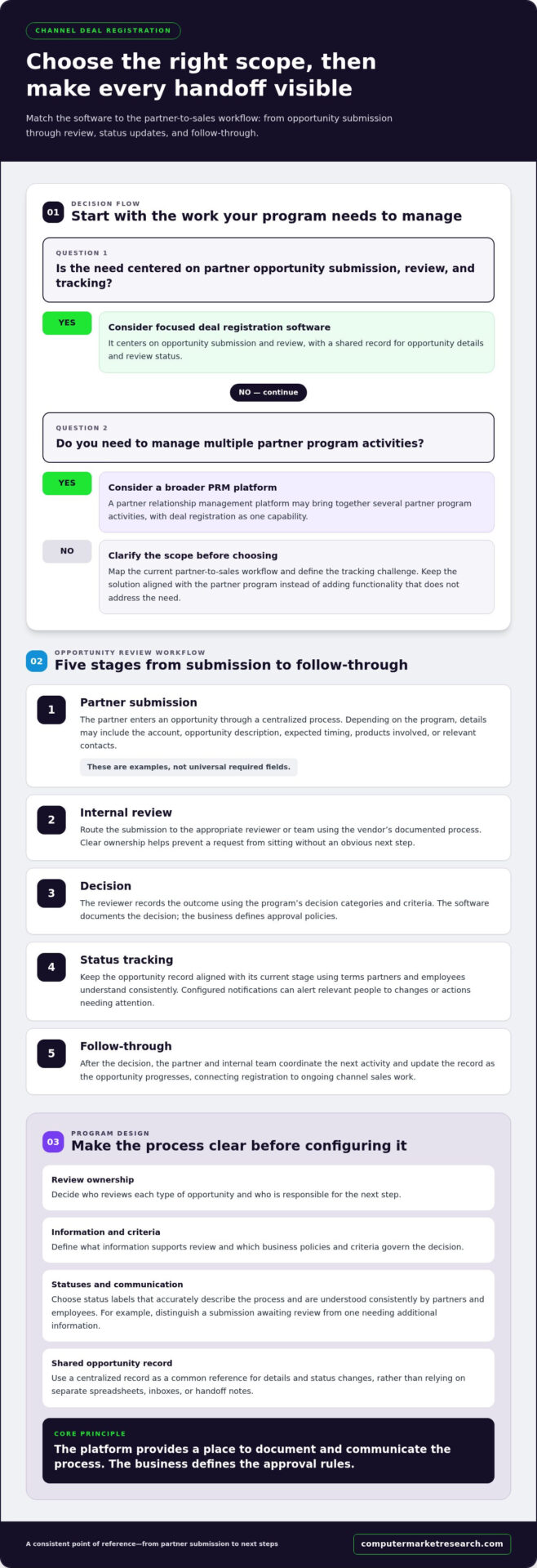
A partner identifies an opportunity and submits its details through the registration process. The vendor reviews the information according to its program policies, then records a decision or status. Those policies belong to the business, not the software. The platform provides a place to document and communicate the process; it doesn’t define the vendor’s approval criteria.
Once the status is recorded, partner and internal teams can refer to the same opportunity record when coordinating next steps. For example, a sales representative can see whether a submission is awaiting review or has a recorded decision, rather than relying on a forwarded email that may be out of date. The value is a consistent point of reference, not a universal approval rule.
When manual deal tracking becomes difficult
Manual tracking can work while submissions are limited and ownership is clear. As partner activity grows, opportunity details can become scattered across spreadsheets, email threads, and individual sales records. Teams may spend time reconciling versions, finding the person responsible for a review, or responding to partner questions about status. These are coordination problems: the information exists, but it isn’t organized around a shared process.
A centralized system gives teams a structured place to record submissions and status changes, making handoffs easier to follow. It also gives program owners a clearer foundation for managing how opportunities move between partners and internal reviewers. For a wider view of how these processes fit into channel operations, see the channel sales management software overview.
The practical fit depends on whether a business needs focused registration workflows or a broader PRM environment for managing multiple partner activities. Define that scope first. It helps keep the solution aligned with the partner program instead of adding functionality that doesn’t address the current tracking challenge.
How deal registration software moves an opportunity through review
A useful registration workflow makes the path from partner submission to internal decision visible to everyone who needs to act. The business defines its review policies, ownership, and status language. The software provides a structured place to carry out and record that process. Since each partner program differs, fields and approval routes should reflect how your team evaluates opportunities.
Deal registration workflow summary: A partner submits an opportunity, the vendor reviews it, records a decision, updates its status, and coordinates the next steps.
- Partner submission. The partner enters an opportunity through a centralized process. Depending on the program, the business may capture details such as the account, opportunity description, expected timing, products involved, or relevant contacts. These are examples, not universal required fields.
- Internal review. The submission is directed to the appropriate reviewer or team according to the vendor’s documented process. Clear ownership helps prevent a request from sitting without an obvious next step.
- Decision. The reviewer records the outcome using the program’s decision categories and criteria. The software documents the decision, while the business defines its approval policies.
- Status tracking. The opportunity record reflects its current stage, using terms partners and employees understand consistently. Configured notifications can help make relevant people aware of changes or actions that need attention.
- Follow-through. After the decision, the partner and internal team coordinate the next activity and update the record as the opportunity progresses. This keeps registration connected to ongoing channel sales work.
From partner submission to approval status
Define the submission path before configuring it. Decide who reviews each type of opportunity, what information supports that review, and which status labels accurately describe the process. For example, a team might distinguish a submission awaiting review from one that needs additional information. The goal isn’t to impose a universal sequence, but to make your own sequence clear. This structure supports a consistent channel sales strategy by connecting partner activity with internal review and follow-up.
Where handoffs need clear ownership
Three handoffs deserve particular attention: submission to reviewer, review to internal follow-up, and decision to partner communication. For each, document who is responsible, what action comes next, and how the status should be recorded. If responsibility is shared, identify who coordinates the handoff. A defined workflow makes accountability easier to understand, but software alone can’t guarantee approval speed or prevent channel conflict.
As you configure the process, test it against realistic cases: a complete submission, one that needs clarification, and a decision that requires follow-up. This can reveal unclear status definitions or gaps in ownership before partners use the workflow. Teams evaluating how a platform supports their program can also use a 90-day free trial to explore its fit with their review process.
How to evaluate channel deal registration software
Evaluate channel deal registration software against the work your partner program needs to support, not the length of a feature list. Start by documenting current requirements, then compare how each option handles workflow, partner access, reporting, integrations, and expected program growth. Separate must-haves for registration from capabilities that matter only if you’re also looking to manage wider partner activities.
Use this framework to keep the comparison grounded in operational needs:
- Workflow fit: Can the system reflect your submission steps, review ownership, approval rules, and status definitions? Focus on whether the process can match your documented program, rather than assuming every business needs the same sequence.
- Partner usability: Can partners submit and follow opportunities without unnecessary friction? Consider which details they need to provide, whether instructions are clear, and how they can find relevant status information.
- Reporting: Identify the questions channel leaders need reports to answer. These might include the volume and value of registered opportunities, progress by status, or outcomes by partner. Assess whether the available reporting aligns with those questions.
- Integrations: Map which CRM and ERP systems need to exchange channel data, and identify the records or updates involved. Compare that map with the integration approach offered. An integration checkbox alone doesn’t establish that the required data flow is covered.
- Scalability: Consider whether the process can accommodate anticipated changes to partner types, review ownership, and program structure. Look for room to grow without adding complexity your team doesn’t need now.
Workflow, access, and reporting requirements
Assess the experience from both sides of the submission. Internal users need clear review responsibility and access to the deal information relevant to their role. Partners need a straightforward way to submit and understand progress. Review status labels, visibility, and reporting together. A dashboard is useful only if its information supports decisions your channel team actually makes.
Before comparing platforms, write down essential requirements and distinguish them from preferences. For example, a consistent submission record may be essential, while advanced partner training tools may be optional if training is managed elsewhere. This helps reviewers score products against the same criteria and keeps attractive extras from obscuring gaps in core registration workflows.
Integration and platform scope
Integration planning starts with data. Determine where partner opportunities originate, which system should hold or update each record, and what information users need across systems. CMR states that its solutions integrate with ERP and CRM systems and provide real-time reporting. These capabilities may matter to organizations seeking connected channel data.
Then decide whether your need is focused registration or broader partner program management. Include onboarding and training in the assessment when they’re part of the intended platform scope, but don’t inflate a registration-only requirement with capabilities your team doesn’t need. A broader partner management platform may suit teams consolidating several partner activities; a focused tool may better align with a narrower need. Choose based on documented priorities.
Prepare your team to implement and adopt deal registration software
Implementation is easier to manage when the team agrees on the process before configuring the platform. Treat readiness as a shared responsibility: channel operations, sales, IT, and partner-facing teams each bring context that affects how the workflow should function. Partners also need clear instructions and a practical way to understand the updated process.
Use this checklist to identify decisions and dependencies before setup begins:
- Current workflow: Map how submissions move through review, decision, communication, and status tracking.
- Roles: Assign an owner to each review, follow-up, and partner communication handoff.
- Decision rules: Document who can approve or decline an opportunity and how exceptions are handled.
- Data: Identify the information partners submit and internal teams need to review and follow opportunities.
- Integrations: List relevant CRM or ERP connections and the channel records or updates involved.
- Communications: Prepare partner instructions and internal guidance for the revised process.
Document your current registration process
Start with the workflow as people use it today, not just the process described in existing documentation. Trace a typical submission from arrival to decision and follow-through. For each handoff, record the responsible team, the information it needs, and how the next person learns that action is required. Note recurring exceptions, such as submissions that need clarification, without treating them as universal program rules.
This review helps expose undefined ownership before it becomes part of the new workflow. Confirm approval authority and decision rules with the teams that will apply them, then translate those decisions into process requirements. If an exception has no agreed owner, resolve that responsibility before configuration. A clear source of truth for process decisions also gives the implementation team a stable basis for testing.
Plan integrations and partner adoption
For each CRM or ERP connection, specify which channel data is relevant, where it originates, and which teams use it. CMR states that its solutions integrate with ERP and CRM systems, so organizations can include those connections in evaluation and implementation planning. Scope depends on the systems and data flows involved, so timing should reflect business requirements and integration needs.
Adoption needs preparation on both sides of the partner relationship. Internal users need role-specific guidance on reviewing submissions, updating records, and communicating decisions. Partners need concise instructions on submitting opportunities and interpreting status updates. The partner management platform overview shows how registration can sit within broader partner lifecycle needs when that wider scope is relevant.
Before rollout, walk through representative submissions with internal users and partner-facing teams. Use their feedback to identify unclear instructions, missing ownership, or data requirements that don’t match the documented process. Once the workflow and integration scope are defined, evaluate the platform against your implementation requirements.
Evaluate CMR’s channel deal registration approach
Once your requirements are documented, compare them with the capabilities and platform scope CMR provides. Computer Market Research serves manufacturers, distributors, and global enterprise companies that use indirect sales channels. Its Channel Sales Management capabilities include deal registration, opportunity management, and SPIF management, supporting organizations that want to assess registrations alongside related channel sales activities.
PartnerPortal is CMR’s flagship PRM platform for centralized channel program management. CMR describes its solutions as cloud-based, with ERP and CRM integration and real-time reporting. The company also brings over 40 years of channel expertise. These details offer useful context for evaluation, but the key question is whether the platform aligns with your documented workflow, data needs, and partner program structure.
Assess CMR against your buying criteria
Use the requirements established earlier in your evaluation to examine the fit. If your priority is opportunity oversight, consider how deal registration and opportunity management relate to the process your teams have defined. If reporting matters, assess how real-time reporting can support the channel questions your organization needs to answer. For integration planning, compare your CRM and ERP requirements with CMR’s stated integration capabilities.
Keep the assessment specific. A capability matters when it supports a defined business need, not simply because it appears in a product description. Consider whether your internal reviewers and partner-facing teams can use the proposed workflow consistently, and whether centralized channel program management matches the scope you’re seeking. CMR’s platform is intended for organizations working through indirect sales channels, including manufacturers, distributors, and global enterprises.
Customer testimonials can provide additional perspective, but evaluate each one in context. Review the stated wording and attribution, then consider whether the described experience relates to your own requirements. Don’t infer a particular workflow, integration, or outcome from a testimonial unless its wording supports that conclusion.
Evaluate the platform with a 90-day free trial
CMR offers a 90-day free trial, giving organizations a defined period to assess the platform against documented requirements. Use that time to examine relevant registration and opportunity workflows, review how reporting relates to your channel questions, and evaluate ERP or CRM integration needs with your team. Involve the people who will manage submissions, review opportunities, and communicate with partners so the assessment reflects day-to-day use.
Before the evaluation, select representative scenarios and agree on what a good fit means for your organization. That might include whether the workflow reflects your approval ownership, whether status information is useful to the people who need it, and whether reporting supports your operating decisions. This keeps the trial focused on fit rather than feature volume.
If CMR’s approach aligns with your partner program requirements, start your 90-day free trial to evaluate the platform against those priorities.
Turn your evaluation into a confident next step
The best channel deal registration software is one your team can use within a clearly defined partner process. Before moving forward, choose a representative workflow and assess day-to-day fit: where information is entered, how teams coordinate, and what visibility helps them make decisions. That practical test can turn evaluation criteria into a focused implementation plan.
Bring partner-facing and internal users into the process early. Their feedback can reveal friction that a feature comparison may miss, while helping establish shared expectations for adoption. CMR’s customer testimonials from D-Link, Buffalo, and Jabra offer additional perspectives as you consider the platform.
Use the trial to explore how the platform aligns with your team’s requirements and partner program. Start your 90-day free trial and take the next step toward a more coordinated registration process. With a clear evaluation plan, your team can move forward with confidence.
Frequently Asked Questions
What is channel deal registration software?
Channel deal registration software gives partners and vendors a shared system for recording partner-sourced sales opportunities and their review status. It keeps information tied to an opportunity rather than dispersed across separate files or inboxes. The software supports the registration process, while the vendor sets its own rules for evaluating submissions. It may be a focused tool or one capability within a broader partner management platform.
How does deal registration software work?
Partners enter opportunity details, and the vendor’s team reviews the submission according to its program process. The system records the opportunity and its status so authorized users can refer to the same information as the review progresses. For example, if a reviewer needs more detail, the team can record that follow-up in relation to the submission. The exact steps, decision categories, and responsibilities depend on the vendor’s process.
What features should deal registration software include?
Prioritize capabilities that support your process, such as configurable submission forms, review routing, clear status visibility, notifications, reporting, and CRM integration. Duplicate detection may also be useful if overlapping submissions are a concern for your program. Treat these as evaluation criteria, not a universal checklist. A feature is valuable when it addresses a defined operational need and can be used consistently by partners and internal reviewers.
Can deal registration software integrate with a CRM?
Yes. CMR states that its solutions integrate with CRM systems. Before evaluating an integration, identify which CRM records and channel details your team needs to connect with registration activity. For example, determine whether users need to reference account or opportunity information while reviewing submissions. Then assess the integration in the context of your existing systems and data requirements, rather than assuming every CRM connection handles information in the same way.
How do you choose deal registration software for a channel program?
Start with the operational issue you need to address, then assess each option against a realistic partner scenario. Consider whether the system fits your review process, is usable by partners, provides reporting your team can act on, and aligns with your CRM or ERP environment. The right channel deal registration software should match the program’s documented needs. Avoid selecting a platform based only on the number of available features.
Does CMR offer a free trial for deal registration software?
Yes. Computer Market Research offers a 90-day free trial. Use the evaluation period to assess relevant workflows with the people who will manage submissions and review opportunities. Define practical evaluation scenarios in advance, such as a routine submission and one that requires follow-up. This gives your team a structured way to assess platform fit against its channel program requirements.

Article by
Del Heles
Del Heles is the founder and CEO of Computer Market Research (CMR), a channel management software company he launched in 1984. With more than 40 years of experience, he’s known for helping manufacturers and distributors simplify complex partner programs through practical, customer-focused technology solutions.