

A dependable PRM-to-ERP integration starts with workflow decisions and data ownership, not the connector. Connecting PRM to ERP systems can reduce duplicate entry, but only when partner, order, and financial records have clear owners and consistent synchronization rules.
If your teams are re-entering information or reconciling mismatched records, the frustration is understandable. Each system may hold useful data, yet uncertainty about which one is authoritative can make channel operations harder to trust. A reliable connection aligns those workflows instead of creating another place for discrepancies to hide.
This guide explains which PRM and ERP processes are practical to connect, how to assign ownership for shared data, and how to plan synchronization and implementation. It also covers how to evaluate integration patterns against business requirements. For organizations using PartnerPortal™ for partner relationship management, a well-planned integration can support channel visibility and reduce manual administration. The result is a more controlled foundation for partner and operational workflows.
Key Takeaways
- Define the channel workflows the integration should support before selecting an architecture.
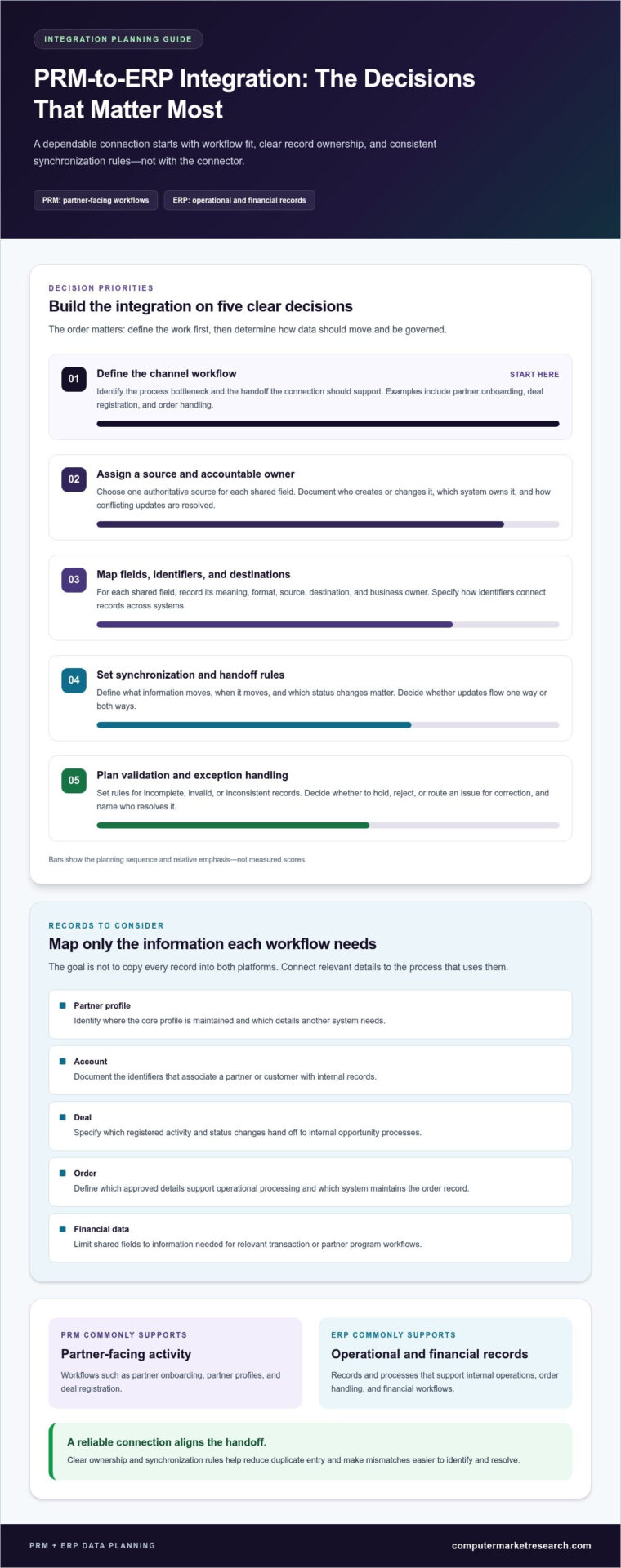
- Map each record to a source system, destination, and accountable data owner to reduce conflicting updates.
- Compare integration patterns by system complexity, governance, monitoring, and maintenance needs.
- Plan connecting prm to erp systems in testable stages, with clear owners for validation and exception handling.
- See how PartnerPortal™ supports partner onboarding, deal registration, and performance tracking alongside ERP workflows.
Why connect PRM to ERP systems? Start with channel workflows
Connecting PRM to ERP systems means creating a controlled data exchange that supports partner-facing activity and the operational or financial processes behind it. The goal isn’t to copy every record into both platforms. It’s to make relevant information available where a workflow needs it, while keeping responsibility for creating and maintaining each record clear. Start by understanding how Partner Relationship Management (PRM) supports partner interactions, then identify where those interactions meet internal operations.
Without a defined connection, teams may re-enter partner details, reconcile conflicting account records, or lack a complete view of what happens after a deal is registered. These gaps can slow handoffs between channel, sales, operations, and finance teams. Integration is most useful when it addresses a specific process bottleneck, rather than being pursued simply because two systems can exchange data.
For a concise overview of ERP systems and their role in business operations, watch this video:
Think of integration as a workflow agreement: what information moves, when it moves, and which team relies on it next. A structured approach to channel data management systems can help teams organize these decisions around consistent partner and business records.
Which channel workflows benefit from PRM and ERP integration?
Start with processes that cross team boundaries. During partner onboarding, a PRM may manage partner-facing steps and profile details, while selected account information may also be needed in an ERP. Define the shared fields and the event that triggers an update. For example, specify whether an account record is created after onboarding approval or whether an existing account is matched first.
Deal registration is another practical example. An approved deal may need to inform an internal opportunity process and later connect to order handling if it progresses. Approved partner activity can also provide context for operational or financial workflows. Map the exact handoff, including which status changes matter and which team acts on them, to prevent unnecessary data transfers.
What should each system own?
PRM and ERP systems have different responsibilities, but the boundary depends on the organization’s processes. A PRM commonly supports partner-facing workflows such as onboarding and deal registration. An ERP commonly supports operational and financial records. Define the division based on how teams create, use, and maintain each record.
Assign one authoritative source for each shared field. For example, one system might maintain a partner’s workflow status while the other owns an operational account identifier. Document who can create or change each field, whether updates flow in one or both directions, and how conflicts are resolved. These decisions make integration behavior predictable and give staff a clear reference when records don’t align.
Map PRM-to-ERP data flows before designing the integration
Before selecting an integration approach, document what information each workflow needs and where that information should go. A field-level map gives business and technical stakeholders a shared reference, reduces ambiguity during configuration, and highlights unnecessary data movement. It also surfaces ownership and validation decisions before they become exceptions in a live process.
Start with an inventory of candidate records. For each one, note its purpose, source, destination, and accountable owner. The Enterprise Resource Planning (ERP) systems overview from Oracle provides useful context for the operational role ERP records can play. Your map should reflect your organization’s workflows rather than assume a universal division of responsibilities.
- Partner profile: Used for onboarding and partner-facing processes. Identify where the core profile is maintained and which details another system needs.
- Account: Used to associate a partner or customer with internal records. Document the identifiers that connect the account across systems.
- Deal: Used to track registered partner activity and its handoff to internal opportunity processes. Specify which status changes matter.
- Order: Used to support operational processing. Define which approved details must be available and which system maintains the resulting order record.
- Financial data: Used for relevant transaction or partner program workflows. Limit shared fields to what each role needs to do its work.
Create a field-level mapping for shared records
For each shared field, record its meaning, format, source, destination, and accountable business owner. Include identifiers and rules for required values. For example, if a partner ID links a PRM profile to an ERP account, specify which system creates the identifier and how the other system references it.
Flag duplicate identifiers, missing values, inconsistent date or status formats, and required transformations. Keep the mapping as a review document so business owners can validate what each field means and technical teams can use it to configure the connection. Standardization and data quality are central to effective channel data management systems.
Set data quality and access rules
Define what happens when a record is incomplete, invalid, or inconsistent. Decide whether it should be held for correction, rejected, or routed to an exception queue, and assign an owner to resolve it. Clear rules prevent silent failures from leaving teams with outdated or partial records.
Specify which roles may view or update partner, deal, order, and financial fields. Access should reflect workflow needs, not simply system availability. Assign monitoring responsibility too: identify who reviews failed transfers, recurring data issues, and mapping changes. These controls help keep synchronization accountable as processes evolve.
With the data map reviewed, teams can design connecting prm to erp systems around defined business requirements instead of assumptions. Treat the mapping as a working document and update it when workflows, field definitions, or ownership decisions change.
Compare PRM-to-ERP integration patterns and trade-offs
Once workflows and data responsibilities are defined, compare architecture patterns against the work they need to support. A limited exchange between two systems has different demands from a process involving multiple applications, data transformations, and teams. The right fit depends on the system landscape, workflow requirements, governance capacity, and ability to monitor and maintain the connection.
Three patterns are commonly considered. A point-to-point connection links systems directly. Middleware places an intermediary layer between systems to coordinate exchanges. A platform-led approach uses a broader platform to manage connections as part of its role. Evaluate each pattern against the actual systems and processes in scope.
- Point-to-point: A direct link may suit a narrow, stable exchange, but connected systems can become harder to manage as workflows or dependencies grow.
- Middleware: An intermediary may coordinate exchanges and transformations across systems, while adding another component to govern, monitor, and maintain.
- Platform-led: A platform may provide a central place to coordinate integration activity. Assess how it handles responsibilities, visibility, and change control.
When might a direct connection fit?
A direct connection may be appropriate when the exchange is limited, clearly defined, and manageable between the systems involved. For example, a specific partner or deal status might need to pass to an internal process. Before choosing this pattern, assign responsibility for monitoring errors and updating the connection when a field, workflow, or system changes. Direct doesn’t automatically mean simpler.
When should teams consider middleware or a managed integration?
An intermediary layer may help coordinate multiple systems, apply transformations, or route information according to workflow rules. Centralized oversight can make monitoring and governance more consistent, but it also creates design and operational responsibilities. Assign clear owners for configuration changes, failed exchanges, and ongoing maintenance. For broader context on partner-management concepts, consult a PRM and partner management guide.
Compare patterns using the same operational criteria rather than choosing by familiarity alone:
- System complexity: How many systems and workflow handoffs must the design support?
- Data volume and movement: What records need to move, and how often must the process support them?
- Governance: Who approves mapping changes and resolves ownership conflicts?
- Monitoring: How will teams detect and assign failed or incomplete exchanges?
- Maintenance: Who reviews the integration when business processes or connected systems change?
Use these answers to weigh the trade-offs and estimate the operational effort each pattern requires. A design for connecting prm to erp systems should fit current workflows and the organization’s capacity to manage change. During implementation planning, align the technical design with the selected systems, data mappings, and workflow requirements.
Implement a PRM-to-ERP integration in clear, testable stages
A controlled rollout turns the workflow and data decisions from earlier planning into a connection teams can operate and support. Keep the initial scope focused, assign owners before configuration begins, and treat testing as a business-process check as well as a technical one. Confirm that information moves as intended and that staff know what to do when it doesn’t.
Plan discovery, design, and ownership
Document the systems, workflows, stakeholders, and records included in the first phase. Confirm the mapping, update direction, validation rules, exception handling, and responsibilities with business and technical owners. Record dependencies and rollout boundaries so everyone understands what the initial integration will cover.
- Discover the workflow. Trace the process from the partner action that starts it through each internal handoff. Note which teams use the exchanged data and what decisions or tasks depend on it.
- Confirm scope and ownership. List the systems and records in scope, then assign a business owner for process meaning and a technical owner for configuration and system behavior. Name who approves mapping changes and who resolves data exceptions.
- Review the design. Validate field mappings, identifiers, update direction, required values, and rules for incomplete or conflicting records. Document dependencies, access needs, and rollout boundaries before configuration begins.
- Configure and prepare test cases. Use representative records to check routine processing, missing information, duplicate scenarios, and records that should be rejected or routed for review. Include permissions so testing reflects the roles that will use the workflow.
- Run a controlled rollout. Start with the agreed scope and have business users confirm that expected tasks can be completed across connected systems. Record defects, assign each one an owner, and resolve critical issues before expanding usage.
- Review and refine. After launch, monitor data quality, recurring exceptions, and whether the connected process supports its intended operational outcome. Assign responsibility for reviewing these signals and updating mappings when workflows change.
Validate the connection before expanding usage
Testing should prove more than successful data transfer. Confirm that a normal record arrives with the expected values, an incomplete record follows the defined exception path, and a duplicate doesn’t create confusing or conflicting results. Test rejected records too, so teams know how they’re identified and corrected. Then verify that authorized users can complete their expected tasks without seeing or changing information outside their role.
Before broadening the rollout, document remaining defects, support ownership, and the process for reporting and resolving issues. Expand in deliberate phases, using feedback and monitoring results to guide the next scope decision. This gives teams a practical way to manage change without assuming every workflow is ready at once.
Connecting prm to erp systems is an ongoing operational responsibility, not a one-time configuration task. Explore PartnerPortal™ with a 90-day free trial as you plan how partner workflows can fit into your channel operations.
Connect channel workflows with PartnerPortal™ and ERP systems
A well-planned integration connects defined channel processes to the operational records that support them. PartnerPortal™ provides a channel-management environment for partner onboarding, deal registration, and performance tracking. ERP systems support the organization’s operational and financial workflows. The connection should support handoffs between these environments without blurring which system owns each record.
Computer Market Research’s implementation services include setup, configuration, branding, and integration with clients’ existing CRM, ERP, or financial systems. The technical design can align with the processes, field ownership, and data-quality rules established during planning. A connection is useful when teams can interpret the information consistently and know how to handle exceptions.
Where PartnerPortal™ fits in the connected workflow
PartnerPortal™ centralizes partner-facing channel activity, giving teams an environment for onboarding, deal registration, and performance tracking. These workflows can connect with relevant ERP processes, such as internal order or financial activity, according to the organization’s scope and data responsibilities. The aim is a dependable handoff between partner activity and internal operations, with each system continuing to serve its defined role.
Explore how channel partner management software supports partner workflows. When assessing the platform in an integration context, focus on the tasks partners and internal teams need to complete, the information each step requires, and the records that should remain authoritative in each system. This keeps platform decisions grounded in channel requirements.
Evaluate the approach through a guided trial
A trial gives your team a practical setting to examine channel workflows and clarify integration priorities. Start by selecting representative partner processes, such as onboarding or deal registration, and note where teams need visibility into related internal records. Then review the field ownership, information quality, and handoffs to address in an implementation plan.
Use the evaluation to bring business and technical stakeholders together around practical questions. Which partner activities need consistent visibility? What information should cross system boundaries? Who will own exceptions and ongoing review? These discussions turn broad integration goals into requirements your team can assess. Use the trial to examine workflow fit and refine implementation scope.
With PartnerPortal™ and implementation services for existing business systems, Computer Market Research can help align channel workflows with an integration plan built around defined processes and data responsibilities. Claim your 90-day free trial to evaluate PartnerPortal™ against your channel workflow priorities.
Make integration readiness part of channel planning
Connecting prm to erp systems is an ongoing business decision, not a task that ends when information first moves between platforms. As partner processes evolve, revisit whether the connection still reflects how teams work and who relies on its data. Treat changes in channel strategy as a prompt to review integration priorities, so operational visibility remains useful rather than becoming another source of stale information.
A practical next step is to bring channel, operations, and technical stakeholders together around one real partner workflow. Identify what teams need to see, where decisions are made, and what an effective handoff looks like. That shared view can help your organization move from general integration goals to a focused evaluation of its channel-management approach.
Explore how PartnerPortal™ fits your priorities and choose the workflows your team wants to assess. Claim your 90-day free trial to take the next step toward more coordinated channel operations.
Frequently Asked Questions
What data should a PRM system share with an ERP?
Share the fields needed to support a defined handoff, rather than copying every partner record. For example, an ERP process may need a partner or account identifier and an approved deal reference to associate an order with channel activity. A finance workflow may need specific transaction details, while partner-facing notes may not be relevant. Decide field by field based on the task, user access, and the system responsible for maintaining the information.
Can a PRM and ERP system synchronize data in both directions?
Yes, bidirectional synchronization is a possible design, but it should be limited to fields with clear update rules. For example, a partner’s profile status might be maintained in the PRM while an internal account code is maintained in the ERP. If both systems can edit the same field, specify how conflicts are identified and resolved. The direction and frequency of updates should follow system capabilities and the agreed workflow.
How do you prevent duplicate partner records during PRM-to-ERP integration?
Define a reliable matching method before records are exchanged. Identify which existing field or combination of fields distinguishes a partner, then specify how the process handles a match, a possible match, or no match. For example, a repeated partner submission can be flagged for review rather than automatically creating another account. Clean up known duplicates and assign an owner to resolve uncertain matches to keep records consistent.
What is the difference between a PRM, an ERP, and a CRM?
A PRM organizes processes and interactions involving channel partners, such as partner onboarding and deal registration. An ERP supports internal operational and financial processes, while a CRM focuses on customer and sales relationship activity. Their responsibilities can overlap depending on an organization’s configuration. For instance, a partner-originated deal could appear in the PRM and relate to an opportunity tracked in a CRM, while an ERP handles a later order workflow.
Does PRM-to-ERP integration require middleware?
No. Middleware is one possible architecture, not a universal requirement. A limited exchange between two systems might use a direct connection if the systems and workflow support it. An intermediary may be useful when information must be transformed or coordinated across several systems. Compare the options based on governance, monitoring, maintenance responsibilities, and workflow complexity. Choose the architecture to fit the requirements.
How do you test a PRM-to-ERP integration before launch?
Test representative scenarios in a controlled environment before expanding use. Include a valid record, a record with a missing required field, a duplicate, and one that should be rejected or reviewed. Check that values arrive in the intended fields, users can complete their assigned tasks, and errors reach the person responsible for resolving them. Record defects and verify corrections with the same test cases before moving to a broader rollout.
Can PartnerPortal™ integrate with an existing ERP system?
Computer Market Research provides implementation services that include integration with clients’ existing ERP systems. Planning starts with the workflow and information the connection needs to support, then aligns the implementation with defined field responsibilities and process requirements. The implementation plan should account for the systems, integration requirements, and project scope.

Article by
Del Heles
Del Heles is the founder and CEO of Computer Market Research (CMR), a channel management software company he launched in 1984. With more than 40 years of experience, he’s known for helping manufacturers and distributors simplify complex partner programs through practical, customer-focused technology solutions.