

What if the first sign of a stockout isn’t low inventory, but a partner report that’s late, incomplete, or missing? Avoiding stockouts with channel visibility starts with separating a real inventory risk from a gap in the data. When distributor inventory and sell-through arrive in inconsistent formats, teams can’t confidently compare them, so replenishment decisions often rely on spreadsheets and manual follow-up.
Connecting partner inventory and sales signals gives teams a clearer basis for spotting risks and coordinating a response. Visibility alone isn’t enough, though. Data needs validation, exceptions need owners, and replenishment decisions need a repeatable process.
This guide explains how to use partner inventory and POS signals to identify potential stockouts earlier, distinguish low stock from stale or missing reports, and coordinate follow-up across teams. It also shows how centralized channel data management can support that work. PartnerPortal™ brings partner data together and supports real-time visibility into channel inventory, giving teams a more informed starting point for responding to stockout risk.
Key Takeaways
- Separate partner inventory risks from warehouse shortages and point-of-sale stockouts to focus the right response.
- Compare partner inventory, POS, order, and ERP data using consistent product identifiers and reporting periods.
- Evaluate spreadsheets, periodic reports, and centralized workflows by data freshness, partner coverage, validation effort, and actionability.
- Make avoiding stockouts with channel visibility a repeatable process by assigning clear ownership for data submission, validation, escalation, and replenishment decisions.
- See how PartnerPortal™ can support channel inventory visibility by bringing partner data and POS and inventory management into the workflow.
Why channel visibility matters when preventing stockouts
Channel visibility is timely, usable insight into partner inventory and sales activity that helps teams assess product availability beyond their own warehouse. For manufacturers selling through distributors or resellers, internal inventory records show only part of the picture. A product may be available upstream but scarce or unavailable at the partner location where customers expect to buy it.
A stockout occurs when a product is unavailable for purchase when needed. The stockout may happen in a warehouse, at a distributor or reseller, or at the point of sale. These situations call for different responses: a warehouse shortage means supply is unavailable upstream, while a channel stockout can occur even when the manufacturer still has inventory. If the product isn’t available where demand occurs, the result may be a lost sale and reduced confidence in the partner’s ability to serve customers.
That gap makes avoiding stockouts with channel visibility a data and coordination challenge, not just a warehouse planning task. Late or fragmented partner reports can hide a developing shortage. Teams may treat a low inventory figure as current or mistake a missing report for evidence that a partner has no inventory. Without clear timestamps, reporting expectations, and validation, teams can delay or misdirect their response.
What does a channel stockout look like?
Consider a distributor that has run low on a product while the manufacturer still has units available. The problem is downstream availability, but the manufacturer may not recognize it until a partner report arrives or sales activity changes. Before acting, distinguish confirmed low stock from missing, stale, or incomplete data. A blank inventory field is a reporting gap, not proof that stock is depleted.
Which channel signals reveal rising stockout risk?
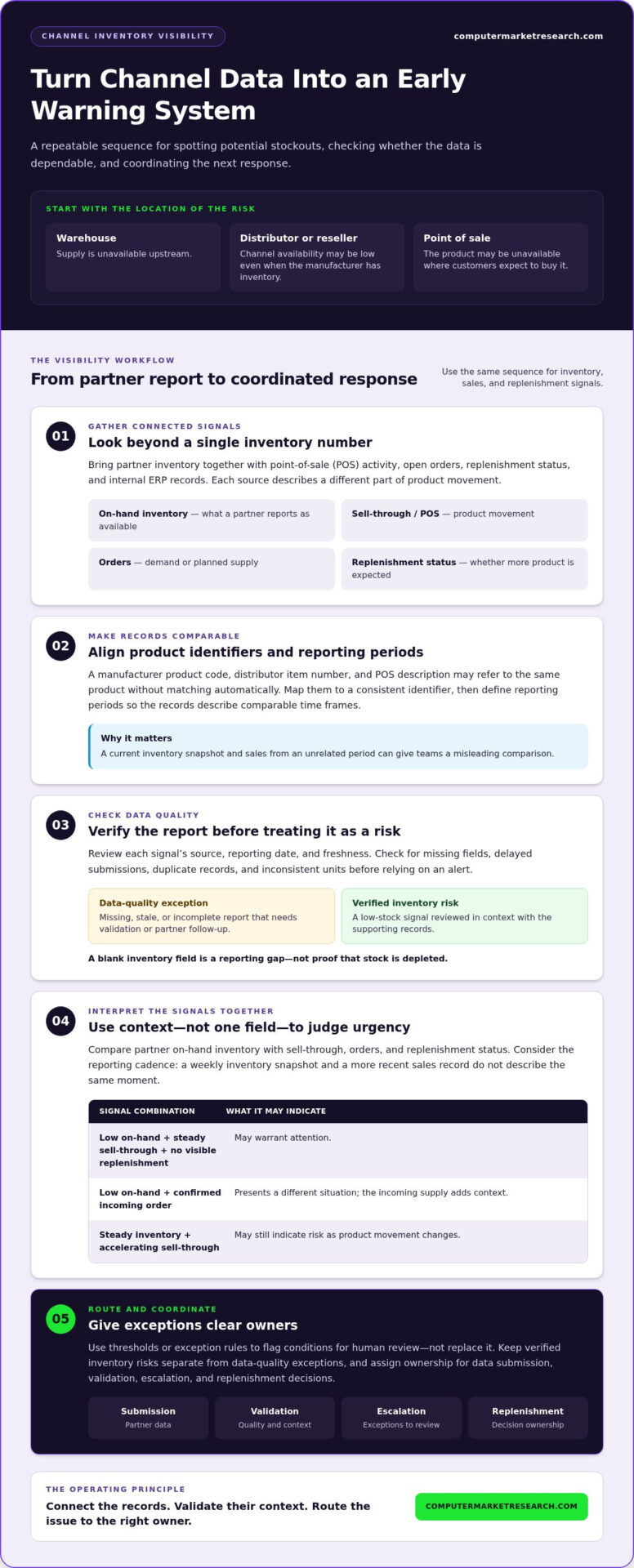
Review partner on-hand inventory alongside sell-through, incoming orders, and replenishment status. On-hand inventory indicates what a partner reports as available; sell-through shows product movement; orders can indicate demand or planned supply; and replenishment status helps clarify whether more product is on the way. A single data point rarely tells the whole story. Low stock may be manageable if replenishment is progressing, while steady inventory may still be at risk if sell-through is accelerating.
Interpret those signals in light of their reporting cadence and freshness. A weekly inventory snapshot and a more recent sales record don’t describe the same moment. Consistent timestamps and partner reporting practices help teams judge whether a change reflects genuine risk or simply a lag in submitted data. This discipline is part of broader channel data management, which makes partner information more useful for coordinated decisions.
How channel inventory data becomes an early warning system
Partner reports are more useful when compared with other records rather than reviewed in isolation. A practical view brings together distributor or reseller inventory, point-of-sale (POS) activity, open orders, replenishment status, and internal enterprise resource planning (ERP) records. Each source describes a different part of product movement, so teams can compare what partners report with what is selling and what supply is planned.
For reliable comparisons, align product identifiers across systems and partner files. A manufacturer’s product code, a distributor’s item number, and a POS description may refer to the same product but won’t match automatically. Map them to a consistent identifier, and define reporting periods so teams aren’t comparing a current inventory snapshot with sales from an unrelated time frame. These practices help channel data management systems make partner information usable across workflows.
Connect POS, inventory, and order data
On-hand inventory shows the stock a partner reports, while POS data adds context by showing product movement. Orders can indicate demand or planned supply, and replenishment status helps clarify whether incoming inventory is expected. As the Association for Supply Chain Management explains in its discussion of the power of supply chain visibility, clearer views of goods in motion can inform inventory decisions. Together, these records turn scattered reports into signals teams can review and act on.
For example, low on-hand inventory alongside steady sell-through and no visible replenishment may warrant attention. The same inventory figure paired with a confirmed incoming order presents a different situation. No single field establishes the full risk; the connections between records provide context.
Check data quality before acting on alerts
An alert is only as dependable as the information behind it. Check for missing fields, delayed submissions, duplicate records, and inconsistent units before treating a signal as a confirmed stock risk. Record the source, reporting date, and freshness of each data point so reviewers can distinguish a current partner update from an older snapshot.
Set thresholds or exception rules to flag conditions for human review, not replace it. A low inventory value can trigger a check against POS movement, open orders, and replenishment status. Keep verified inventory risks separate from data-quality exceptions that need partner follow-up. This is a practical foundation for avoiding stockouts with channel visibility: connect the records, validate their context, then route the issue to the right decision-maker.
Compare channel visibility approaches before stockouts escalate
The right approach depends on how many partner feeds teams manage and how quickly they need to respond. A spreadsheet can support a focused review of a limited set of products or partners. As coverage grows, manual updates, inconsistent formats, and separate follow-ups make it harder to identify current inventory records and risks that need attention.
Spreadsheets and periodic reports versus connected visibility
Periodic partner reports provide structured snapshots, but inventory can change before the next submission. Spreadsheets can bring those snapshots together, yet staff still need to reconcile files, check entries, and circulate updates. A centralized workflow provides a repeatable place to organize partner data, validate it, and route exceptions for review. It doesn’t make reports current by itself: reporting expectations and data freshness still matter.
| Approach | Freshness and coverage | Validation and actionability |
|---|---|---|
| Spreadsheets | Depends on manual updates and the partners included. | Flexible for focused tracking, but reconciliation and follow-up take staff effort. |
| Periodic partner reports | Offers scheduled snapshots, which may be outdated between submissions. | Provides a consistent input if formats and fields align; delays can limit response. |
| Centralized channel workflow | Can bring partner records into a shared view, subject to feed cadence and coverage. | Supports consistent validation and exception routing when owners and response steps are defined. |
For teams evaluating approaches to avoiding stockouts with channel visibility, the key comparison isn’t simply manual versus automated. Assess whether each method provides adequate partner coverage, shows when data was reported, makes validation manageable, and helps someone take the next step.
What makes an alert useful rather than noisy?
More data can create more alerts without improving decisions. Define the inventory conditions that warrant review, specify how old a report can be before it’s treated as stale, and assign an owner to each exception type. A low-stock signal based on current, validated data may need a replenishment review. A missing field or delayed file needs data follow-up first.
Keep these paths distinct so reporting problems aren’t mistaken for confirmed inventory risks. Then review alert outcomes: note which signals led to useful action, which stemmed from data issues, and which thresholds produced unnecessary escalations. Use those patterns to refine rules and ownership over time. Visibility becomes operationally useful when each signal has context, a responsible reviewer, and a defined response.
Build a channel visibility process to prevent stockouts
A repeatable process helps teams move from partner data collection to a clear replenishment decision. Start with a focused scope, then define how information is submitted, checked, reviewed, and escalated. This keeps avoiding stockouts with channel visibility from depending on individual follow-ups or disconnected spreadsheets.
- Select products and partners. Prioritize items and channel relationships where timely partner inventory and sales information can guide decisions.
- Set reporting expectations. Define required fields, product identifiers, reporting dates, and how partners should submit inventory and POS data.
- Validate incoming information. Check completeness, duplicates, units, and freshness before treating a signal as an inventory risk.
- Review exceptions. Compare validated inventory and sales signals with orders and replenishment status. Use a review cadence that fits data availability and operational needs.
- Escalate and document decisions. Route confirmed risks to the appropriate supply and partner-facing teams, then record actions and resolution status.
Set reporting expectations and a shared source of truth
Specify the inventory and POS fields partners should provide, the product identifiers they should use, and the date each report represents. If a submission is missing or delayed, record that status rather than treating the gap as zero inventory. Clear ownership for collecting and validating reports helps teams distinguish data exceptions from confirmed stock concerns. For broader guidance on organizing reliable partner information, see channel data management systems.
Turn risk signals into coordinated follow-up
Define who reviews a potential shortage, who checks supply and replenishment options, and who communicates with the partner. A confirmed risk may require coordination across these roles; an incomplete report should first go to the person responsible for data follow-up. Track the signal, decision, assigned action, and resolution status in a shared record. This gives teams a practical history for refining review rules and responsibilities.
A consistent workflow makes channel data easier to interpret and act on. To explore a platform that supports centralized partner and inventory visibility, explore a 90-day free trial.
Use PartnerPortal™ to support channel stockout visibility
A centralized channel management platform can give teams a shared view of partner information relevant to inventory decisions. PartnerPortal™ supports real-time visibility into channel data and inventory. Its POS data management and inventory management capabilities support the workflow described earlier: collect partner signals, validate them, review exceptions, and coordinate follow-up. This can support better-informed stockout responses, but it doesn’t guarantee that stockouts will be prevented.
Useful visibility still depends on the quality and timeliness of incoming data, partner participation, and clear process ownership. A platform can bring information together, but teams need defined reporting expectations and responsible owners to interpret the signals and decide what to do next. That combination is central to avoiding stockouts with channel visibility.
Where a partner portal fits in the stockout workflow
A partner portal provides a centralized place to manage information across channel relationships. When inventory and POS data are available alongside partner records, teams have more context for reviewing potential risks and deciding whether a signal needs investigation, replenishment review, or partner follow-up. Explore how the PartnerPortal channel management platform supports partner and inventory visibility.
The portal is one part of a broader channel management discipline. Reliable decisions still require consistent identifiers, current reports, and agreement on who validates exceptions. Treat the platform as a way to support a disciplined process, not as a substitute for data quality or human judgment.
Choose practical next steps for improving visibility
Start with a manageable scope, then expand as the reporting and review process becomes established:
- Select priority products and key partners where inventory visibility can inform action.
- Identify existing partner inventory, POS, and order data, and establish how each source will be reviewed.
- Assign owners for data submission, validation, risk escalation, and replenishment decisions.
- Set a review cadence that reflects the freshness of available data and operational needs.
Once the process is clear, centralizing partner information can help teams apply it consistently across channel relationships. To explore PartnerPortal™ in the context of your channel visibility workflow, claim your 90-day free trial.
Turn Channel Signals Into Earlier Action
A practical approach to avoiding stockouts with channel visibility starts with connected partner inventory, POS, order, and replenishment data. Consistent product identifiers and reporting dates make those signals easier to compare, while validation helps teams separate a genuine inventory concern from a missing or stale report.
Clear ownership turns visibility into a repeatable response. Define who submits and checks partner data, who reviews exceptions, and who coordinates replenishment decisions. PartnerPortal™ supports real-time visibility into channel data and inventory, providing a centralized view to inform that work. The platform supports the process, while reliable data, partner participation, and team follow-through remain essential.
Computer Market Research has specialized in channel management solutions since 1984. To explore how PartnerPortal™ can support your channel visibility workflow, claim your 90-day free trial. A clearer, more coordinated view of partner inventory is a practical step toward responding to risk with greater confidence.
Frequently Asked Questions
What is channel visibility in inventory management?
Channel visibility is timely, usable insight into inventory and sales activity across distributors, resellers, and other sales partners. It extends the view beyond a manufacturer’s own warehouse, helping teams understand what partners report as available and how products are moving downstream. Useful visibility also includes reporting dates and data freshness, so teams can tell whether information reflects a current inventory position or an older snapshot.
How does channel visibility help prevent stockouts?
Channel visibility helps teams recognize potential shortages earlier by bringing partner inventory, sell-through, order, and replenishment signals into the same review. For example, low reported stock alongside ongoing sales and no visible replenishment may warrant escalation. Teams still need to validate the data and coordinate a response; visibility alone can’t prevent every shortage. A consistent process for avoiding stockouts with channel visibility makes it easier to identify, assess, and act on risk.
Which data should manufacturers collect from distributors to identify stockout risk?
Collect partner on-hand inventory, POS sell-through, open orders, and replenishment status, along with the product identifier and reporting date for each record. These details help teams compare stock position with product movement and planned supply. Also track the report source and whether expected information is missing or delayed. Consistent identifiers, units, and reporting periods make comparisons more reliable and help distinguish an inventory concern from a data-quality issue.
Can POS data help predict channel stockouts?
POS data can help reveal rising stockout risk, but it doesn’t predict a shortage on its own. Sell-through shows how products are moving at the point of sale, adding demand context to a distributor’s reported on-hand inventory. Compare those signals with current report dates, open orders, and replenishment status. If sales continue while available stock declines, teams may need to review the position, validate the data, and coordinate follow-up.
What happens if channel partners report inventory late or inconsistently?
Late or inconsistent reports reduce confidence in the inventory picture and can delay a response. A missing report shouldn’t be treated as zero inventory, and a stale figure shouldn’t be assumed to describe current stock. Record submission dates, flag missing fields or delayed files, and assign an owner to follow up. Keep data-quality exceptions distinct from verified stock risks so teams investigate reporting gaps without overlooking confirmed replenishment needs.
Is a spreadsheet enough to manage channel inventory visibility?
A spreadsheet can support focused tracking when the number of products, partners, and updates is manageable. However, teams must maintain it, reconcile partner formats, check freshness, and follow up on exceptions. As coverage expands, manual coordination can make it harder to maintain a current, consistent view. Compare the approach against your needs for partner coverage, data freshness, validation effort, and clear ownership before deciding whether a centralized workflow is more appropriate.
How can a partner portal support stockout prevention?
A partner portal can centralize partner information and support visibility into inventory and POS data, giving teams a shared basis for reviewing potential risks. Computer Market Research’s PartnerPortal™ supports real-time visibility into channel data and inventory, alongside partner onboarding, deal registration, and performance tracking. The portal can inform stockout response, but outcomes still depend on data quality, partner participation, and clear ownership for reviewing signals and coordinating replenishment.

Article by
Del Heles
Del Heles is the founder and CEO of Computer Market Research (CMR), a channel management software company he launched in 1984. With more than 40 years of experience, he’s known for helping manufacturers and distributors simplify complex partner programs through practical, customer-focused technology solutions.