

A PRM migration should improve channel operations, not simply reproduce the old system. When migrating from an old prm system, the challenge isn’t just moving records. It’s keeping partner onboarding, deal registration, and incentive workflows running while teams reconcile fragmented data and connected systems.
That concern is well founded. Partner records may be spread across platforms and spreadsheets, while legacy workflows can rely on manual steps that are difficult to validate. A controlled migration starts with clear ownership and a shared view of what needs to move, what needs to change, and how teams will confirm the new system is ready.
This guide explains how to audit partner data and workflows, map legacy fields, validate integrations, and test critical processes before rollout. It also covers continuity planning, decision ownership, and how to assess a modern PRM against your channel requirements. With those requirements in hand, you can evaluate options such as PartnerPortal™, including its implementation and integration services, without assuming every legacy format or connection will be supported. The goal is reliable partner operations and a stronger foundation for growth.
Key Takeaways
- Identify where legacy PRM friction affects visibility, then confirm which limitations warrant a system change.
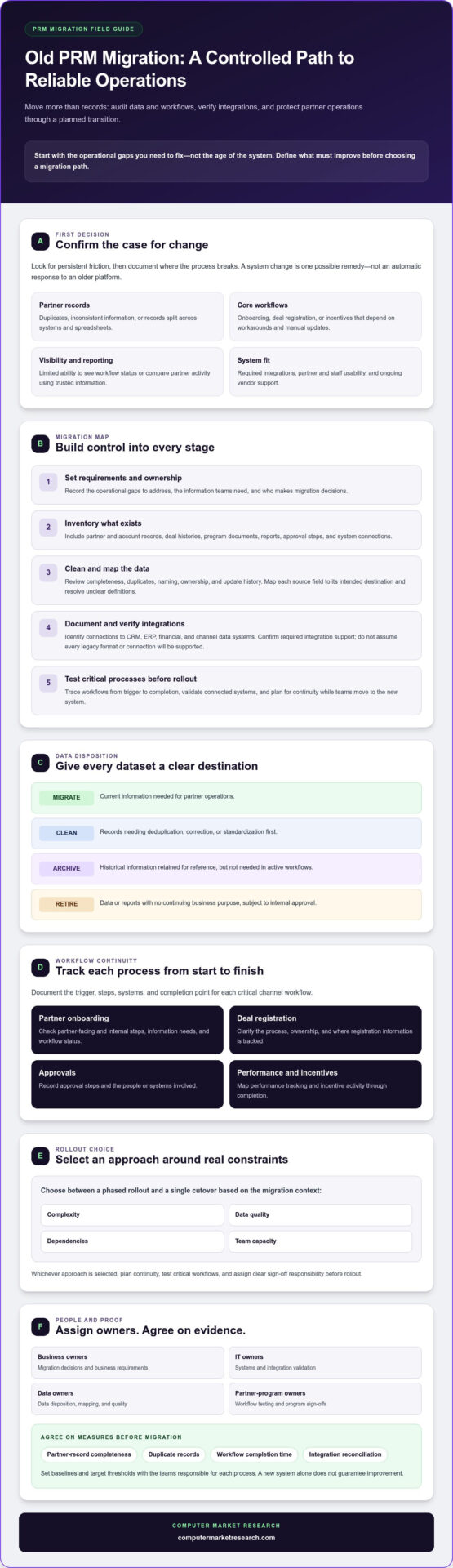
- Inventory partner records, documents, workflows, reports, and integrations. Decide what to migrate, clean, archive, or retire.
- When migrating from an old prm system, choose a phased rollout or single cutover based on complexity, data quality, dependencies, and team capacity.
- Assign business, IT, data, and partner-program owners to migration decisions, testing, and sign-offs.
- Document requirements and verify integration support before moving critical channel workflows.
Why migrate from an old PRM system before its limitations compound
An older PRM system isn’t automatically the wrong system. The better test is whether it still supports your partner strategy, key workflows, integrations, and day-to-day usability. For teams migrating from an old prm system, the goal should be to address specific operational gaps, not replace software based on age alone.
Partner relationship management brings together the processes and tools used to manage relationships with business partners. If partner information is split between a PRM, spreadsheets, email, and other business systems, teams may struggle to identify current records or see where a workflow stands. Manual workarounds can keep tasks moving, but they make process ownership and channel performance harder to assess.
Which legacy PRM problems signal a need to change?
Look for persistent friction: duplicate partner records, inconsistent onboarding steps, deal registrations tracked outside the system, or incentive activity that requires repeated manual updates. Limited reporting can also make it difficult to compare partner activity using consistent, trusted information.
Ask whether the system still fits how your program operates. Can partners and internal teams complete onboarding without avoidable back-and-forth? Does deal registration follow a clear process? Can staff manage incentive workflows and check their status without relying on disconnected records? If these tasks routinely require workarounds, document where the process breaks before deciding whether migration is the right remedy.
What should a PRM migration improve?
Define the improvements before selecting a replacement. Priorities may include more consistent partner records, clearer ownership of data and workflows, and less friction in partner-facing tasks. Check whether teams can find current information, follow consistent processes, and understand the status of onboarding, registrations, and incentives.
System fit depends on more than features. Confirm that the platform can support required integrations, assess usability for partners and staff, and understand what ongoing vendor support is available. These checks help distinguish a platform limitation from a process issue that could be fixed without migration.
Migration success means meeting documented requirements, measured through agreed indicators such as partner-record completeness, duplicate records, workflow completion time, and integration reconciliation. Set baselines and target thresholds with the teams responsible for those processes. Don’t assume a new system alone will improve them.
Treat the move as an opportunity to refine channel operations. Decide which manual steps to remove, which workflows need clearer ownership, and what information teams need to manage partner performance. This preparation makes the system change a deliberate operational improvement.
Audit PRM data, workflows, and integrations before migration
A migration plan is only as reliable as its inventory. Before moving data, identify what the PRM contains and how teams use it. Include partner and account records, deal histories, program documents, reports, approval steps, and connections to CRM, ERP, financial, and channel data systems. Ask each business owner which information is essential, who relies on it, and whether it’s still accurate.
How should teams assess legacy PRM data?
Review records for completeness, duplicates, naming consistency, ownership, and update history. Flag business-critical or sensitive information, then document who should be able to access it in the destination system. Map each source field, such as partner status or deal owner, to its intended destination. Resolve unclear definitions before migration. If teams use a field to mean different things, reports may be unreliable even when the data transfers correctly.
Assign every dataset a disposition and an accountable owner:
- Migrate: Current information needed for partner operations.
- Clean: Records that need deduplication, correction, or standardization first.
- Archive: Historical information retained for reference but not needed in active workflows.
- Retire: Data or reports with no continuing business purpose, subject to internal approval.
Which workflows and integrations need documentation?
Trace onboarding, deal registration, approvals, performance tracking, and incentive processes from trigger to completion. Record where each data point originates, which system receives it, whether information flows one way or both ways, and which other processes depend on the connection. Name a system owner who can confirm current behavior and validate the future setup. For practical guidance on managing data quality and governance across channel operations, review this channel data management guidance.
Capture exceptions as well as the standard path. Note, for example, whether a deal can be returned for corrections, who approves an incentive, and how a failed system transfer is identified. These details help teams avoid rebuilding a workflow that works only under ideal conditions. Verify supported formats and integration requirements with the prospective platform provider instead of assuming existing connections will carry over unchanged.
As you prepare for migrating from an old prm system, document the sequence for inventory, mapping, cleanup, and validation. The data migration best practices outlined by TechRepublic can inform planning, including the role of backups. The audit should produce a reviewed data map, a workflow inventory, and a list of integration dependencies with named owners. These deliverables provide a clear, testable starting point for the next stage.
Compare PRM migration approaches and address disruption risks
Choose a migration approach based on the work being moved, not a default preference for “phased” or “all at once.” Consider workflow dependencies, data quality, integration readiness, and the capacity of teams responsible for keeping partner operations running. A phased rollout can limit the scope of each transition, but teams may need to coordinate between old and new processes. A single cutover concentrates the change, so it requires a thoroughly tested scope and clear launch readiness.
Is phased PRM migration safer than a full cutover?
Neither approach is universally safer. Phasing can make issues easier to contain, but overlapping systems or workflows can create temporary complexity. A single cutover may suit a simpler, well-tested scope with understood dependencies. Compare both approaches against operational readiness, and decide how active registrations, approvals, and partner access will be handled before choosing.
| Approach | Benefits | Trade-offs | Better fit when |
|---|---|---|---|
| Phased migration | Limits each release to a defined group of records, workflows, or partners. Feedback can inform later phases. | Requires coordination across old and new processes. Teams need to know which system is authoritative during the transition. | Workflows have distinct stages or groups, dependencies can be separated, and owners can support parallel operations. |
| Single cutover | Moves the defined scope at once, avoiding a prolonged period of operating across systems. | More activity depends on launch readiness. Issues affecting a core workflow may have a wider immediate impact. | The scope is contained, data and integrations are validated, and teams are prepared to switch together. |
Rehearse the migration sequence, data reconciliation, integration behavior, and partner-facing tasks before launch. Set decision gates with explicit pass criteria, such as acceptable record matches and confirmed completion of critical workflow tests. Name the people authorized to approve each gate. Keep a verified backup and document rollback criteria, including who makes the decision and how teams will communicate it.
How can teams protect partners during the transition?
Give partners clear notice before a change affects access or process steps. Explain what is changing, when it takes effect, where to complete active registrations or approvals, and which support contact to use. Internally, assign escalation owners and document temporary procedures for exceptions. Prioritize continuity for open partner activity, then confirm the new process is working before retiring the old route.
For teams migrating from an old prm system, a written launch plan should connect these safeguards to accountable owners and decision points. Before committing, confirm that critical records are reconciled, dependencies are tested, partners are informed, and recovery steps are agreed. If any gap remains, hold the cutover until it is addressed.
Build a PRM migration plan with testing and ownership
A practical migration plan turns requirements into work that can be assigned, tested, and approved. Sequence the project so early decisions guide configuration and validation, rather than leaving teams to resolve unclear requirements during launch preparation.
- Define requirements and scope: Confirm which workflows, records, reports, and integrations are included, along with acceptance criteria.
- Prepare data: Approve field mappings, clean records, and document exceptions that need review.
- Configure and test: Set up the destination system, validate integrations, and run representative partner scenarios.
- Launch and review: Proceed only after required sign-offs, then monitor issues and review results against the agreed criteria.
Assign decision rights before execution begins. Business owners confirm process requirements; IT owners validate system connections and technical dependencies; data owners approve mappings and reconciliation; and partner-program owners verify that day-to-day channel work is represented accurately. Record decisions and unresolved issues in a shared log, with an owner and next action for each item. This helps prevent teams from configuring different interpretations of the same requirement.
What belongs in a PRM migration checklist?
Track scope, data mapping, workflow decisions, integration dependencies, accountable owners, and acceptance criteria. Include an issue log and decision record. Define launch readiness around business-critical tasks that have passed testing and received stakeholder approval. The checklist should make gaps visible, not just document completed work.
How should teams test migrated PRM workflows?
Use representative scenarios across partner types and permission levels. Test migrated records, access rights, approvals, notifications, reports, and connected systems. Reconcile source and destination data, and record exceptions for review. Business users should complete end-to-end tasks, such as submitting and reviewing a deal registration, before partners are asked to use the new process.
Testing should confirm both the data and the work it supports. A partner record may appear complete while an approval route or report still behaves incorrectly. Document expected results before each test, capture actual results, and assign defects to an owner. Retest corrected issues and retain sign-off so launch approval is based on evidence rather than assumption.
As you plan migrating from an old prm system, evaluate whether the destination aligns with documented workflows and integration requirements. Use this channel partner management software resource to review a channel-focused option as part of that assessment. Confirm specific data-format and integration support with the provider before finalizing scope.
Move to a modern PRM system and stabilize channel operations
Choosing a replacement is a requirements decision, not a feature-count exercise. Compare platforms against the workflows, data, reporting, and governance needs documented during planning. Check whether the system supports partner onboarding, deal registration, and performance tracking in a way that gives staff and partners a clear, consistent process.
What should teams evaluate in a replacement PRM?
Assess fit across partner processes, reporting needs, access controls, and the connections your channel operations depend on, including CRM and ERP systems. Ask how implementation, configuration, and data responsibilities are divided between your team and the provider. Verify support for each required integration, data format, and migration method directly. Don’t assume existing connections will transfer unchanged.
PartnerPortal™ is one channel-focused option to evaluate against these requirements. It centralizes partner onboarding, deal registration, and performance tracking. Review the channel partner management software information alongside your requirements, then confirm that specific workflows and integrations match your intended use.
What should happen after PRM go-live?
Launch is the start of stabilization, not the end of the project. Monitor whether users can access the right functions, core workflows are completing as intended, and migrated records or integrations are generating exceptions. Keep a visible issue log with a named owner and next action. Partner questions and support requests can also reveal where instructions or process steps need clarification.
Review results against migration requirements rather than relying on general impressions. Check record completeness and duplicate handling, confirm that active deal registrations move through the expected steps, and ask internal users whether reports provide the information they need. If performance falls short, identify whether the cause is data quality, configuration, training, or an unclear business process before deciding on a fix.
Use feedback to refine the new operating model, not to recreate every legacy workaround. A process retained only because the old system required it may no longer be necessary. Document approved changes and keep process ownership clear so improvements don’t introduce new inconsistencies.
If you’re migrating from an old prm system, evaluate the platform against your defined criteria before making a commitment. You can also explore the 90-day free trial as part of your assessment.
Make your next PRM move a foundation for growth
A successful migration is more than transferring partner records. It’s a chance to clarify how channel work should happen, establish dependable data ownership, and choose a system that fits documented requirements. When migrating from an old prm system, a deliberate plan helps protect essential operations while preparing your team to refine processes over time.
Evaluate platform fit, integration needs, and ongoing administration before committing. PartnerPortal™ centralizes partner onboarding, deal registration, and performance tracking. Computer Market Research also provides implementation services for system setup and integration with existing business systems. Confirm specific data and integration requirements as part of your evaluation.
Ready to assess a channel-focused option against your migration needs? Explore the 90-day free trial.
Frequently Asked Questions
How do you migrate from an old PRM system?
A structured approach to migrating from an old PRM system starts with documented requirements and a full inventory of data, workflows, reports, and integrations. Assign owners to approve field mappings and process decisions, then clean and classify information before configuration. Test migrated records and end-to-end partner workflows, reconcile exceptions, and launch only after business stakeholders confirm critical tasks work as expected. Monitor issues after go-live and assign owners to address them.
What data should you migrate from a legacy PRM?
Migrate records and history needed for active partner operations and agreed reporting requirements. This may include partner and account details, current deal registrations, program information, and documents or reports teams still rely on. Check completeness, duplicates, naming consistency, and ownership before transfer. Map source fields to destination fields, and identify information to clean, archive, or retire so unnecessary or unreliable records don’t enter the new system.
How can you avoid disrupting partners during a PRM migration?
Protect continuity by testing partner-facing workflows before launch and planning how active registrations, approvals, and access will be handled during the transition. Tell partners what is changing, when it takes effect, and where to get help. Internally, assign support contacts and escalation owners, document temporary procedures, and agree on rollback criteria before the launch decision. Rehearsing the transition helps teams identify gaps while there’s still time to address them.
Should you migrate all historical data to a new PRM system?
No. Migrate historical data selectively based on business use, reporting needs, and retention decisions made by your organization. Keep information that supports active processes or provides necessary context, and consider archiving records that are useful for reference but not daily work. Retire data with no continuing purpose after the appropriate owners approve. Document what moves and where archived information can be found so teams understand the limits of the new system’s history.
Can a PRM migration affect CRM or ERP integrations?
Yes, a PRM migration can affect CRM or ERP integrations because field mappings, data direction, dependencies, or connection settings may change. Document which system creates and updates each record, what information is exchanged, and which workflows depend on the connection. Verify the proposed platform’s specific integration support with its provider. Test data transfer and reconciliation before launch, and assign system owners to review exceptions and confirm expected behavior.
How do you test a PRM system before launch?
Test representative partner scenarios from start to finish, including record creation, permissions, deal registration, approvals, notifications, reports, and connected systems. Compare source and destination records using agreed checks, and log mismatches for review rather than treating a completed transfer as proof of accuracy. Ask business users to perform real tasks and confirm results against acceptance criteria. Resolve critical defects and record stakeholder approval before opening the new process to partners.
What should happen after a new PRM system goes live?
After go-live, monitor access, workflow completion, data exceptions, integration behavior, and partner support requests. Compare results with the requirements and acceptance criteria established during planning, then assign each gap to an owner with a clear next action. Gather feedback from partners and internal users to identify confusing steps or training needs. Review recurring issues and refine the process without automatically carrying forward manual workarounds from the legacy system.

Article by
Del Heles
Del Heles is the founder and CEO of Computer Market Research (CMR), a channel management software company he launched in 1984. With more than 40 years of experience, he’s known for helping manufacturers and distributors simplify complex partner programs through practical, customer-focused technology solutions.